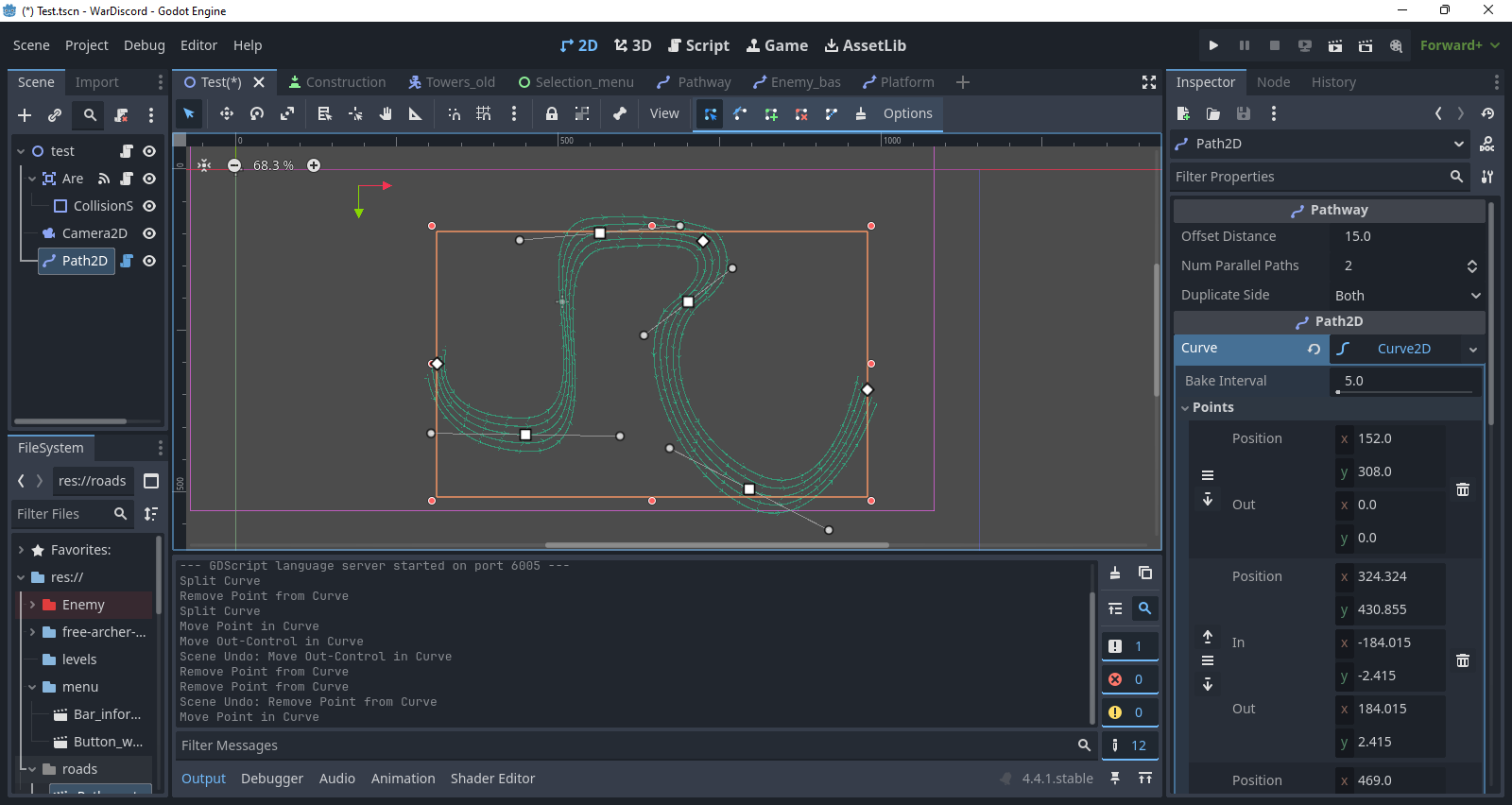
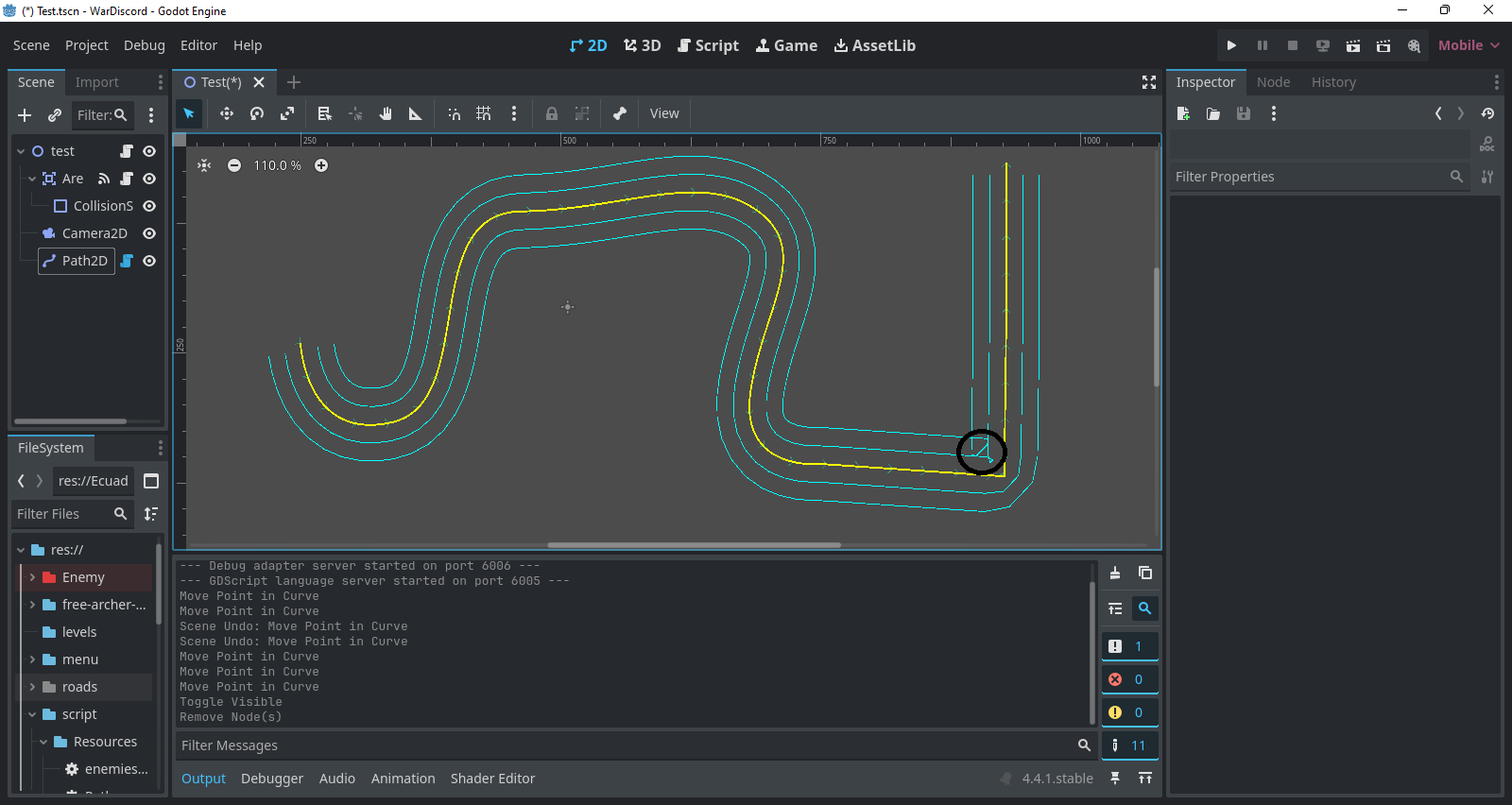
I’m working on a tower defense game for my younger brother. I added parallel paths to my curves, but there’s an issue: when the path turns sharply, the parallel curves get distorted and bend too much. help please
@tool
extends Path2D
class_name Pathway

@export var offset_distance    : float = 15.0
@export var num_parallel_paths : int = 2
@export_enum("Both", "Left", "Right") var duplicate_side : String = "Both"

var _parallel_paths : Array[Path2D] = []
var way             : Array[Path2D] = []

func _ready():
   if curve:
   	curve.connect("changed", Callable(self, "_update_parallel_paths"))
   _update_parallel_paths()

func _update_parallel_paths():
   way.clear()
   _clear_parallel_paths()

   if not curve or curve.point_count <= 1:
   	return

   match duplicate_side:
   	"Both":
   		for i in range(1, num_parallel_paths + 1):
   			_create_parallel_path("parallel_pos_", i, offset_distance * i)
   			_create_parallel_path("parallel_neg_", i, offset_distance * -i)
   	"Left":
   		for i in range(1, num_parallel_paths + 1):
   			_create_parallel_path("parallel_neg_", i, offset_distance * -i)
   	"Right":
   		for i in range(1, num_parallel_paths + 1):
   			_create_parallel_path("parallel_pos_", i, offset_distance * i)

   way.append(self)

func _create_parallel_path(name_prefix: String, index: int, offset: float):
   var parallel_path : Path2D = Path2D.new()
   parallel_path.name = name_prefix + str(index)
   parallel_path.curve = _generate_parallel_curve(offset)
   add_child(parallel_path)
   _parallel_paths.append(parallel_path)
   way.append(parallel_path)

func _generate_parallel_curve(offset : float) -> Curve2D:
   var new_curve : Curve2D = Curve2D.new()

   for i in range(curve.point_count):
   	var point_pos := curve.get_point_position(i)
   	var direction : Vector2

   	if i == 0:
   		direction = (curve.get_point_position(i + 1) - point_pos).normalized()
   	elif i == curve.point_count - 1:
   		direction = (point_pos - curve.get_point_position(i - 1)).normalized()
   	else:
   		var prev := (point_pos - curve.get_point_position(i - 1)).normalized()
   		var next := (curve.get_point_position(i + 1) - point_pos).normalized()
   		direction = (prev + next).normalized()

   	var normal = direction.rotated(PI / 2)
   	var offset_point = point_pos + normal * offset

   	new_curve.add_point(offset_point)

   	if curve.get_point_in(i) != Vector2.ZERO:
   		var in_control = curve.get_point_in(i)
   		new_curve.set_point_in(new_curve.get_point_count() - 1, _offset_control(offset, point_pos, curve.get_point_position(i), in_control))
   	if curve.get_point_out(i) != Vector2.ZERO:
   		var out_control = curve.get_point_out(i)
   		new_curve.set_point_out(new_curve.get_point_count() - 1, _offset_control(offset, point_pos, curve.get_point_position(i), out_control))

   return new_curve
func _offset_control(offset : float, point_pos : Vector2, curve_pos : Vector2, control_pos : Vector2) -> Vector2:
   var control_vector = control_pos - point_pos
   var new_control_pos = curve_pos + control_vector
   var direction = (curve_pos - point_pos).normalized()
   var normal = direction.rotated(PI / 2)
   return new_control_pos + normal * offset

func _clear_parallel_paths():
   for path in _parallel_paths:
   	if is_instance_valid(path):
   		path.queue_free()
   _parallel_paths.clear()
The screenshot shows how the script works.
I would greatly appreciate your help.