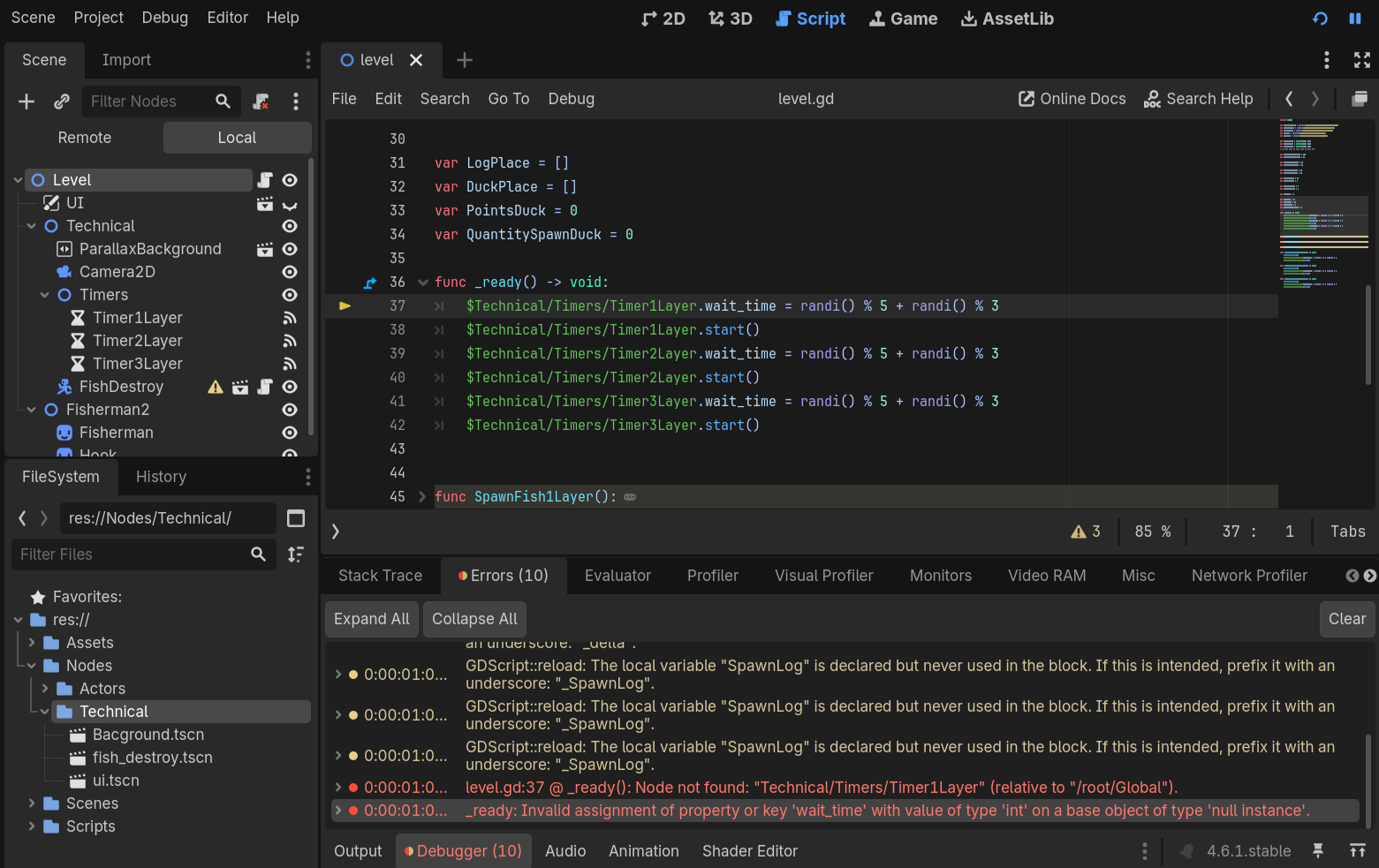
For my game, I need to change the timer delay time many times, the script worked for a while, but then errors appeared, shown in the screenshots. I say in advance that the links to the timers are indicated correctly, you can see this for yourself in the screenshots. I also tried to create @onready variables, but the error still crashes.
This isn’t necessarily a fix to the issue exactly, but keeping track of node paths can quickly get messy, especially if the node order changes, I would recommend making your timers @export variables inside the level script, and then connecting them in the level node, this will ensure that the connection between nodes is not lost even if they’re moved or renamed, storing them in a variable is also better for optimization, as you won’t be getting the nodes each time you want to use them.
I’m going to show you a couple of things. But, a few caveats to keep in mind:
I agree with @marcythejinx that it’s not good practice to use nodepaths in your code. An @onready variable is better than an @export variable though in this case. If you think you’re going to move it around a lot, make the Timer object a unique name and use a % node string to find it. Otherwise you’re just dirtying up your Inspector and creating a failure point when you forget to assign the Timer objects.
Timer objects are not accurate if their value is less than a half a second. That doesn’t seem to be an issue here.
Your main problem is you need to cast your ints to float, because that’s what the wait_time variable holds.
Personally I would never start a timer on a ready script, technically it shouldn’t matter, but as ready is literally the first things that happens after a node enters a tree there is always the possiblity that the timer isnt ready yet.
Better to have some sort of ‘enable’ method in your code, and then call it when you know for sure the object is in the tree. IMO.
_enter_tree() is the first thing that happens after a node enters the tree. It doesn’t matter if the timer is “ready” or not if it doesn’t run a script. By the time the first _ready() is called the tree structure is already fully set up.
“Ready” means that the whole tree is there and all _ready() functions in children have been executed.
Starting a Timer inside _ready() is no different than checking the Autostart button. And with the given Node architecture, the Timer objects are all guaranteed to be ready, because they are children of the Node starting them.
Yeah, this is all verifiable by looking at the source code. Timers don’t even have to be “ready” because they don’t execute any code in their ready handler, except starting themselves if they are set to be autostarted. From Timer::_notification() in timer.cpp:
void Timer::_notification(int p_what) {
	switch (p_what) {
		case NOTIFICATION_READY: {
			if (autostart) {
#ifdef TOOLS_ENABLED
				if (is_part_of_edited_scene()) {
					break;
				}
#endif
				start();
				autostart = false;
			}
		} break;
// etc
Even if timeout is set to 0, a timer won’t call any signal handler that might depend on some eventual initialization in some _ready() before the next processing round, at which point all _ready() functions in the tree will be executed.