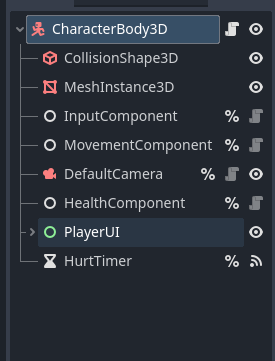
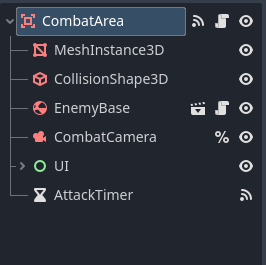
This is probably a dumb question, perhaps easily fixable, but I am thoroughly confused so I wasn’t sure what else to do. My Player scene contains a Timer which I called HurtTimer. I only want it to start when inside an Area3D I created, however once the Player enters, I call the HurtTimer to start() in the Area3D’s script, and I get this error:
E 0:00:03:822 _on_body_entered: Cannot call method ‘start’ on a null value. combat_area.gd:23 @ _on_body_entered()
I’ve seen this error before so I sort of know what its saying (the timer has no value?), but don’t exactly understand why its giving me this particular error. I’ve been having trouble trying to check for the Player being within the Area3D in its own script, so I’m sort of at a loss as small as this issue is.
Please show us a screenshot of the scene tree and copy and paste the full code of your Player. Format your code by pressing Ctrl+E or clicking the button in the toolbar. Or by typing the following:
Ok so, the Area3D code is attached to the CombatArea node?
The problem is the CombatArea is looking for a HurtTimer in its scene, which does not exist. Even if Player is in the same larger scene with it, it cannot see the Player’s nodes using the % notation. However, you don’t need it. Do this instead:
extends Area3D

@onready var combat_camera: Camera3D = $CombatCamera
@onready var enemy_base: RigidBody3D = $EnemyBase
@onready var label: Label = $UI/Label
@onready var button: Button = $UI/Button
@onready var attack_timer: Timer = $AttackTimer


func _on_body_entered(body: Node3D) -> void:
	body.hurt_timer.start()
	combat_camera.make_current()
	button.show()
	label.show()
I removed health_component and hurt_timer because they do not exist for the CombatArea.
I removed the functions that had pass after them to clean up your code.
I removed the CharacterBody3D check. It’s much faster and more reliable to put the Player on an additional Physics Layer (like 2), and then take the CombatArea off Physics Layer 1 and Physics Mask 1, and make it only detect the Player by putting it on the same Mask as the Player’s layer (like 2).
I updated your code to start the HurtTimer on the Player.
Thank you. It did something odd to a button displayed on-screen.. it isn’t disabled, but I can’t click it. Though, this did fulfill the solution, so thank you.
I’d need more info. Like what the button is, etc. You might just want to make a new post about that problem. I doubt it’s related, though it may seem like it. Feel free to tag me in the new post.
 button in the toolbar. Or by typing the following: