Queue_free() makes another sprite invisible

Godot Version

4.7

Question

Hi! I am having a weird bug in my prototype which I do not understand and don’t know how to debug.

(As I just created the forum account, I’m unfortunately not allowed to upload a small video of the bug. I also posted my case here on the Godot discord in case someone wants to check Discord )

Game setup

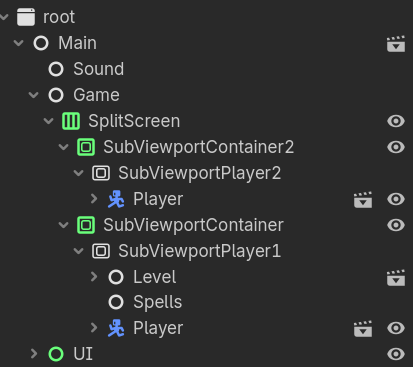
  • Local multiplayer game, Splitscreen
  • SubViewportPlayer1 is the main window with the Level scene as child, its world2d is propagated to SubViewportPlayer2
  • Each Player has a Camera as child

Spell Casting architecture

  • A UIComponent handles input and calls a cast function on the Player. The spell scene will be instantiated from a SpellResource and added to the scene tree as a child of Spells (so technically far away from Player 2)
  • After a timer runout, the spell scene will queue_free() itself

Problem

  • Whenever Player 2 casts a spell, and Player 1 casts a spell immediately after, The sprite of Player 2 will dissapear once their spell scene will queue_free()

What I checked

  • I think this problem is related to the queue_free() because once I remove this line from the spell script, the problem disappears
  • The node is still in the tree and set as visible, the physics process is still working
  • Debugger monitor shows the object in Physics2D and in “Objects Drawn”.
  • I see no Error messages at all in the debugger

Once I cast another spell from either Player 1 or 2, Player 2 will re-appear. This bug is even dissappearing after a certain amount of casts. I am completely clueless, so I am grateful for any kind of direction on this problem.

Thanks in advance!

dose the sprite dissapears or both objects gets que free?

What happens if you extend or decrease the length before queue_free()? Does the issue still appear at the queue_free()? It sounds very odd that something like this should happen. Could you show some of your code? Not a bulk copy paste, just what you believe is relevant.

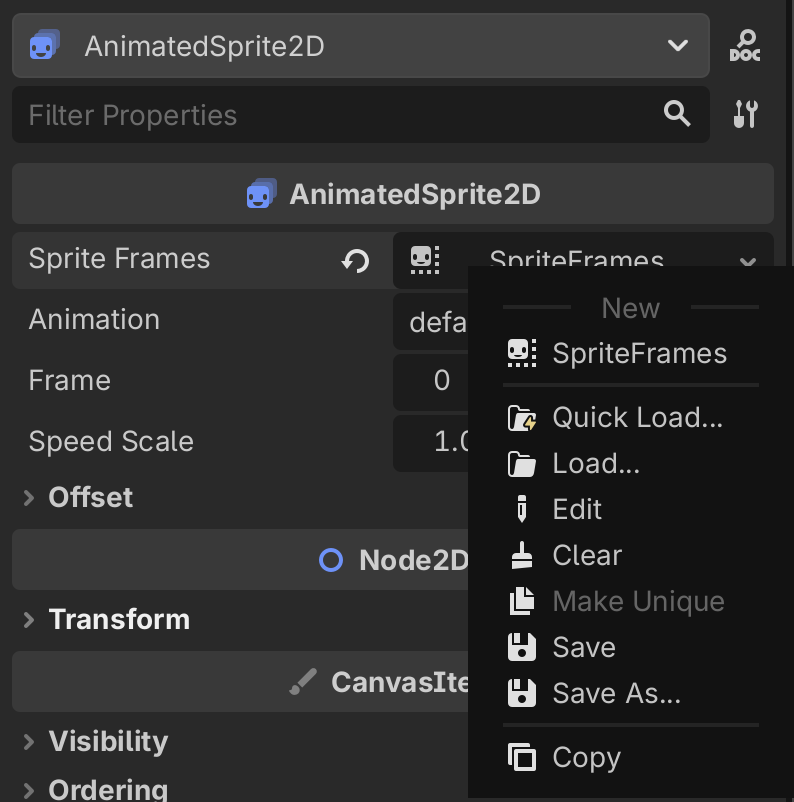
My first thought is you haven’t made something (e.g. a material) unique to the scene.
The queue_free is therefore removing all instances of whatever the non unique thing is.

It is just the Sprite, or rather AnimatedSprite2D.

The Player 2 is still there as a physics Object, responding to Inputs.

I quickly checked and changing the Timer timeout does not help : Player 2 is still going invisible once their spell Is queue_free.

Will post Code snippets in the evening!

Hmm how would I make something not unique to the scene?

Maybe I did it on Accident, could you explain the process for that? Will be posting my spell setup and some more details in the evening if that helps.

That would definitely help.
Maybe I glossed over this, but:

Is the player sprite temporarily removed from the scene tree as well after this queue_free was called?

Have you checked its modulate and/or visibility while debugging?

Have you tried setting a break point at the queue_free so that you can debug the state of your scene at that instance?

I’m actually making a 3D game so haven’t used AnimatedSprite2D. I just added one to a scene to have a look. I’m not sure if my theory is correct anymore :thinking:

Just incase, you can make resources unique to a scene by right clicking on them and selecting Make Unique (it’s disabled in this screenshot as the resource is already unique)

Player2 is still in the scene tree after queue_free(). The modulate as well as visibility for both the Characterbody and the AnimatedSprited2D look as expected.

Here is a snippet from my code.

The UI component is a child of Playerand handling input. If I press my cast keybind, player.spell_data.cast(player) will be called.

ui_component.gd

func _unhandled_input(event: InputEvent) -> void:
	if input_component.ui_actions[str(player.id,"open_castmenu")] == true:

		input_component.move_handling = !input_component.move_handling
		quickspell_menu.visible = !quickspell_menu.visible

	if quickspell_menu.visible == true:
				if event.is_action_pressed(str(player.id,"ui_accept")):
			print("cast_pressed")
			player.spell_data.cast(player, player.spell_data.scene)
			quickspell_menu.visible = !quickspell_menu.visible
			input_component.move_handling = !input_component.move_handling

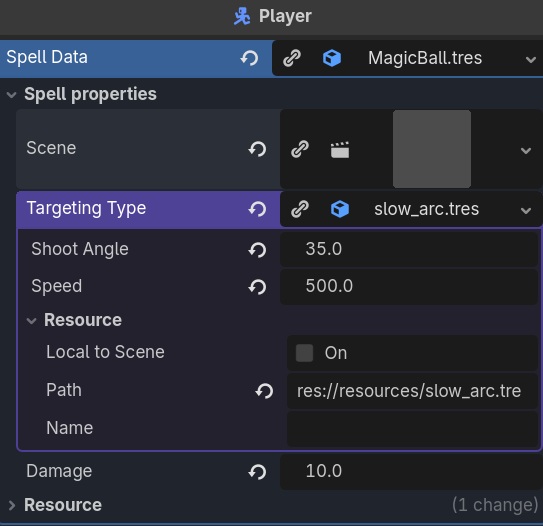
SpellData is a Resource on the Player. It contains information about the spell being cast, e.g. a spell scene with the PhysicsBody, a targeting scene describing the movement of the RigidBody as well as variables for this behaviour.

SpellData looks like this. It instantiates the scene and adds it to the scene tree (I tried to add it to child of either SubViewports, and to the SubviewPort1/Spells node, but no difference).

class_name SpellData
extends Resource

@export_group("Spell properties")
@export var scene: PackedScene
@export var targeting_type: SpellTypeResource
@export var damage: float

func cast(caster: Node2D) -> void:
	if scene != null:
		var instance = caster.create_instance(caster, scene)
		targeting_type.execute(caster, instance)


func create_instance(caster: Node2D, spellscene) -> Node2D:
	var instance = spellscene.instantiate()
	caster.get_parent().add_child(instance)
	instance.position.x = caster.global_position.x + 20 * caster.face_direction
	instance.position.y = caster.global_position.y - 5
	return instance

The spell scene (called “MagicBall”) has a Rigidboy, a CollisionShape2D and a timer node. The main node calls queue_free() after 3 seconds. Then, then my problem happens :frowning:

What is super weird is, that the Player 2 disappears only if both Players cast at the same time. And then after a few casts, the bugs stops happening.

As a new user I’m unfortunately unable to upload an .mp4 to show my problem. I uploaded it to YouTube though, in case you want to see it : https://youtu.be/8hpQC_lrzTo

Okay I started counting, and the Player2 only goes invibisle 3 times before the bug is gone. I don’t know if I can get any more confused than that…

Try with another spell. Just something simple like print(“hi”), queue_free(). If the player doesn’t disappear when that spell queue_frees, then the issue could have something to do with your initial spell. If it still causes issues then god knows what.

Just tried with a basic spell. It’s just a Node2D with a Timer calling queue_free(). Player2 still disappears for 3 casts. Guess I have to start praying then :smiling_face_with_tear:

What is happening here? I would have expected that create_instance(..) of your SpellData class would be invoked here, but it seems as though you’re invoking a method of that same name on your caster argument.

Does your instance of caster also have this method? With the same signature?

What happens if you add the spells to another node, as children? Like a separate empty node that is a direct child to “Game”, both players to the same node.

Oh, I’m sorry. This is still a debugging artefact. I copy pasted the same method to the player just so I can more easily reference/ hardcode the spell parent in the scene tree. I thought the parent node of the spell might make a difference, but unfortunately not.

I hope someone can correct me if I’m wrong but when I’ve been looking about how to use subviewports for splitscreen, it seems most common to use a separate “world” node with things such as tilemaps, enemies, players etc and then splitscreen nodes with separate cameras, for rendering the shared world nodes. Perhaps doing things differently could cause the rendering to behave in unexpected ways.

Printing the scene tree from godot’s example project for split screen multiplayer ( Dynamic Split Screen Demo - Godot Asset Library ) results in this:


┖╴World3D
┠╴DirectionalLight3D
┠╴WorldEnvironment
┠╴Cameras
┃  ┠╴View
┃  ┠╴Viewport1
┃  ┃  ┖╴Camera1
┃  ┖╴Viewport2
┃     ┖╴Camera2
┠╴Player1
┃  ┠╴Mesh
┃  ┠╴CollisionShape3D
┃  ┠╴MeshInstance3D
┃  ┖╴OmniLight3D
┠╴Player2
┃  ┠╴Mesh
┃  ┠╴CollisionShape3D
┃  ┠╴MeshInstance3D2
┃  ┖╴OmniLight3D
┠╴Ground
┃  ┠╴Mesh
┃  ┖╴CollisionShape3D
┖╴Walls
┠╴Group1
┃  ┠╴Wall1
┃  ┃  ┠╴CollisionShape3D
┃  ┃  ┖╴MeshInstance3D
┃  ┠╴Wall2
┃  ┃  ┠╴CollisionShape3D
┃  ┃  ┖╴MeshInstance3D
┃  ┠╴Wall3
┃  ┃  ┠╴CollisionShape3D
┃  ┃  ┖╴MeshInstance3D
┃  ┠╴Wall4
┃  ┃  ┠╴CollisionShape3D
┃  ┃  ┖╴MeshInstance3D
┃  ┠╴Wall5
┃  ┃  ┠╴CollisionShape3D
┃  ┃  ┖╴MeshInstance3D
┃  ┖╴Wall6
┃     ┠╴CollisionShape3D
┃     ┖╴MeshInstance3D
┠╴Group2
┃  ┠╴Wall1
┃  ┃  ┠╴CollisionShape3D
┃  ┃  ┖╴MeshInstance3D
┃  ┠╴Wall2
┃  ┃  ┠╴CollisionShape3D
┃  ┃  ┖╴MeshInstance3D
┃  ┠╴Wall3
┃  ┃  ┠╴CollisionShape3D
┃  ┃  ┖╴MeshInstance3D
┃  ┠╴Wall4
┃  ┃  ┠╴CollisionShape3D
┃  ┃  ┖╴MeshInstance3D
┃  ┠╴Wall5
┃  ┃  ┠╴CollisionShape3D
┃  ┃  ┖╴MeshInstance3D
┃  ┖╴Wall6
┃     ┠╴CollisionShape3D
┃     ┖╴MeshInstance3D
┠╴Group3
┃  ┠╴Wall1
┃  ┃  ┠╴CollisionShape3D
┃  ┃  ┖╴MeshInstance3D
┃  ┠╴Wall2
┃  ┃  ┠╴CollisionShape3D
┃  ┃  ┖╴MeshInstance3D
┃  ┠╴Wall3
┃  ┃  ┠╴CollisionShape3D
┃  ┃  ┖╴MeshInstance3D
┃  ┠╴Wall4
┃  ┃  ┠╴CollisionShape3D
┃  ┃  ┖╴MeshInstance3D
┃  ┠╴Wall5
┃  ┃  ┠╴CollisionShape3D
┃  ┃  ┖╴MeshInstance3D
┃  ┖╴Wall6
┃     ┠╴CollisionShape3D
┃     ┖╴MeshInstance3D
┠╴Group4
┃  ┠╴Wall1
┃  ┃  ┠╴CollisionShape3D
┃  ┃  ┖╴MeshInstance3D
┃  ┠╴Wall2
┃  ┃  ┠╴CollisionShape3D
┃  ┃  ┖╴MeshInstance3D
┃  ┠╴Wall3
┃  ┃  ┠╴CollisionShape3D
┃  ┃  ┖╴MeshInstance3D
┃  ┠╴Wall4
┃  ┃  ┠╴CollisionShape3D
┃  ┃  ┖╴MeshInstance3D
┃  ┠╴Wall5
┃  ┃  ┠╴CollisionShape3D
┃  ┃  ┖╴MeshInstance3D
┃  ┖╴Wall6
┃     ┠╴CollisionShape3D
┃     ┖╴MeshInstance3D
┠╴Group5
┃  ┠╴Wall1
┃  ┃  ┠╴CollisionShape3D
┃  ┃  ┖╴MeshInstance3D
┃  ┠╴Wall2
┃  ┃  ┠╴CollisionShape3D
┃  ┃  ┖╴MeshInstance3D
┃  ┠╴Wall3
┃  ┃  ┠╴CollisionShape3D
┃  ┃  ┖╴MeshInstance3D
┃  ┠╴Wall4
┃  ┃  ┠╴CollisionShape3D
┃  ┃  ┖╴MeshInstance3D
┃  ┠╴Wall5
┃  ┃  ┠╴CollisionShape3D
┃  ┃  ┖╴MeshInstance3D
┃  ┖╴Wall6
┃     ┠╴CollisionShape3D
┃     ┖╴MeshInstance3D
┠╴Group6
┃  ┠╴Wall1
┃  ┃  ┠╴CollisionShape3D
┃  ┃  ┖╴MeshInstance3D
┃  ┠╴Wall2
┃  ┃  ┠╴CollisionShape3D
┃  ┃  ┖╴MeshInstance3D
┃  ┠╴Wall3
┃  ┃  ┠╴CollisionShape3D
┃  ┃  ┖╴MeshInstance3D
┃  ┠╴Wall4
┃  ┃  ┠╴CollisionShape3D
┃  ┃  ┖╴MeshInstance3D
┃  ┠╴Wall5
┃  ┃  ┠╴CollisionShape3D
┃  ┃  ┖╴MeshInstance3D
┃  ┖╴Wall6
┃     ┠╴CollisionShape3D
┃     ┖╴MeshInstance3D
┖╴Group7
┠╴Wall1
┃  ┠╴CollisionShape3D
┃  ┖╴MeshInstance3D
┠╴Wall2
┃  ┠╴CollisionShape3D
┃  ┖╴MeshInstance3D
┠╴Wall3
┃  ┠╴CollisionShape3D
┃  ┖╴MeshInstance3D
┠╴Wall4
┃  ┠╴CollisionShape3D
┃  ┖╴MeshInstance3D
┠╴Wall5
┃  ┠╴CollisionShape3D
┃  ┖╴MeshInstance3D
┖╴Wall6
┠╴CollisionShape3D
┖╴MeshInstance3D


Cases like this are exactly why I joined the community. There is so much practical experience here, and I’m looking forward to learning more about complex engine behavior, scene tree management, rendering pipelines, and debugging techniques from experienced developers.

Hello there!
I had time to restructure the scene tree only today.
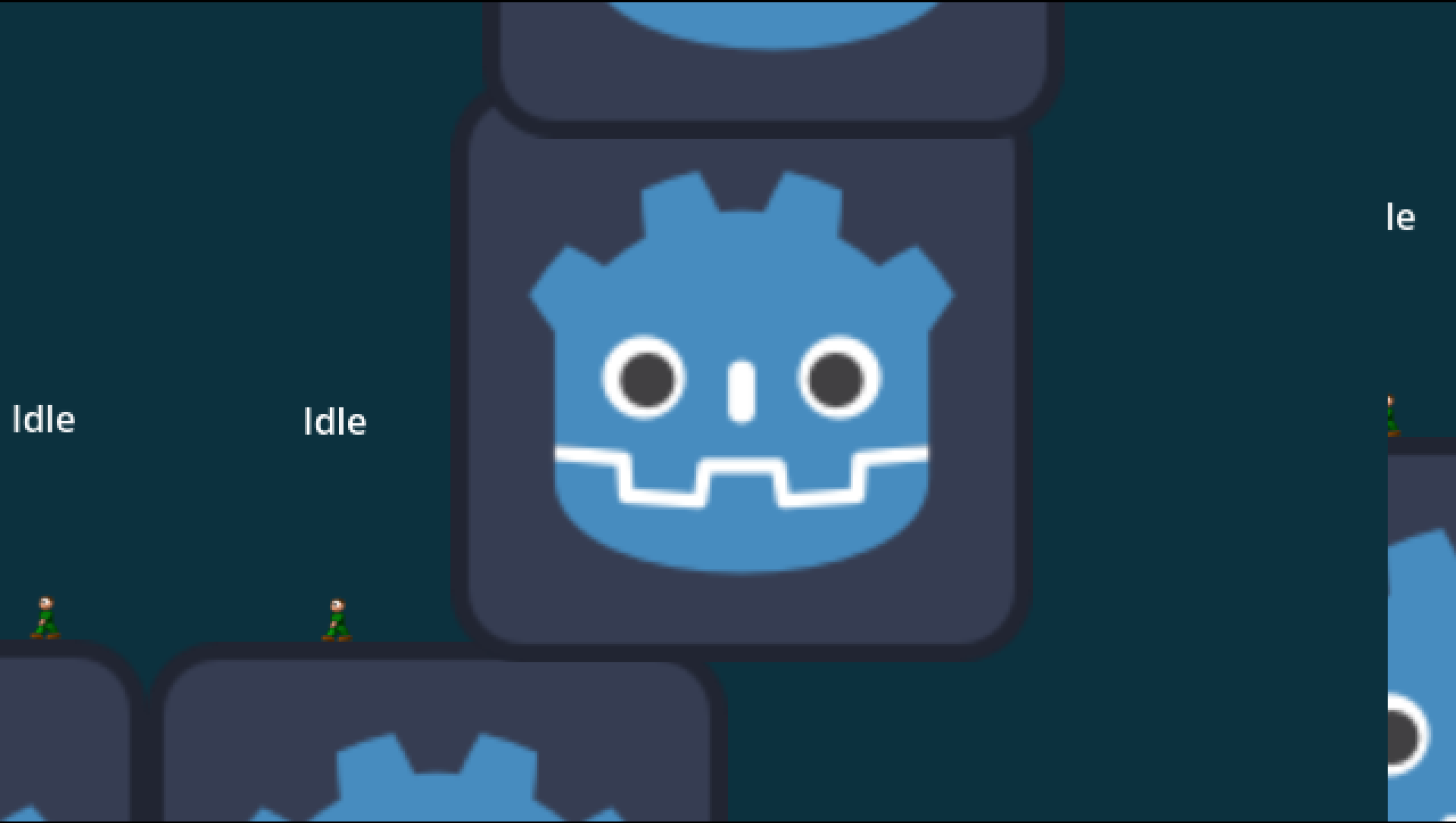
Good thing: We circumvented the bug! Yay! Thanks so much for the scene tree advice, this actually helped. It really has something to do with the Subviewports and the position of the level, player and spell nodes, although I still don’t know what exactly

But I don’t understand how to properly set up the splitscreen this way. You see in the screenshot the 2 Subviewports. One is a tiny fraction of the other. But the right one actually follows my player movement while the other one is not.

I simply tried to copy the scene tree structure you mentioned. The cameras have simple target scripts. On intial setup they get Playeras a target variable and on _process()they update their positions based on the player position.

Also, I get an error this time!
draw_list_bind_uniform_set: Attempted to use the same texture in framebuffer attachment and a uniform (set: 3, binding: 0), this is not allowed.

I don’t understand Viewports enough to know what’s going on. Any support much appreciated !

Hello, it’s me again !

I think I found a solution I can live with. This is my scene tree. All the world objects are children of Subviewport 1. The only child of Subviewport2 is P2Camerawhich sets Player 2 as target. The only think I have to fiddle around with now, is how to give each Subviewport its own CanvasLayerUI, but I will get there soon I think :slight_smile:

Food for thought: I think my previous problem had something to do with rendering more than just the Subviewports. Maybe this wouldve changed if Gamewas my root node.

 ┖╴Main
    ┠╴Sound
    ┠╴Game
    ┃  ┖╴SplitScreen
    ┃     ┠╴SubViewportContainer2
    ┃     ┃  ┖╴SubViewportPlayer2
    ┃     ┃     ┖╴P2Camera
    ┃     ┖╴SubViewportContainer
    ┃        ┖╴SubViewportPlayer1
    ┃           ┠╴Level
    ┃           ┃  ┖╴Level
    ┃           ┠╴Spells
    ┃           ┠╴Players
    ┃           ┃  ┠╴Player1
    ┃           ┃  ┖╴Player2
    ┃           ┖╴P1Camera
    ┖╴UI