So I’m continuing to play with Godot to have a good grasp on everything before I start my actual project, because as great as Godot is, it can be a real pain to refactor, so I’m working out everything I’d like to do and implementing POC so when I start the project I’ll know all the logic, and the way I’d like to layout the project.
So currently I have a few build tasks for the test project that processes scene files and generates some stuff based on the scene. I’d like to move this to a plugin that executes the action whenever a scene is saved in the editor.
Some googling brings up two results, hooking up the scene saved signal, or overriding _Notification something like:
	public override void _Notification(int action)
	{
		if (action == NotificationEditorPreSave)
		{

		}
		else if (action == NotificationEditorPostSave)
		{

		}
	}
However it looks to me like this would only be valid for custom node types to inform them of changes made to the current scene that the node is part of, is this correct?
TBH not sure. Here’s what I would try: Make an AutoloadScene that looks for that notification. Since Autoloads are loaded first, it should trigger before the other scenes and you should be able to iterate over the tree and do your pre-processing then. You could add all the scenes you want to preprocess to a Group.
Otherwise, yeah, you’re going to have to creating a base Node for your scenes that handles it, or add a component Node that does it.
However, if you want to do this as a default action for every scene, you should really be doing this at the engine level and should be spinning your own version of Godot.
TBH, your question smacks of future-proofing and the X-Y Problem, and relying on programming experience outside of Godot, instead of understanding how Godot works. There are probably easier, better ways of achieving what you want in Godot than your current approach. But to find that out, you’d have to take a step back and tell us what you’re trying to accomplish, instead of asking us to fix the solution you already came up with.
So your saying if you do things the Godot way it’s okay to just wing it, no need to plan the development. And what happens when you move scenes around in the file system, or resources get moved between folders or I guess the godot way is to just live with it?
Secondly c# outperforms Godot in most things that don’t directly interface with the Godot engine.
Lastly did you miss part where currently I’m just playing with the engine, learning how it works, and figuring out the best way to integrate with it, to plan the project I will be doing, how is this not learning how Godot works?
Maybe instead of being smug and pretentious you could politely answer the question that is asked instead of saying things like don’t rely on your years of programming experience.
As it happens the node code posted does not trigger in event of a scene being saved. Instead I needed to use the scene saved event, which is right there available for the plugin.
So all it took was SceneSaved += OnSceneSaved;
To get what I needed. Which was one of the two options I mentioned in my first post. Thank you for replying.
I did not say that. I personally create UML diagrams and plan out everything with tickets when I build stuff in Godot.
Yes and no. You should read up on UIDs. If you are using Godot 4.4 or later, UIDs will keep your files straight, because references to files are through UID. Since you’re using 4.6.1, even references in code using drag-and-drop will reference UIDs instead of file paths.
So to answer your question, the Godot way is to let Godot handle that and not worry about it - and just don’t hardcode file paths.
K. I never said anything about that here, so perhaps that reply belongs in a different thread? And the statement that C# outperforms Godot in everything but the game itself doesn’t seem like a strong argument IMO. Unless I’m misunderstanding what you are saying?
Personally, I would be interested in any benchmarking you might have done to prove that. My information comes from posting a while back that C# was more performant, and being corrected by a team member that GDScript surpasses it in many areas now.
I like C# enough as a language, and used it professionally for many years. But I prefer GDScript for many reasons with Godot. But if you like C# for Godot, then that’s what you should use.
That’s a fair question. I’d recommend building a small game or three. That will teach you a lot about how Godot works and help you design things better. Based on my own experience and missteps. Maybe you won’t make those same missteps. I can only give advice based on my own experience.
You reading my words as smug and pretentious is your own interpretation. If you believe that you have more experience than me, then disregard what I’m saying. Your bruised ego is your own problem though, don’t put that on me.
I was trying to give you genuine advice, based on my 30+ years of professional development experience, and four years of Godot experience. I was trying to warn you about the pitfalls that many of us experienced developers fell into. Things like building my own singletons instead of using Autoloads because I felt that I could make something more performant. Not understanding that meant I’d have to jump through hoops to use signals and couldn’t use @export variables - which I learned were very important in Godot.
Coming to Godot with programming experience can blind you to some of the elegant and performant design decisions that the Godot team has made. It’s not a judgement on your intelligence or experience, just a hard-won piece of advice. If you don’t want to take it, don’t.
Well, it was just a theory.
Glad you got it working. My advice about the X-Y problem remains the same. You can take my advice or leave it, but I’d recommend either way that you might benefit from examining why that advice offended you so much. It was not meant that way.
Yes I’m familiar enough with GDScript, in fact up till now it’s what I used to create plugins.
Currently 90 percent of the plugin functionality could have been done in Gd Script, but I have handlebar templates to render and couldn’t figure out how to do that with Gd Script. Although it would of been a lot easier had I been able to figure it out, because even though I did get it working properly, I would not in any way, shape or form recommend doing a plugin in C# unless you are a masochist. I’ll probably see if I can do it in unman-aged code using a GDExtension.
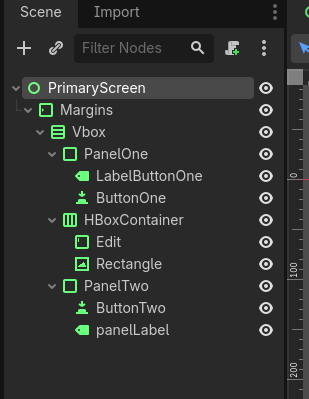
It’s a pretty simple plugin, in that all it does is generate some boilerplate code for the scene so that there is a field for each node in the scene, and in ready it sets the fields value based on node path, whenever the node paths change, ie either renamed or moved, it regenerates this code when the scene is saved.
The first time a scene is saved it also generates a another file that is also a partial class that is meant to be the script for the scene. This is not touched if it exists by the plugin, so it is possible to attach this script before hand.
It names the first file SceneName.designer.cs
And the second SceneName.cs
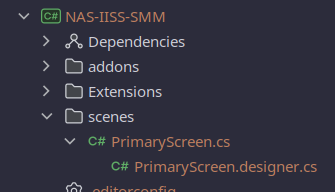
In most ides the first file is hidden as a child of the second file because it is not meant to be edited.
Sample designer output:
namespace NASIISSSMM.scenes;

public partial class PrimaryScreen : Control
{
    private MarginContainer Margins;
    private VBoxContainer Vbox;
    private PanelContainer PanelOne;
    private Label LabelButtonOne;
    private Button ButtonOne;
    private HBoxContainer HBoxContainer;
    private TextEdit Edit;
    private TextureRect Rectangle;
    private PanelContainer PanelTwo;
    private Button ButtonTwo;
    private Label panelLabel;

    // Called when the node enters the scene tree for the first time.
    public override void _Ready()
    {
        Margins = GetNode<MarginContainer>("Margins");
        Vbox = GetNode<VBoxContainer>("Margins/Vbox");
        PanelOne = GetNode<PanelContainer>("Margins/Vbox/PanelOne");
        LabelButtonOne = GetNode<Label>("Margins/Vbox/PanelOne/LabelButtonOne");
        ButtonOne = GetNode<Button>("Margins/Vbox/PanelOne/ButtonOne");
        HBoxContainer = GetNode<HBoxContainer>("Margins/Vbox/HBoxContainer");
        Edit = GetNode<TextEdit>("Margins/Vbox/HBoxContainer/Edit");
        Rectangle = GetNode<TextureRect>("Margins/Vbox/HBoxContainer/Rectangle");
        PanelTwo = GetNode<PanelContainer>("Margins/Vbox/PanelTwo");
        ButtonTwo = GetNode<Button>("Margins/Vbox/PanelTwo/ButtonTwo");
        panelLabel = GetNode<Label>("Margins/Vbox/PanelTwo/panelLabel");

        _Startup();
    }
}
Main Class:
namespace NASIISSSMM.scenes;

public partial class PrimaryScreen : Control
{

	// Called from _Ready()  -- put initialization logic here
	private void _Startup()
	{

	}

	// Called every frame. 'delta' is the elapsed time since the previous frame.
	public override void _Process(double delta)
	{
	}
}
It calculates the namspace based on the resource path and the base namespace set in the c# project file.
I chose handlebar, because it is mustache compatible which basically means I could use the same template across different languages which means I can reuse them in my next experiment with trying a plugin to do the same thing in c++ with GDExtension.
I’m not sure what you mean by the last question. I create a scene file in the editor when the scene is saved, it generates code in the designer file to update the field names for any node name changes, and updates the GetNode line of code in _Ready() to be the new node path for any nodes that where moved or removed from the scene.
The other file is then attached as the script to the scene, meaning that when the scene tree changes the .designer part of the object is updated automatically with any node path changes, and the main code where you implement logic is left untouched.
Here’s a sample hadlebar file that creates the designer file:
using Godot;
using System;

namespace {{NameSpace}};

public partial class {{ClassName}} : {{ClassType}}
{
{{#each SceneNodes}}
    private {{type}} {{name}};
{{/each}}

    // Called when the node enters the scene tree for the first time.
    public override void _Ready()
    {
{{#each SceneNodes}}
        {{name}} = GetNode<{{type}}>("{{path}}");
{{/each}}

        _Startup();
    }
}
And here’s the output of the template:
public partial class PrimaryScreen : Control
{
    private MarginContainer Margins;
    private VBoxContainer Vbox;
    private PanelContainer PanelOne;
    private Label LabelButtonOne;
    private Button ButtonOne;
    private HBoxContainer HBoxContainer;
    private TextEdit Edit;
    private TextureRect Rectangle;
    private PanelContainer PanelTwo;
    private Button ButtonTwo;
    private Label panelLabel;

    // Called when the node enters the scene tree for the first time.
    public override void _Ready()
    {
        Margins = GetNode<MarginContainer>("Margins");
        Vbox = GetNode<VBoxContainer>("Margins/Vbox");
        PanelOne = GetNode<PanelContainer>("Margins/Vbox/PanelOne");
        LabelButtonOne = GetNode<Label>("Margins/Vbox/PanelOne/LabelButtonOne");
        ButtonOne = GetNode<Button>("Margins/Vbox/PanelOne/ButtonOne");
        HBoxContainer = GetNode<HBoxContainer>("Margins/Vbox/HBoxContainer");
        Edit = GetNode<TextEdit>("Margins/Vbox/HBoxContainer/Edit");
        Rectangle = GetNode<TextureRect>("Margins/Vbox/HBoxContainer/Rectangle");
        PanelTwo = GetNode<PanelContainer>("Margins/Vbox/PanelTwo");
        ButtonTwo = GetNode<Button>("Margins/Vbox/PanelTwo/ButtonTwo");
        panelLabel = GetNode<Label>("Margins/Vbox/PanelTwo/panelLabel");

        _Startup();
    }
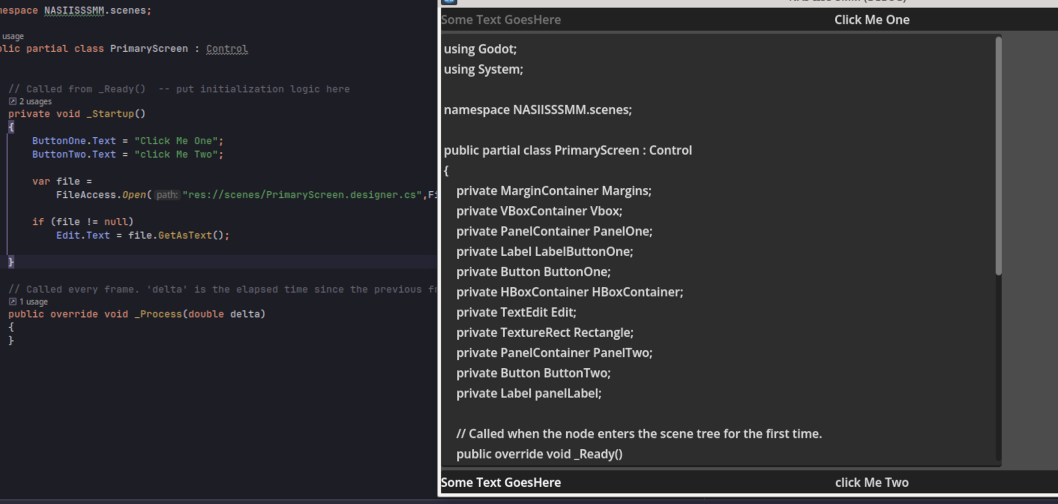
And here’s a screenshot with the main script attached and using the generated code:
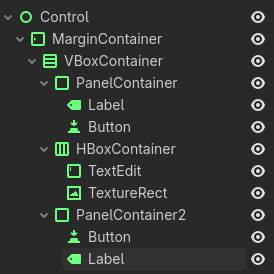
A .tscn file is a Text Scene, as opposed to a .scn file, which is binary. So let’s take you example from the screenshot. I made my own version and saved it as example.tscn. (I just didn’t bother to rename the nodes.)
What I’m suggesting is basically ETL. Create a script that takes in a handlebar file and outputs a .tscn file. It will load into the game no problem. You can use GDScript to do both - since you were saying that was your hang-up with using Handlebar. Alternately, you can do the same thing with your C# or C++ versions.
That output works. Now that I see what you’re doing, I think it’s worth pointing out that unless you are planning on manipulating all of those nodes, they don’t all need references once they’ve been created. They could be scoped inside _Ready() instead of at the class level.
I don’t know what else you’re using this for so, this might not work, but I’d also recommend looking into using Resources instead of Handlebars. It’d be easier building from a base scene, but you could put the information you need into a Resource with @export variables, and even put the ETL code inside it.
But again, while I see what you are doing, I don’t see why. It’s unclear to me what root problem you are trying to solve.
I don’t why you keep saying generate the scene file. it is faster and easier to create the scene in the scene editor, then create a definition for each scene that would basically be the whole scene layed out to generate the scene for every scene in the project?
The idea is to have it behave like Visual designers do in visual studio and other ides. They generate a designer file with generated code and a reference to each item for design elements created in the designer. In this case the scene editor. So as I add and edit scenes, the node paths are always up to date in the scene, and if I rename a node, it gets caught at compile time, instead of throwing a null object exception when a node path is broken from rearranging the scene tree.
As the items already exist there is no extra overhead to making them class wide variables. This is the standard way most visual designers I’ve worked with work.
So basically currently the code is generated based on parsing the tscn file that has changed and been saved, so yes I realize it is just text.
The designer, or scene editor is what drives the template generation in the first place when changes for any scene in the project are saved. And because .designer.cs is recognized by most ides as generated code the file is hidden by default, and is usually presented as a child of the implementation file:
Because that is how I interpreted what you were showing me. I did not know you were building the pre-scene in the Editor. I thought you were building the scene from the file.
Agreed. Hence my confusion.
Ah ok, so you are creating a text interface to populate the GUI?
Why not just access them all as unique names and do this?
class_name PrimaryScreen extends Control

@onready var margins: MarginContainer = %Margins
@onready var vbox: VBoxContainer = %Vbox
@onready var panel_one: PanelContainer = %PanelOne
@onready var label_button_one: Label = %LabelButtonOne
@onready var button_one: Button = %ButtonOne
@onready var h_box_container: HBoxContainer = %HBoxContainer
@onready var edit: TextEdit = %Edit
@onready var rectangle: TextureRect = %Rectangle
@onready var panel_two: PanelContainer = %PanelTwo
@onready var button_two: Button = %ButtonTwo
@onready var panel_label: Label = %panelLabel

func _ready() -> void:
	_start_up()
That would solve the same problems with half the code, and the engine will take care of any reordering for you. (Obviously you’d have to do the C# version.)
There is very little overhead, but there is some. It’s not worth worrying about, you’re right though.
Godot passes Nodes by reference, so for every instance of this class in memory, each of your private variables is holding a pointer to the actual Node in the scene. They are not shared between every all instances of the class, because they all point to different objects.
Again, not an issue memory-wise, just curious why I was doing it. Convention is a good reason.
It seems you are separating out display from logic, so basically an MVC architecture - focusing on the View and Controller portions.
I meant I don’t know if Resources would work for you. But I think they would.
However, it also seems like you like your approach. In my experience, there are easier ways to do things in Godot that are more user-friendly. But if you’re doing this for you because it’s familiar, go for it. You seem to be going for an MVC approach instead of a Godot approach, and that’s going to take some tweaking.
If you’d like to look at another way to do UI templating in Godot, you can take a look a my User Interface Plugin which has a generic Screen and SplashScreen nodes. You can see them in action in my Game Template Plugin.
At this point I’m asking if you have any thoughts on using Moustache to create MVC templates for Godot games, and might there be an easier way to keep the view and controller sections separate than what has been presented?
What’s a “MVC template”? All this is too abstract for my pea-brain. Let’s hear the description of what is actually being made here. What problem for the user needs be solved by this plugin or whatever is brewing here?
Doing “true” MVC in Godot makes no sense as long as you’re accepting the scene tree as your main loop. Scene tree is fundamentally anti-MVC in that it by design fuses those 3 things. For true MVC you’d need to ditch the scene tree and manage your own scene graph of whatever kind you like. Doing this in GDScript would be a bit crazy due to performance reasons.
I’m not sure I understand anything that’s been written in this thread, including this post
I think you answered my question in your typical blunt manner. (I was just thinking earlieafter replying to what looked like an AI slop post that I’ve never doubted that you’re a real human. )
No onready in C# has to be done in _Ready(), secondly this is regenerated every time the scene changes, based on the current layout of the the scene.
It’s not MVC.
It’s a design choice predating MVC, all the way back to VS 6, it’s also how Glade originally worked for creating GTK+ controls, and it’s how Netbeans handles swing design using it’s visual form designer.
It’s simply having the class split into two parts. One part contains implementation logic, the other, the .designer file contains code generated from the Scene editor.
Whenever a scene is saved, if it has changed the .designer file is regenerated to keep all references up to date. Now when items move around in the scene tree, that paths are always up to date in the designer code file. It also means that node renames will be caught at compile time as the field name will change breaking the implementation portion, instead of waiting till runtime when something tries to access that node which is usually the way you find out that you forgot to update code for changes made in the scene editor.
Speaking of AI SLOP:
AI Overview
The .designer.cs file in C# is an auto-generated partial class file used by Visual Studio’s visual designers (like Windows Forms or ASP.NET Web Forms) to separate layout code from hand-written application logic.
Key Concepts
Auto-Generated Code: The code within this file is automatically produced and managed by the Visual Studio designer tool when you use the graphical interface to design a UI.
Partial Class: The partial keyword is used to split the definition of a single class across two or more files. The main application logic resides in the main .cs file, while the UI components’ declarations and initialization (specifically the InitializeComponent() method) are in the .designer.cs file.
Purpose: The primary purpose is to define and initialize the components (e.g., buttons, labels, text boxes), their properties (size, location, text), and wire up event handlers created in the design view.
Noted. I just read up on that. But also, one reason my examples were in GDScript were because you said you couldn’t figure out how to do this in GDScript. (The other is I didn’t want to convert it to Godot C# because I would have to look things up. GDScript is in my head.)
Visual Studio 6 came out in 1997, Glade in 1998. Moustache was created originally in Ruby in 2009. MVC was designed originally for Smalltalk in the 1970s.
I said it seems like MVC without the model. I didn’t say it was MVC. But looking into Moustache it was developed for Ruby web pages and Ruby on Rails, which is straight up MVC. So you can see why I would conflate the two.
I understand now that this is an old Microsoft paradigm you are working from.
This is your sticking point IMO - not Moustache. Moustache is just text to parse. It’s an easy hurdle. Hell, the original Moustache code in Ruby was only 200 lines. So recreating that in GDScript would be pretty easy.
However GDScript does not support multiple inheritance. Thus a partial class is never going to work in GDScript. If traits are implemented soon, you could try using that approach.
You could do this with Composition instead of Inheritance. But then we get back to what @normalized said, which is that this is already what the Godot Editor does through Inheritance.
This is a made up problem. In other words, if you use Godot correctly, this problem doesn’t exist. I addressed that above. I call it made up, because your approach creates this problem, which doesn’t exist in the Godot editor. (I showed you how to avoid it in my last post using GDScript.)
It seems to me you have recreated the .tscn file with the .designer.cs file.
The scene file and script already separate view from logic. In Godot you create the View in the Editor and save it as a .tscn file. Then, you attach .gd files to node through the GUI. These scripts contain ALL the logic (i.e.Control).
Conclusion
Ultimately, you can lead a horse to water, but you can’t make them drink. If you like your approach, go for it. From where I sit, it appears you are re-inventing the wheel - just using a Microsoft paradigm. IMO, you are making your life harder, because by blazing your own path, if you get stuck, it’s a lot harder to get help. However, if you like that challenge, or you just really don’t like the way Godot does things, that’s why Godot is open source and flexible.
It’s not a MS only practice as mentioned it’s been used in GTK as well as java neither of which is ms.
And actually it’s to save trouble down the road, because Godot does not care if the GetNode path is wrong, and you will not know the path is wrong until that object is accessed at runtime.
For example you decide to rename a button in the scene editor you save the scene. You forget to update the node path in the script, you won’t know there is a problem till it is caught at runtime when something tries to access the now null object because the path was no longer correct.
This way whenever I modify the scene tree, my node paths are always correct, and field names match the names of the nodes in the scene editor. This means while working on the scripts for scenes I just have to worry about implementation as node references are automatically kept up to date.
But I’m sure all you so experienced Godot developers, with your great knowledge of C# and all things Godot, that you are probably correct, as if someone does something different then you it must be wrong.
Also note in C# you can’t just get a node using the wildcard like in your gdscript example, or at least you couldn’t before, but this wouldn’t help if the node name changes as this would still break the lookup in your code would it not?
You should have started with that, save us all time and brain cells.
As I earlier noted, you already have the editor that does this for you:
[Export] Godot.Node2D n;
Now you can assign the node in the inspector and editor will keep track and make updates if you move or rename it.
There are also scene unique names that let GetNode() fetch nodes by names without needing the path.


 )
)