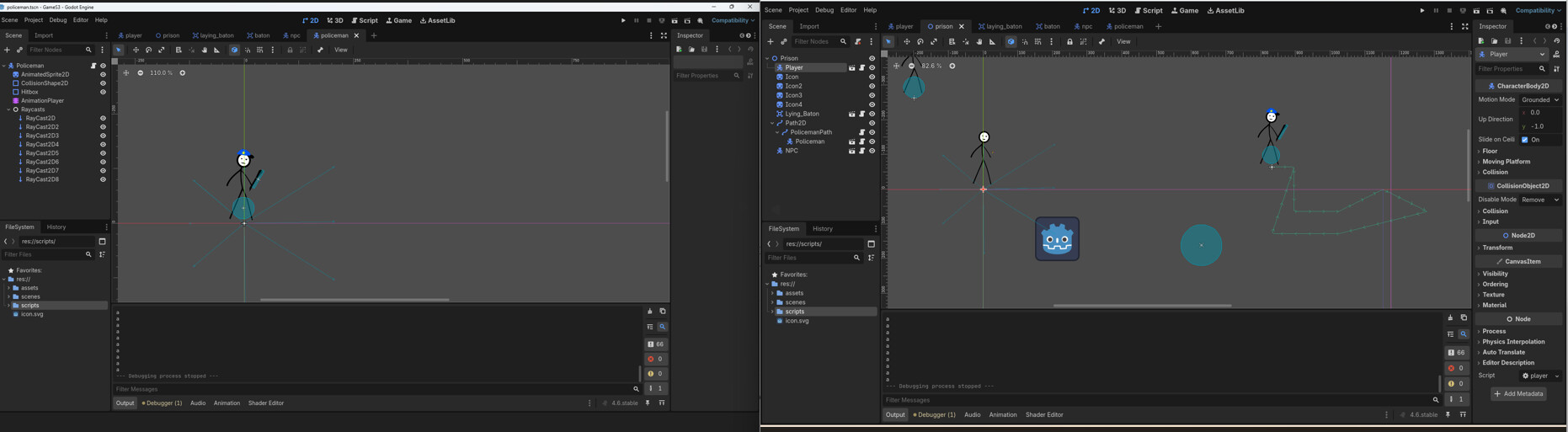
I was making a new charecter in my Game: A policema that would move around a seted path and when his raycasts will overlap a player, he'll approache him, but a got some problems. First of all, when I spawn him as a child of PathFollow2D, raycasts for whatever reason are positinied apart from a policeman, and also when Player is overlaping with raycasts, a policeman doesn’t approache him, although his speed increases as was impemented.
extends CharacterBody2D

var speed:=200.0
@onready var raycasts: Node = $Raycasts

func _physics_process(delta: float) → void:
for raycast: RayCast2D in raycasts.get_children():
var target = raycast.get_collider() as Player
if target:
print(“a”)
speed=350.0
var direction:=global_position.direction_to(target.global_position)
velocity=velocity.move_toward(direction,speed*delta)
move_and_slide()
It looks like the parent of the raycast nodes is a Node. Node does not have a position. Change the type to Node2D.
Even better, listen to normalized. In this case using a CollisionShape2D with a CircleShape2D would be much better than the raycasts. Only if you are going to add walls or something else that block policeman’s vision to player, you need raycasts. Even then, instead of having multiple raycast nodes, make only one raycast, straight from the policeman position to the player position. If the raycast succeeds (ie. the ray doesn’t hit to a wall), policeman sees the player.
Yeah, it does work better. Don’t know why I didn’t use that earlier. But there’s still one problem, a policeman doesn’t start approaching player when he enters the area. I tried to fix it by reparenting him to the scene’s nody, but he’s just starting to stand stil after he detects player.
Here is the code:
extends CharacterBody2D

var speed:=200.0
@onready var detector: Area2D = $Detector
@onready var new_parent = get_node(“/root/Prison”)

func _physics_process(delta: float) → void:
detector.body_entered.connect(func(body:Node2D):
if body is Player:
print(“a”)
call_deferred(“reparent”, new_parent)
speed=350.0
var direction:=global_position.direction_to(body.global_position)
velocity=velocity.move_toward(direction,speed*delta))
move_and_slide()
Do not connect to a signal every frame, this surely causes errors or is a memory leak. Connect on _ready or through the editor.
You may want a new variable for which “state” the policeman is in
var chasing_target: Player = null # not chasing yet

func _ready() -> void:
    detector.body_entered.connect(_on_body_entered)

func _on_body_entered(other: Node2D) -> void:
    if other is Player:
        chasing_target = other # now we have someone to chase

func _physics_process(delta: float) -> void:
    if chasing_target:
        pass # chase the player
    else:
        pass # walk along path