Godot Version
v4.4.1.stable.official [49a5bc7b6]
Question
Hello all,
I’m trying to rotate a Rect2 with an angle from a pivot point on Rect2. I think I can do it ‘simply’ with Transform2D but I couldn’t figure it out yet.
Any suggestion?
v4.4.1.stable.official [49a5bc7b6]
Hello all,
I’m trying to rotate a Rect2 with an angle from a pivot point on Rect2. I think I can do it ‘simply’ with Transform2D but I couldn’t figure it out yet.
Any suggestion?
try this code for such behaviour.
self.rotation_degree = 45
or simply
rotation_degree = 45
Rect2 is not a Node, it’s a variant type (like Array or int) so this would not work.
Like you pointed out yourself - it’s not a Node2D, so it doesn’t have an idea about “rotation”. How do you want to rotate something that doesn’t know rotation?
What’s your end goal here?
I think the documentation says you can do this, but it’s not 100% clear.
Although Rect2 itself is axis-aligned, it can be combined with Transform2D to represent a rotated or skewed rectangle
And I already have a rotated rectangle with this code. But the pivot point of this rotation is 0,0 of the rectangle. I’m trying if I can change that pivot point.
rect_rotated = Transform2D.IDENTITY.rotated(deg_to_rad(-90)) * rect
This is what I get with each 90 degree counter-clockwise rotation:
rotation deegree: 0.0
rect : [P: (0, 0), S: (1, 2)]
rotation deegree: -90.0
rect : [P: (0, -1), S: (2, 1)]
rotation deegree: 180.0
rect : [P: (-1, -2), S: (1, 2)]
rotation deegree: 90.0
rect : [P: (-2, 0), S: (2, 1)]
rotation deegree: 0.0
rect : [P: (0, 0), S: (1, 2)]
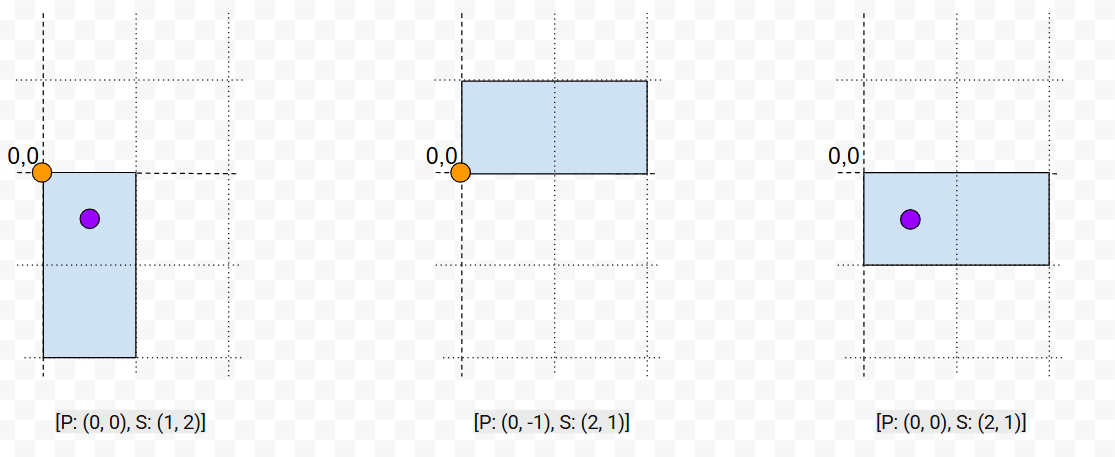
I hope this explains a bit better:
The first is the original rect.
The second is the rotation I can do with Transform2D uses pivot point as 0,0 -orange-.
The third is the rotation I want to do. Having pivot point as a variable. (0.5,0.5) - purple- in this case
I have a grid based system. And rect represents which cells in the grid are occupied for an object.
When I click on an object and then rotate them, I’d like to have the pivot point of rotation as where I clicked on the object, not the top left corner, which is rect’s 0,0.
I already rotate the Node2D of the object properly. But they don’t have the data where the grid is occupied.
Ok, gotcha.
It’s not really applying rotation, but rather changing the dimensions of the Rect2 to look like it’s rotated - which may or may not be what you need.
Why not use the Node2D though? It has a Transform2D embedded in it already, so it’ll be much easier to rotate stuff. E.g. I can embed a RectangleShape into a CollisionShape2D, as a child of Area2D and get this rotation, all within 10 seconds and 0 lines of code:
Is this not what you need?
I will still need the shape which is at the end a Rect2 in local position. It will also be in real position and real dimensions, not mapped to the grid.
In theory I can do this:
It seems like a lot of work compared to using a transform function (if it can work). But I can still try to see if it works. Do you know how to do the second part?
I played around with the Transform2D transformations, extending your original code and this is what worked for me:
func _ready() -> void:
	var pivot_offset: Vector2 = Vector2(0.5, 0.5)
	var rect1: Rect2 = Rect2(Vector2.ZERO, Vector2(1,2))
	var rect2: Rect2 = Transform2D.IDENTITY.translated(-pivot_offset).rotated(deg_to_rad(-90)) * rect1
	var rect3: Rect2 = Transform2D.IDENTITY.translated(pivot_offset) * rect2

	prints("rect1", rect1.position, rect1.size)
	prints("rect2", rect2.position, rect2.size)
	prints("rect3", rect3.position, rect3.size)
This is the printed output, you can see the last rect is what you wanted:
rect1 (0.0, 0.0) (1.0, 2.0)
rect2 (-0.5, -0.5) (2.0, 1.0)
rect3 (0.0, -0.0) (2.0, 1.0)
Why this works is that in order to rotate around a pivot, you first need to translate (move) your rect by the inverse of a given pivot, do the rotation, and then translate back.
Is that Rect2 enough to handle in your game?
I’m still confused by your usecase honestly, but if it works, it works 
If this doesn’t work, I can help you with the Node2D instead.
This topic was automatically closed 30 days after the last reply. New replies are no longer allowed.