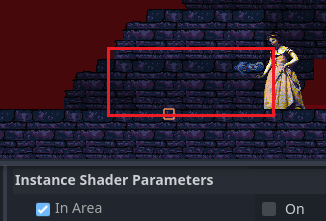
Godot Version
V4.5.1
Question
Hi, I’ve got an Area that I’d like to go transparent when the player enters it. I’ve got a Tilemap with a shader and an Area2D with a script attached. The script is very simply:
public partial class HiddenArea : Area2D
{
    private TileMapLayer tilemap;
    private void OnAreaEntered(Node2D node)
    {
        tilemap.SetInstanceShaderParameter("InArea", true);

    }

    private void OnAreaExited(Node2D node)
    {
        tilemap.SetInstanceShaderParameter("InArea", false);
    }
    // Called when the node enters the scene tree for the first time.
    public override void _Ready()
    {
        tilemap = GetParent<TileMapLayer>();
    }

}
The shader is also very simply:
shader_type canvas_item;
render_mode blend_mix;
instance uniform bool InArea = false;

void vertex() {
// FloatConstant:5
    float transparencyAmount = 0.5;
    float outputTransparency;
// If:3
    if(InArea == true)
    {
        outputTransparency = transparencyAmount;
    }
    else
    {
        outputTransparency = float(1);
    }
// Output:0
    COLOR.a = outputTransparency;
}
So basically when they go into the area, the transparency should be enabled, and when they leave it should be disabled. If I set the default to be True I see the TilemapLayer as having the expected transparency, so I know the logic of the shader code works. When I view the HiddenArea in the remote editor, I can see InArea in the Instance Shader Parameters toggle between on and off as expected on entry/leaving. So it seems like both pieces are working independently, and I don’t know why they aren’t working together?
I couldn’t find anything on google related to this, and my editor is showing no errors. Thanks!