Godot Version
4.7/4.6.3
Question
Using the limbo ai plugin and looking at tutorials on it, many of them say I can have a sub state machine within the main one but don’t tell/show me how to set it up or tell/show me how to change between states under the main one to the sub ones and vice versa.
could some one show an example with code on how to set this concept up with my states and structure?
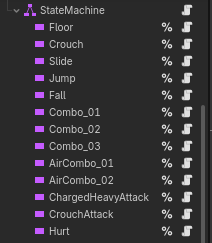
in the named state machines node:
class_name PlayerMovementStateMachine extends LimboHSM

@export var player : PlayerController

@export var movement : PlayerMovementComponent

## States
@onready var floor_state: LimboState = %Floor
@onready var fall_state: LimboState = %Fall
@onready var jump_state: LimboState = %Jump
@onready var crouch_state: LimboState = %Crouch
@onready var slide_state: LimboState = %Slide
@onready var hurt_state: LimboState = %Hurt
@onready var combo_01_state: LimboState = %Combo_01
@onready var combo_02_state: LimboState = %Combo_02
@onready var combo_03_state: LimboState = %Combo_03
@onready var air_combo_02_state: LimboState = %AirCombo_02
@onready var air_combo_01_state: LimboState = %AirCombo_01
@onready var crouch_attack_state: LimboState = %CrouchAttack
@onready var melee_heavy_attack_state: LimboState = %ChargedHeavyAttack

func _ready() -> void:
	initialize(player)
	set_active(true)
	initial_state = floor_state

	transitions_setup()

func _process(delta: float) -> void:
	movement.coyote_timer -= delta
	movement.buffer_jump_timer -= delta


func transitions_setup() -> void:
#region /// Movement Transitions
	add_transition(floor_state, crouch_state, "CROUCHING")
	add_transition(floor_state, slide_state, "SLIDING")
	add_transition(floor_state, jump_state, "JUMPING")
	add_transition(floor_state, fall_state, "FALLING")
	add_transition(floor_state, combo_01_state, "COMBO_01")
	add_transition(floor_state, melee_heavy_attack_state, "CHARGED_HEAVY")
	add_transition(floor_state, hurt_state, "HURTING")

	add_transition(crouch_state, floor_state, "FLOOR")
	add_transition(crouch_state, crouch_attack_state, "CROUCH_ATTACK")
	add_transition(crouch_state, hurt_state, "HURTING")

	add_transition(jump_state, fall_state, "FALLING")
	add_transition(jump_state, hurt_state, "HURTING")

	add_transition(fall_state, floor_state, "FLOOR")
	add_transition(fall_state, air_combo_01_state, "AIR_COMBO_01")
	add_transition(fall_state, hurt_state, "HURTING")
	add_transition(fall_state, jump_state, "JUMPING")

	add_transition(slide_state, fall_state, "FALLING")
	add_transition(slide_state, jump_state, "JUMPING")
	add_transition(slide_state, floor_state, "FLOOR")
	add_transition(slide_state, crouch_state, "CROUCHING")
	add_transition(slide_state, hurt_state, "HURTING")
#endregion

#region /// Attack Transitions
	add_transition(combo_01_state, combo_02_state, "COMBO_02")
	add_transition(combo_02_state, combo_03_state, "COMBO_03")
	add_transition(air_combo_01_state, air_combo_02_state, "AIR_COMBO_02")

	add_transition(combo_01_state, floor_state, "FLOOR")
	add_transition(combo_01_state, fall_state, "FALLING")
	add_transition(combo_01_state, hurt_state, "HURTING")

	add_transition(combo_02_state, floor_state, "FLOOR")
	add_transition(combo_02_state, fall_state, "FALLING")
	add_transition(combo_02_state, hurt_state, "HURTING")

	add_transition(combo_03_state, floor_state, "FLOOR")
	add_transition(combo_03_state, fall_state, "FALLING")
	add_transition(combo_03_state, hurt_state, "HURTING")

	add_transition(melee_heavy_attack_state, floor_state, "FLOOR")
	add_transition(melee_heavy_attack_state, floor_state, "FALLING")
	add_transition(melee_heavy_attack_state, hurt_state, "HURTING")

	add_transition(air_combo_01_state, fall_state, "FALLING")
	add_transition(air_combo_01_state, hurt_state, "HURTING")

	add_transition(air_combo_02_state, fall_state, "FALLING")
	add_transition(air_combo_02_state, hurt_state, "HURTING")

	add_transition(crouch_attack_state, crouch_state, "CROUCHING")
	add_transition(crouch_attack_state, hurt_state, "HURTING")
#endregion

#region /// Health Based Transitions
	add_transition(hurt_state, floor_state, "FLOOR")
	add_transition(hurt_state, fall_state, "FALLING")
#endregion