Godot Version
4.5
Question
I’ve written two shaders in the Compatability renderer. They both write to ALPHA when sampling textures with transparency, but don’t set any render_mode settings beyond cull_disabled on tiled_slice.gdshader. I’ve tried setting different render modes like depth_prepass_alpha and depth_draw_always, but nothing changes unless I don’t write to ALPHA (which prevents the transparency effect I want).
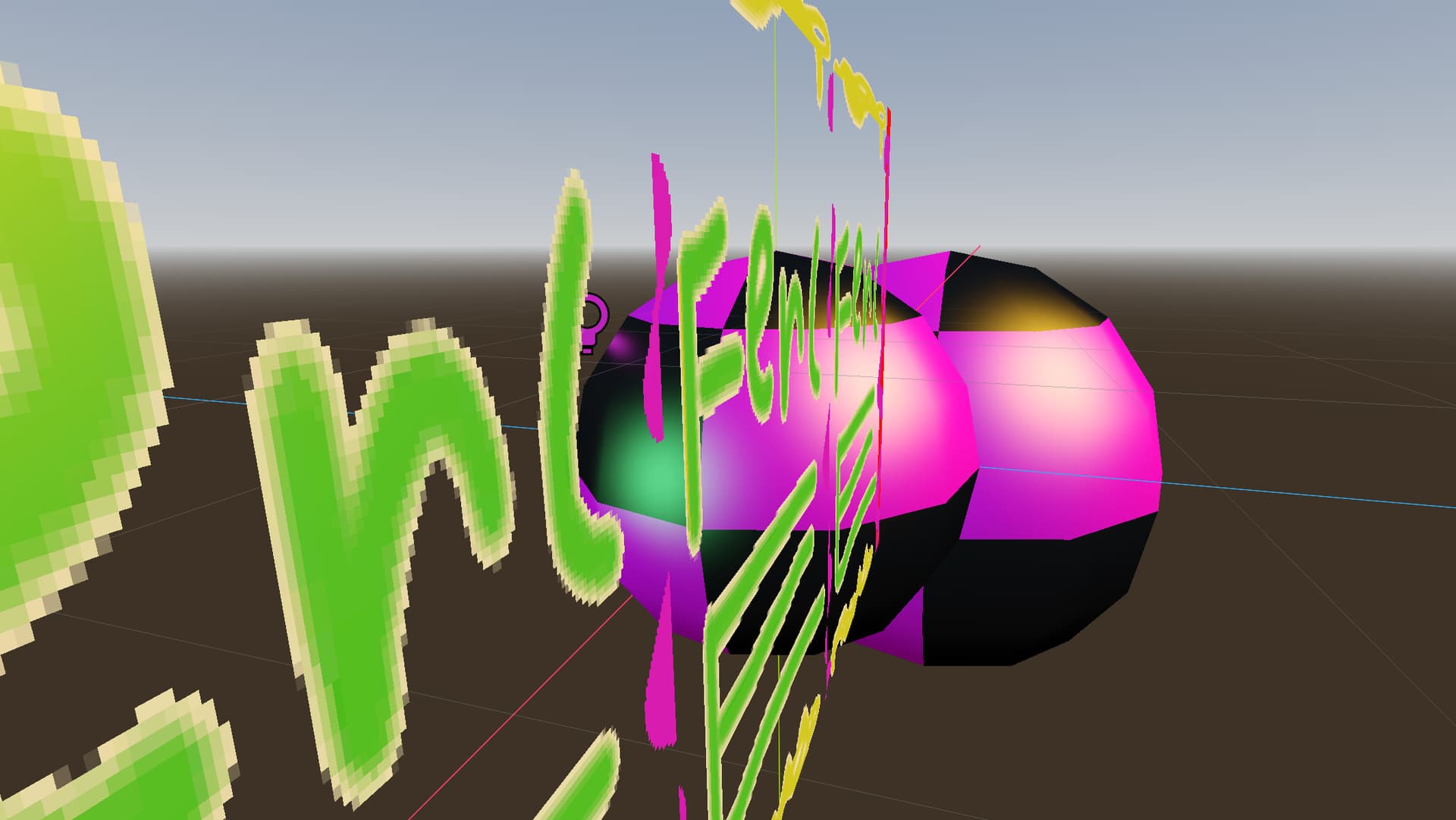
Two spheres (
sampled_texture.gdshader) and a plane (tiled_slice.gdshader) clipping each other
I suppose one fix would be to have different shaders for transparent and opaque objects and avoid clipping transparent meshes, but that seems redundant, and it’d be nicer to just have a bool set per-material for transparency.
lighting.gdshaderinc:
group_uniforms Lighting;
group_uniforms Lighting.Diffuse;
uniform float diffuse_wrap : hint_range(0.5, 1, 0.01) = 1.0;
group_uniforms Lighting.Highlight;
uniform float specular_power : hint_range(1.0, 100.0, 0.5) = 24.0;
uniform vec3 specular_color : source_color = vec3(1.0);
group_uniforms;

void light() {
	vec3 light_color_no_pbr = LIGHT_COLOR / PI;

	float diffuse = max(dot(NORMAL, LIGHT), 0.0);
	diffuse = pow(diffuse * diffuse_wrap + (1.0 - diffuse_wrap), 2.0);
	DIFFUSE_LIGHT += diffuse * ATTENUATION * light_color_no_pbr;

	float specularity = pow(max(dot(NORMAL, normalize(VIEW + LIGHT)), 0.0), specular_power);
	SPECULAR_LIGHT += specularity * SPECULAR_AMOUNT * ATTENUATION * specular_color * light_color_no_pbr;
}
sampled_texture.gdshader:
shader_type spatial;

#define FILTER_MODE filter_nearest_mipmap_anisotropic

group_uniforms Texture;
uniform sampler2D albedo_texture : FILTER_MODE, source_color;
group_uniforms;

void fragment() {
	vec4 albedo = texture(albedo_texture, UV);

	ALBEDO = albedo.rgb;
	ALPHA = albedo.a;
}

#include "lighting.gdshaderinc"
tiled_slice.gdshader:
shader_type spatial;

render_mode cull_disabled;

#define FILTER_MODE filter_nearest

uniform sampler2D albedo_texture: FILTER_MODE, source_color;
uniform vec2 slice_inset_min = vec2(0.25, 0.0);
uniform vec2 slice_inset_max = vec2(0.75, 1.0);
/**
  * How many texture repetitions per 1.0 scale unit.
  * [code]vec2 repetitions = max(floor(scale / repetition_interval), 1.0);
  * Set to a negative value to for stretching instead of tiling.
  */
uniform vec2 repetition_interval = vec2(1.0, -1.0);
uniform int culling_mode: hint_enum("Disabled:0", "Back:-1", "Front:1") = 0;

struct Inset {
	vec2 min;
	vec2 max;
};

bool between(float v, float lt, float gt) {
	return (lt <= v && v <= gt);
}

Inset inset_new(vec2 a, vec2 b) {
	Inset new;
	if (b.x > a.x && b.y > a.y) {
		new.min = a;
		new.max = b;
	} else {
		new.min = b;
		new.max = a;
	}
	return new;
}

vec2 inset_size(Inset x) {
	return x.max - x.min;
}

Inset inset_scaled(Inset x, vec2 scale) {
	Inset new;
	new.min = x.min / scale;
	new.max = x.max + (x.min - new.min);
	return new;
}

vec2 inset_normalized(Inset x, vec2 pos) {
	return (pos - x.min) / inset_size(x);
}

void fragment() {
	if (culling_mode != 0) {
		if (culling_mode == -1 && !FRONT_FACING) discard;
		else if (culling_mode == 1 && FRONT_FACING) discard;
	}

	vec2 scale = vec2(length(MODEL_MATRIX[0].xyz), length(MODEL_MATRIX[1].xyz));

	Inset slice_inset = inset_new(slice_inset_min, slice_inset_max);
	vec2 slice_size = inset_size(slice_inset);
	Inset slice_inset_scaled = inset_scaled(slice_inset, scale);
	vec2 slice_size_scaled = inset_size(slice_inset_scaled);

	vec2 repetitions = max(floor(scale / repetition_interval), 1.0);

	vec2 uv_inset_frame = inset_normalized(slice_inset_scaled, UV);
	vec2 uv_tiled = fract(uv_inset_frame * repetitions);
	vec2 uv_repeated = mix(slice_inset.min, slice_inset.max, uv_tiled);

	vec2 uv_scaled = UV * floor(scale);

	if (between(UV.x, slice_inset_scaled.min.x, slice_inset_scaled.max.x)) {
		uv_scaled.x = uv_repeated.x;
	}

	if (between(UV.y, slice_inset_scaled.min.y, slice_inset_scaled.max.y)) {
		uv_scaled.y = uv_repeated.y;
	}

	vec4 albedo = texture(albedo_texture, uv_scaled);
	ALBEDO = albedo.rgb;
	ALPHA = albedo.a;
}

#include "lighting.gdshaderinc"