Godot Version
v4.7.2
Context
For context I’m trying to do a project similiar to 2017 mobile horror game Granny. The main gimmick in that game was the fact that every physical object made a sound when dropped. I thought it would be pretty easy to replicate and that’s how it seemed at first, but then very annoying problem appeared.
The Problem
The problem is that sometimes, when rigid body is dropped, sound just doesn’t play. I checked the _on_body_entered function first and it works fine, so its not a problem with collision but instead a problem with velocity accaunting on impact.
example ingame:
Tree and code
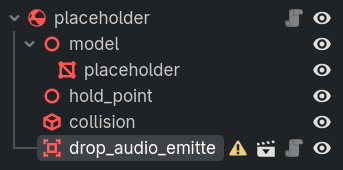
drop_audio_emitter code:
extends Area3D

@export_range(0.0, 2.0, 0.1) var velocity_threshold := 1.0
var _parent: RigidBody3D

func _ready() -> void:
  var parent: Node3D = get_parent()
  if parent is RigidBody3D:
    _parent = parent

    # ...

    body_entered.connect(_on_body_entered)
  else:
    push_error("Parent is not a RigidBody3D, can't function without it!")

func _on_body_entered(_body: Node3D) -> void:
  if not _parent.freeze and (_parent.linear_velocity.length() > velocity_threshold or _parent.angular_velocity.length() > velocity_threshold):
    _play_audio()
I know that the problem here is with the calculation but i genuinely don’t know what else could be used here because there’s almost no information about how to do that kind of stuff, and the one tutorial I found used pretty much the same method as I am.
P.S. Area3D is used instead of RigidBody3D’s contact monitor mainly because with a separate area node it’s easier making only one part of the object make sound. and also lowering the velocity threshold doesn’t really work