Godot Version
4.5.1
Question
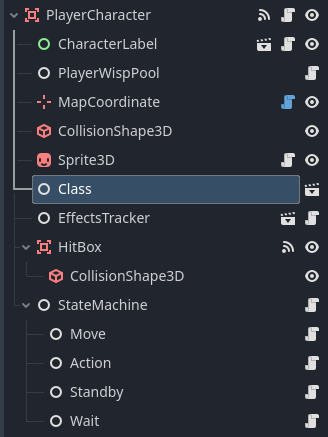
I am converting an existing project I have from Godot v3.6 to the latest stable version of Godot, v4.5.1. I have an issue where I am unable to assign a node to a variable of the same type. Specifically, I have a PackedScene, TestClass, with a script that defines a PlayerClass class. This is placed in another scene, PlayerCharacter, as a child node, Class. When I was working in 3.6 I could assign this node to a variable of type PlayerClass in the script for PlayerCharacter. When I converted to 4.5.1, I this error appears: PlayerCharacter._ready: Trying to assign value of type 'Node' to a variable of type 'player_class.gd'.
I don’t know if this is as a result of how the new Godot version works or a result of something else in my project. Any insight is appreciated.
PlayerClass Scene
@tool
extends Node
class_name PlayerClass
"""
Describes a class a player character can be. A player class defines the current
statistics the player will have, along with some techniques and spells that the
player will have access to.
"""

const STATS: String = "Stats"
const TECHNIQUES: String = "Techniques"
const SPELLS: String = "Spells"
const ACTION_PATH_FORMAT: String = "res://actions/{0}/{0}.tscn"

var stats: CharacterStats
var techniques: Array
var spells: Array

# Reference to the scene tree root.
@onready var _root_node: Node = get_tree().edited_scene_root


# Called when the node enters the scene tree for the first time.
func _ready():
	# Initialize the child nodes if not present in the scene
	if Engine.is_editor_hint() and get_child_count() == 0:
		_create_child_nodes()
		$Stats.set_owner(_root_node)
		$Techniques.set_owner(_root_node)
		$Spells.set_owner(_root_node)
	else:
		stats = get_node(STATS)
	techniques = get_node(TECHNIQUES).get_children()
	spells = get_node(SPELLS).get_children()


# Called when creating a new instance of this object.
func _init(class_data: PlayerClassData = null) -> void:
	if class_data == null:
		return
	name = class_data.name
	_create_child_nodes()
	stats.base_stat_values = class_data.stats
	for technique in class_data.techniques:
		_create_technique_node(technique)
	for spell in class_data.spells:
		_create_spell_node(spell)
PlayerCharacter Scene
class_name PlayerCharacter
extends Character
"""
Handles actions specific to player characters.
"""


# The current player class; determines stat adjusters and abilities.
var _player_class: PlayerClass
# References to the various attacks and spells the character has access to.
var _techniques: Array
var _spells: Array

@onready var wisp_pool: PlayerWispPool = $PlayerWispPool
@onready var _default_portait: Texture2D = preload(
		"res://character/player_characters/PlayerCharacter/" + \
		"PlayerBattlePortrait.atlastex"
)


# Assigns the player a class, updating the relevant details.
func assign_class(new_class: PlayerClass) -> void:
	_player_class = new_class
	_techniques = _player_class.techniques
	_spells = _player_class.spells
	stats = _player_class.stats
	stats.character_id = get_instance_id()
	_connect_to_character_label()
	_connect_stats_to_effects_tracker()
	_initialize_actions()


# Called when the node enters the scene tree for the first time.
func _ready() -> void:
	wisp_pool.player_name = name
	battle_portrait = (
		_default_portait if battle_portrait == null
		else battle_portrait
	)
	var class_node: PlayerClass = $Class
	assign_class(class_node)