Godot Version 4.4
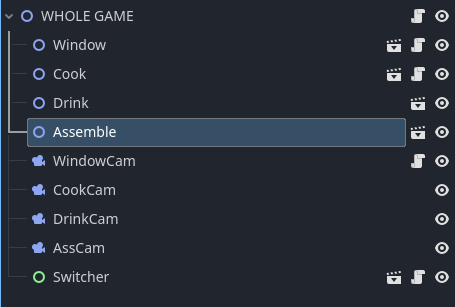
Hello! I’m trying to create 4 buttons that switch to their assigned cameras when clicked. Currently whenever I click one of those buttons the game crashes. I have the scene with the buttons (Switcher) in the scene with all 4 cameras (Whole Game). The script I have attached to the Switcher is this:
func _on_window_pressed() -> void:
	$WindowCam.current = true
	$CookCam.current = false
	$DrinkCam.current = false
	$AssCam.current = false

func _on_cook_pressed() -> void:
	$WindowCam.current = false
	$CookCam.current = true
	$DrinkCam.current = false
	$AssCam.current = false

func _on_drinks_pressed() -> void:
	$WindowCam.current = false
	$CookCam.current = false
	$DrinkCam.current = true
	$AssCam.current = false

func _on_assemble_pressed() -> void:
	$WindowCam.current = false
	$CookCam.current = false
	$DrinkCam.current = false
	$AssCam.current = true
Any help is appreciated! I am very new to this.
What is the error you recieve?
make sure to format your code pastes between three back ticks ```
Posting here so to be linked for later use instead of re-typing this every time
Make sure you paste scripts instead of screenshots. To properly format pasted code use three ticks ``` at the start and end of your paste like so:
```
# type or paste code here
func _ready() -> void:
print("My ready function!")
```
Results in:
# type or paste code here
func _ready() -> void:
print("My ready function!")
Press the </> button or ctrl+e in the forum to create these ticks.
[2024-09-02…
You do not have to writeCamera3D.current = false
So only need this:
func _on_window_pressed() → void:
    $WindowCam.current = true

func _on_cook_pressed() → void:
    $CookCam.current = true

func _on_drinks_pressed() → void:
    $DrinkCam.current = true

func _on_assemble_pressed() → void:
    $AssCam.current = true
No idea why your game crashes, the code seems fine to me.
Thank you for the format advice, didn’t know how to do that.
This is the error I got:
“Invalid assignment of property or key ‘current’ with value of type ‘bool’ on a base object of type ‘null instance’.”
I’ve tried writing that, I wrote everything else as false because it wasn’t working. I think the issue is something else though so I’ll delete all the false statements
One of your node paths (or all of them) is wrong. Show your scene structure.
So yeah, your node paths are wrong as those cams are not Switcher’s children. The correct path to a sibling would be $“../Name”
ok so I tried replacing the $Camera with $“../Camera” and still had the same issue. I parented the cameras to the switcher, using $Camera and that also didn’t do anything
print(self.get_path()) in those functions.
I’m not exactly sure what you mean by this
func _on_window_pressed() -> void:
	print(self.get_path())
	$WindowCam.current = true
	$CookCam.current = false
	$DrinkCam.current = false
	$AssCam.current = false
I FIXED IT! I used the set_current_camera($Cam) instead of $cam.current
this is what my final code looks like
extends Control

func _on_window_pressed() -> void:
	set_current_camera($"../WindowCam")

func _on_cook_pressed() -> void:
	set_current_camera($"../CookCam")

func _on_drinks_pressed() -> void:
	set_current_camera($"../DrinkCam")

func _on_assemble_pressed() -> void:
	set_current_camera($"../AssCam")

func set_current_camera(new_camera: Camera2D) -> void:
	$"../WindowCam".enabled = false
	$"../CookCam".enabled = false
	$"../DrinkCam".enabled = false
	$"../AssCam".enabled = false
	new_camera.enabled = true
Thank you all for the help!
1 Like
If you manually set a camera’s Current property to false, another camera will try to become the current one automatically, so you should instead just use the make_current() method on whichever camera you are trying to switch to.
If this does not solve the issue, can you post the exact error you are seeing and the Node Hierarchy?
system
December 7, 2025, 9:42am
15
This topic was automatically closed 30 days after the last reply. New replies are no longer allowed.