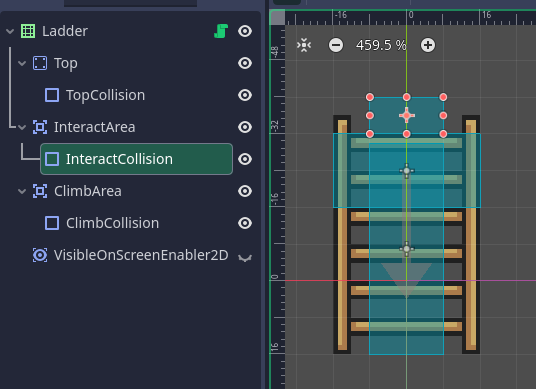
I’ve recently added ladders to my game, and now I had the bright idea to implement a climb buffer: it’s like a jump buffer but for ladders. However, for some reason, when I try to make it work, it works as intended when grabbing a ladder from the side while jumping, but doesn’t work in basically any other situation. What am I doing wrong?
Relevant player code:
func state_move(delta: float) -> void:
	if Input.is_action_just_pressed("ui_up"):
		ladder_buffer_timer = LADDER_BUFFER_TIME

	if ladder_buffer_timer > 0:
		ladder_buffer_timer -= delta

func state_ladder() -> void:
	get_input_vector()
	velocity.y = input_vector.y * CLIMB_SPEED

	if Input.is_action_just_pressed("jump"):
		if !Input.is_action_pressed("ui_down"):
			velocity.y = -jump_force
		else:
			# disabling semisolid collision
			set_collision_mask_value(4, false)

		state = States.FREE_MOVEMENT

	await get_tree().create_timer(0.1).timeout

	if is_on_floor() and Input.is_action_pressed("ui_down"):
		state = States.FREE_MOVEMENT
if ($ClimbArea.has_overlapping_areas() and GameWindow.player_node.ladder_buffer_timer > 0) \
		or ($InteractArea.has_overlapping_areas() and Input.is_action_just_pressed("ui_down")):

	put_player_on_ladder()
Then add print statements in both to see when the conditions are passed for either of the two halves.
Its just a hunch but i that you may have to edit the second part to include the ladder_buffer_timer.
You probably also need to add a third condition check for the up direction? ($InteractArea.has_overlapping_areas() and Input.is_action_just_pressed(“ui_up”)). Plus the buffer timer part of the check
The “InteractArea” is the part on top that checks specifically for the down direction, it doesn’t overlap with the climbing area, so I’m pretty sure it’s not the problem here
I noticed that you only start the timer when pressing up.
‘‘‘
if Input.is_action_just_pressed(“ui_up”):
ladder_buffer_timer = LADDER_BUFFER_TIME
‘‘‘
I would maybe add “climb” as an input map key. Then have up and down keys as “climb”. Then you get the buffer started whenever you try to climb. Or i assume you should be able to climb down?
Well yeah, you should be able to climb down when you’re standing at the top of a ladder, that’s what the interact area is for, when you press down while overlapping this area, you get on the ladder. This part works perfectly fine because I haven’t broken it with my buffer stuff yet
The climbing up part also worked fine while the second part of the condition was Input.is_action_just_pressed("ui_up"), but I didn’t like that at high speeds, I couldn’t grab the ladder when it seemed like I should have.
Basically I wanna be able to grab ladders at the very edge when I’m running, but not snap to them when the character is standing still at the very edge cuz that looks off. I’m considering adding another wider area and simply check for player speed instead of whatever the hell I’m doing now
Ok it seems i misunderstood your initial post. Either way i would check with prints to see where it all goes wrong.
I did have a second look though and you free movement state is only set on two specific occasions. One of them is when jumping. This state is required for the enter ladder part.
First line of input:
if GameWindow.player_node.state != PlayerController.States.FREE_MOVEMENT:
return
I dont know the rest of your code but it seems like the buffer wont work when e.g. running or falling off a ledge.
Yes definitely. The other time the state is set is when on the ground and pressing down. But when you press down your timer doesnt start. It only starts when pressing up, as noted before.
No, free movement includes running, jumping, falling, it’s basically everything that’s not hurt (recoil + temporary invincibility), dead (can’t move for obvious reasons) and the ladder state itself (locked horizontal movement, can only move up and down). Internally, there’s also a comment about how this seemingly destroys the whole purpose of the state machine and it might be a better idea to do the entire ladder thing in the player’s code, but I have no idea where to start with it so that’s what this hacky line is for
Yes well i think you are onto something. It sounds a bit like it defeats the purpose to set up a state machine like that, and i think having the ladder set up for the player what to do just makes it more difficult to get a clear overview and entangles the code in an unnecessary way. I got a bit confused when trying to decipher your code tbh.
In general i dont know if it makes much sense for each ladder to check for input and get overlapping areas each frame. Others are welcome to pitch in and correct me but it seems wasteful to me. It wont hurt if its just the ladders but im thinking about the habit in general. As more things are added that does the same thing, eventually the amount of unnecessary functions processed each frame may start causing problems. If instead you have a part of the player check for spikes, lava, ladders etc you will get the same functionality for a fraction of the processing power.
It seems to work a bit better, but I kinda already did what I was thinking about a couple comments above, with an extra margin area that activates if the player’s velocity is high enough. Now it looks like this:
if ((abs(GameWindow.player_node.velocity.x) > 25 and $ClimbAreaWide.has_overlapping_areas() and Input.is_action_pressed("ui_up"))
	or ($ClimbAreaNarrow.has_overlapping_areas() and Input.is_action_pressed("ui_up"))
	or ($InteractArea.has_overlapping_areas() and Input.is_action_just_pressed("ui_down"))):
		put_player_on_ladder()
Now I’m thinking about the best way to transfer this into player code. I’ve come up with two options: make ladder areas into a separate class (but there’s 3 of them now so it seems kinda clunky) or put them onto a separate layer and check for that. Anyone got better ideas?
First, await get_tree().create_timer(0.1).timeout will never work. Timers are not accurate at less than half a second. That’s probably part of your problem.
This seems like overkill for moving up and down on a ladder. Are you trying to blend animations through code?
I’d recommend this for the ladder:
Turn physics_process off.
Create an Area2D that covers the ladder completely and detects only the Player.
When the Player enters the Area2D, turn physics_process on.
If the user presses up or down on the ladder, tell the Player.
Handle moving up and down on the ladder in the Player code.
If the Player leaves the ladder, tell the Player.
Have the Player exit the climb state based on whether it’s on the ground or not.
class_name Ladder extends Area2D

const MOVE_UP = "move_up" #Make an action
const MOVE_DOWN = "move_down" #Make an action

player: Node2D

func _ready() -> void:
	body_entered.connect(_on_body_entered)
	body_exited.connect(_on_body_exited)
	set_physics_process(false)


func _physics_process(delta: float) -> void:
	if Input.is_action_pressed(MOVE_UP) or Input.is_action_pressed(MOVE_DOWN):
		player.enter_ladder()


func _on_body_entered(body: Node2D) -> void:
	player = body
	set_physics_process(true)


func _on_body_exited(body: Node2D) -> void:
	player.exit_ladder()
	player = null
	set_physics_process(false)
Then define enter_ladder() and exit_ladder() functions for the Player. The player will be able to move up and down the ladder as long as they are touching the Area2D.
class_name Player extends CharacterBody2D


func enter_ladder() -> void:
	state = States.CLIMB #Or whatever it is.


func exit_ladder() -> void:
	state = States.FREE_MOVEMENT


func state_ladder() -> void:
	get_input_vector()
#	velocity.y = input_vector.y * CLIMB_SPEED
	velocity = input_vector * CLIMB_SPEED #Optionally allow the player to move left-right on laddder

	if Input.is_action_just_pressed("jump"):
		if !Input.is_action_pressed("ui_down"):
			velocity.y = -jump_force
		else:
			# disabling semisolid collision
			set_collision_mask_value(4, false)

		state = States.FREE_MOVEMENT

	if is_on_floor() and Input.is_action_pressed("ui_down"):
		state = States.FREE_MOVEMENT
Then you don’t need a ladder buffer at all.
Because it is recommended to make your own. Those are intended for use in UI navigation. This means that if you have Controls on the screen the player will move while the menus are being navigated. You also cannot add keybinding functionality without messing up UI navigation.
This is literally so that the player wouldn’t drop from the ladder as soon as I press down cuz the is_on_floor condition returns true
What should I do instead? I honestly hate this awaiting a millisecond timer thing so much but I have no idea how to get the desired behavior otherwise
Also I have an entire dialog box scene that uses such micro-timers to print characters one by one, should I just scrap it?
Uh, depends on whether traveling to them in the state machine counts as blending?
I thought messing up the navigation was the whole point so you could immediately tell something’s off maybe I’m just dumb
That shouldn’t matter as they both have to return true.
is_on_floor() only returns true if two conditions are met.
The body is colliding with the an object on the DOWN vector.
The body’s velocity is moving them towards the DOWN vector.
This means that gravity has to be pushing your Player against an object that the Player’s physics mask is set to detect.
It could be that your problem is that your Player is detecting your Ladder physics layer - which it does not have to do. The Ladder only needs a Mask to detect the Player physics layer. It doesn’t need to be on a layer itself. (Unless the top needs to be so the player can stand on it.)
Not if it’s working. But just know you’re not guaranteed for them to be exactly what you are setting them to.
No. You answered my question.
That’s a decision you have to make for yourself. The official recommendation is make your own actions. But I wouldn’t get dwn on yourself for not knowing something.