I recently upgraded from 4.2. I had a function I saw this amazing youtuber do for helping with jump height. The functions starts with declaring @export var jump_height: Vector2 @export var time_to_peak: Vector2 @export var time_to_decent: Vector2
The function this is used for is this:
func get_gravity1() → Vector2:
return jump_gravity if velocity.y < 0.0 else fall_gravity
and finally I call this function during physics process like this
func _physics_process(delta):
velocity.y += delta * get_gravity1()
var test = velocity + Vector2(base.Agility,0)
var motion = velocity * delta
move_and_collide(motion)
The variables @export var jump_height, time_to_peak, and time_to_decent were previously floats in 4.2 and I used the builtin get_gravity function, but godot made me change them to vector2 and I changed get_gravity to a new function, but now im uncertain on how to handle “velocity.y += delta * get_gravity1()” as it states I cannot add float and Vector2 and i’m trying to make sure this still works. Any advice?
Yes, get_gravity() in 4.5 now returns a Vector2 in 2D project instead of a float. (Likewise a Vector3 in 3D projects.) Yes, it is annoying. And I literally wen through the same issue you’re going through now.
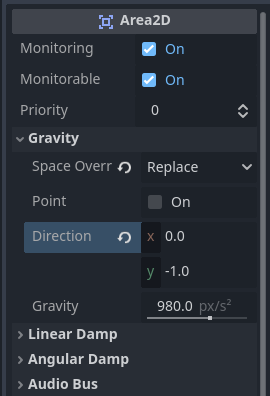
If you take a look at Area2D (or Area3D) there is a new Gravity section.
Here you can change the local gravity for a player. So with the above settings (and the correct physics mask for the Player, Enemy, etc. you want affected) You can make things float to the top of the Area2D As long as you are using get_gravity() and not applying your own gravity to the player.
So you have two solutions.
Use the y-axis from get_gravity()
var gravity:float = get_gravity().y
Use get_gravity()
## Applies gravity to the character. The gravity multiplier can be used when jumping or falling
## to make the character rise slower or faster, or to fall like a rock or a feather.
## This function uses get_gravity() so that it is affected by Area2D nodes that
## might also apply a localized gravity.
func apply_gravity(delta: float, gravity_multiplier: float = 1.0) -> void:
	velocity += get_gravity() * delta * gravity_multiplier
Then alter your gravity_multiplier for jumping and falling in stead of using the time_to_peak and time_to_descent values. Because you’re basically using a different part of the physics problem.
	if velocity.y < 0.0:
		apply_gravity(delta, jump_gravity_multiplier)
	elif velocity.y >= 0.0 and not _state_machine.is_wall_sliding:
		apply_gravity(delta, fall_gravity_multiplier)
Unless you know physics and calculus you’ll have to just play with it til you get what you want, but ti’ll work.
This meant godot gave me an error when trying to run the function after making the transition. It was a red error saying the get_gravity(): float function was incorrect and could not return float, so it made me change it to verctor2 in order to allow the compiler to run
If you want to change the default gravity from the settings in Project Manager, you can create localized gravity with an Area2D. You can apply that selectively (or blanket) to anything you want based on the masks the Area2D has.