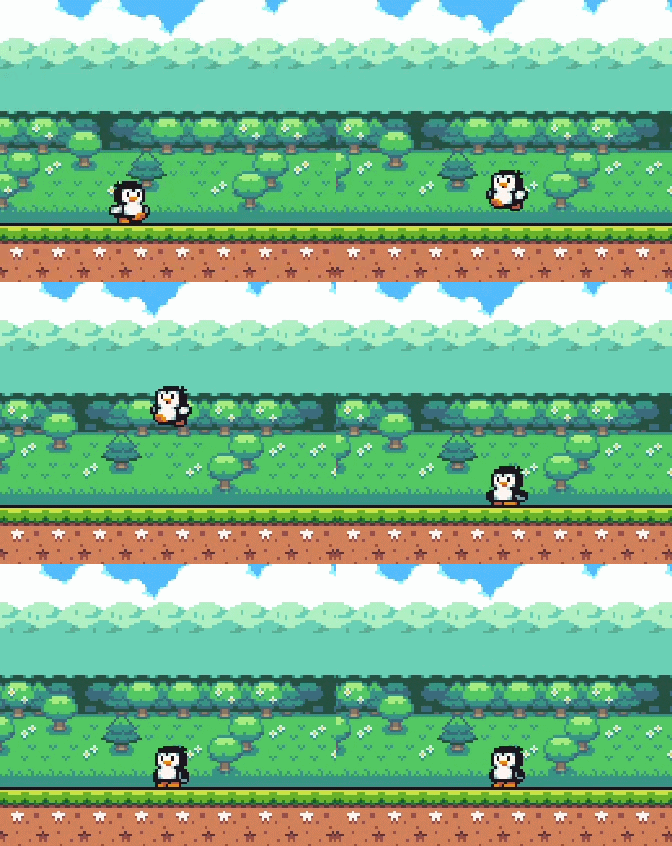
Hello! I’m four days into learning Godot and i’ve been relying a lot on tutorials
For my warmup project i’ve been trying to learn Super Mario bros mechanics, but instead of my player jumping with a variable jump height, my penguin is doing double jumps!
I’m using state machines to control his movement, but I have no idea how to fix the mistake
enum PlayerState{
[...]
jump,
fall
[...]
}
[...]
const gravity: float = 15.5
const jump_height: float = -265
const var_jump_threshold: float = jump_height + 100
var var_jump_applied: bool = false
var release_jump_key: bool = false
var status: PlayerState
[...]
func _physics_process(delta: float) -> void:
if not is_on_floor():
velocity += get_gravity() * delta
[...]
match status:
PlayerState.jump:
jump_state(delta)
PlayerState.fall:
fall_state(delta)
[...]
func go_to_jump_state():
status = PlayerState.jump
anim.play("jump")
var_jump_applied = false
release_jump_key = false
velocity.y = jump_height
func go_to_fall_state():
status = PlayerState.fall
anim.play("Fall")
[...]
func jump_state(delta):
move(delta)
if velocity.y > 0:
go_to_fall_state()
return
func fall_state(delta):
move(delta)
if !release_jump_key and !Input.is_action_just_pressed("jump"):
release_jump_key = true
if release_jump_key and !var_jump_applied and velocity.y < 0.0 and velocity.y > var_jump_threshold:
go_to_idle_state()
velocity.y *= 0.5
var_jump_applied = true
else: go_to_walk_state()
return
It seems like your fall state always progresses to walking or idle states, wouldn’t that allow another jump? Should you only progress to a floor-state when is_on_floor() is true?
Oh yes! I didn’t noticed it need a if is_on_floor() here, it fixed! Thanks!
But I still wanted a variation on jump height, when you slight tap and when you hold the jump button, I don’t know how to do that
Add a timer that starts when you jump, and in process add to the velocity.y as long as jump is held and that timer is above 0. That would make it possible for you to just tap jump to get a tiny jump or hold it to jump very high.
If you want to avoid too small jumps, add a set amount to velocity y as soon as the input is pressed.
You dont need a real timer. You could just add a variable like var jump_timer: float and then when jumping, set it to e.g. 0.3 or whatever you feel like. Then in process, do jump_timer -= delta
Ngl, I’m struggling to add this without breaking what I already have, maybe I’m not interpreting right so:
#just added jump timer
var jump_timer:float
const jump_height: float = -265
func _physics_process(delta: float) -> void:
if not is_on_floor():
velocity += get_gravity() * delta
#add the velocity.y as long as jump is hel and that timer is above 0
if Input.is_action_pressed("jump) and jump_timer > 0:
velocity.y = jump_height
#like this?
jump_timer -= delta
[...]
func go_to_jump_state():
status = PlayerState.jump
anim.play("jump")
var_jump_applied = false
release_jump_key = false
velocity.y = jump_height
#should the jump_timer stay here
jump_timer = 0.3
[...]
func jump_state(delta):
move(delta)
#or should the jump_timer stay here
jump_timer = 0.3
if velocity.y > 0:
go_to_fall_state()
return
but it’s hard to tell; I’d argue state machines overly complicate simple code and it may be better to avoid using them especially for players which have lots of intertwined state. Every variable is little a chunk of “state”, to try and compartmentalize them into a single value with transitions and functions is difficult and rarely the right choice.
But I’ll try to follow your advice and find another way to write the player script without state machines.
I should leave state machines for mobs and simple creatures, right?