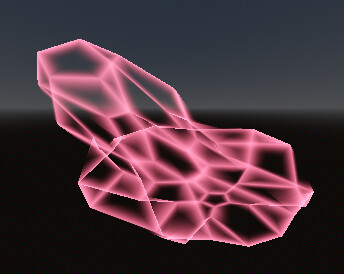
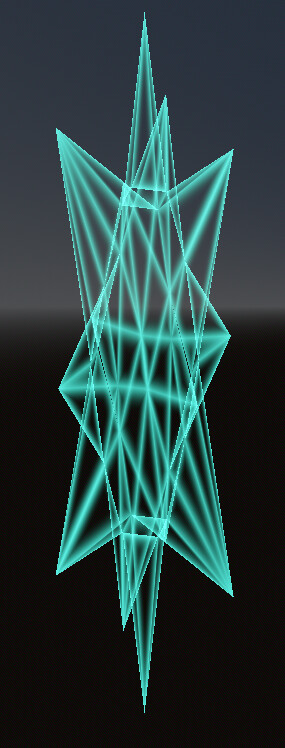
Ok, so I cannot for the life of me solve the vertex shader distortion issue so honestly just take the full code. It’s thoroughly spaghetti and I have a headache. It may take another post just to get it the way I want, let alone showcase it. I’d still be glad if it helps someone though.
Sharp edge finder (shader param preprocess). Just a couple functions to use as you see fit (I put them in autoload).
func validate_wireframe(target: Node):
	var mat = target.get_active_material(0) as ShaderMaterial
	if mat:
		mat.set_shader_parameter("wireframe_edge_points", null)
		mat.set_shader_parameter("wireframe_edge_count", null)
		var edgearray: PackedVector3Array = find_boundary_edges(target.mesh)
		print("validated wireframe for ",target.get_class()," ",target.name)
		print("> edge array size: ",edgearray.size())
		print("> found boundary edges: ",edgearray.size() / 2)
		mat.set_shader_parameter("wireframe_edge_points", edgearray)
		mat.set_shader_parameter("wireframe_edge_count", edgearray.size())
	else:
		print("validate wireframe error: node has no material")

func find_boundary_edges(selfmesh: Mesh) -> PackedVector3Array:

	var mdt = MeshDataTool.new()
	mdt.create_from_surface(selfmesh, 0)

	var edgearray: PackedVector3Array = []
	var unique_edges = PackedVector3Array()

	for index in range(mdt.get_edge_count()):

		if mdt.get_edge_faces(index).size() == 1:

			var vert_a: int = mdt.get_edge_vertex(index, 0)
			var vert_b: int = mdt.get_edge_vertex(index, 1)
			var edge_exists: bool = false

			var pos_a: Vector3 = mdt.get_vertex(vert_a)
			var pos_b: Vector3 = mdt.get_vertex(vert_b)

			for edgecheck in range(0, unique_edges.size(), 2):
				var checked_a: Vector3 = unique_edges[edgecheck]
				var checked_b: Vector3 = unique_edges[edgecheck + 1]

				var dist_a_a = pos_a.distance_squared_to(checked_a)
				var dist_b_b = pos_b.distance_squared_to(checked_b)
				var dist_a_b = pos_a.distance_squared_to(checked_b)
				var dist_b_a = pos_b.distance_squared_to(checked_a)

				if (dist_a_a < 0.001 and dist_b_b < 0.001) or \
				(dist_a_b < 0.001 and dist_b_a < 0.001):
					edge_exists = true
					break

			if edge_exists == false:
				unique_edges.append(pos_a)
				unique_edges.append(pos_b)

				edgearray = unique_edges
	return edgearray
Wireframe module as a ShaderInclude.
group_uniforms Wireframe_Module;
uniform vec3 wireframe_edge_points[1024];
uniform int wireframe_edge_count;

//optional, for compatibility with other vertex shaders
varying vec3 wireframe_displace_modelspace;
varying vec3 wireframe_displace_worldspace;

//distance calculation
float point_to_segment_distance(vec3 p, vec3 a, vec3 b) {
	vec3 pa = p - a;
	vec3 ba = b - a;
	float h = clamp(dot(pa, ba) / dot(ba, ba), 0.0, 1.0);
	return length(pa - ba * h);
}

vec3 do_wireframe(vec3 fragment_vertex, mat4 fragment_viewmatrix, mat4 fragment_modelmatrix,
float wireframe_size, float wireframe_power, float wireframe_strength, vec3 wireframe_color) {
	//conversions etc
	vec3 net_displace = wireframe_displace_worldspace + (fragment_modelmatrix * vec4(wireframe_displace_modelspace, 0.0)).xyz;
	vec3 fragment_worldspace = (inverse(fragment_viewmatrix) * vec4(fragment_vertex, 1.0)).xyz;
	float min_dist = 999.0;

	//unpack edges and do distance
	for (int i = 0; i < wireframe_edge_count; i++) {
		vec3 edge_a = wireframe_edge_points[i * 2];
		vec3 edge_a_worldspace = (fragment_modelmatrix * vec4(edge_a, 1.0)).xyz + net_displace;
		vec3 edge_b = wireframe_edge_points[i * 2 + 1];
		vec3 edge_b_worldspace = (fragment_modelmatrix * vec4(edge_b, 1.0)).xyz + net_displace;
		float dist = point_to_segment_distance(fragment_worldspace, edge_a_worldspace, edge_b_worldspace);
		min_dist = min(min_dist, dist);
	}

	//wireframe color output for my use case, but feel free to adjust for a float output with wirefactor]
	float wirefactor = 1.0 - clamp(min_dist / wireframe_size, 0.0, 1.0);
	return vec3(pow(wirefactor, wireframe_power)) * wireframe_color * wireframe_strength;
}
Example main shader with both model- and world-space transforms.
shader_type spatial;
render_mode unshaded, blend_add, cull_disabled;

uniform float wire_size = 0.1;
uniform float wire_power = 3.0;
uniform float wire_strength = 1.0;
uniform vec3 wire_color: source_color = vec3(1.0);

#include "res://wireframe3.gdshaderinc"

void vertex() {
	vec3 original = VERTEX;
	VERTEX *= sin(VERTEX.y * 6.0 + TIME) / 2.0 + 1.0;
	wireframe_displace_modelspace = VERTEX - original;

	vec3 worldspace = (MODEL_MATRIX * vec4(VERTEX, 1.0)).xyz;
	vec3 worldspacedeformed = worldspace + vec3(sin(worldspace.y + TIME),0.0,0.0) * 1.0;
	vec3 modelspace = (inverse(MODEL_MATRIX) * vec4(worldspacedeformed, 1.0)).xyz;
	VERTEX = modelspace;
	wireframe_displace_worldspace = worldspacedeformed - worldspace;
}

void fragment() {
	vec3 new_wire = do_wireframe(VERTEX,VIEW_MATRIX,MODEL_MATRIX,wire_size,wire_power,wire_strength,wire_color);
	ALBEDO = new_wire * 0.5;
	EMISSION = new_wire * 0.5;
}
So then the remaining issue has to do with non-uniform transformations where there’s unexpected variation in the size of the wireframe surface effect whenever a non-uniform transformation is applied. Not ideal because I’m wanting to do crazy stuff and have all the shaders be compatible, but instead it seems like all the world-space fragment math happens BEFORE vertex transforms (what???), or they actively screw the world space up, or something like that. It’s just so weird that the edges match and the faces don’t.
Please please get in touch if you’d like to collaborate on this further. Otherwise, consider this version of this snippet public domain.