Godot Version
v4.6.2.stable.double.custom_build
Question
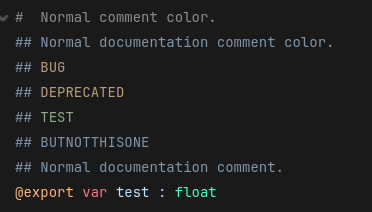
The other day I was working on a big project. I rewrote a part of some gdscript code file and added ## DEPRECATEDabove an exported variable to preserve it as a backup until the rewrite was done. TheDEPRECATEDword was surprisingly highlighted in orange and I tried out some other software vocabulary to see if there are more words and found BUG and TEST (the latter colored in green). There is nothing about this in the documentation GDScript documentation comments — Godot Engine (stable) documentation in English . This color does not have an effect on the tooltip text in the Inspector though unlike @experimental and similar annotations. What is the actual purpose of this and are there more words with this coloring?