Godot Version
v4.7.stable.official [5b4e0cb0f]
So I’m trying to make a line connecting two points using AStarGrid2D, since I want it to snap to the tilemap and stay orthogonal. One issue I’m running into is using the AStarGrid2D offset option, as for some reason, when the y axis of a point is below 0, the point at which the pathfinding starts flips, which puts the offset to the wrong position.
For example, with an offset of (0, 0) (Starts on the right):
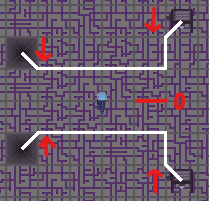
The points above 0 start below the starting point, and those below 0 start above it?
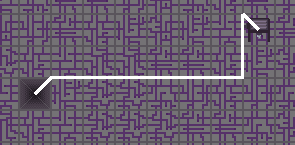
it will also be like this even if the end point is below it:
and so with an offset of (0, 16):
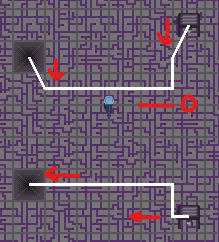
Those below 0 are correctly offset, and those above 0 are even further downwards.
My main question is why does this happen? Is it to do with how the grid finds a path in relation to y=0?
And secondly, is there any solution for this, so that both below and above y = 0 the path will act the same?
Code:
Setting up the grid:
pathGrid.cell_size = Vector2(32, 32)
pathGrid.default_compute_heuristic = AStarGrid2D.HEURISTIC_MANHATTAN
pathGrid.diagonal_mode = AStarGrid2D.DIAGONAL_MODE_NEVER
pathGrid.jumping_enabled = true
pathGrid.region = Rect2i(Vector2i(-640, -640), Vector2i(1280, 1280))
pathGrid.update()
Global.set_path_grid(pathGrid)
Creating the path:
func build_channel(startNode:Node, endNode:Node):
        ## I tried to make it change the offset depending on the position,
        ## but this doesn't account for one of them being below while the other
        ## is above.
	#if startNode.get_global_position().y > 0:
		#pathGrid.offset = Vector2(0, 16)
	#elif startNode.get_global_position().y < 0:
		#pathGrid.offset = Vector2(0, -16)
	pathGrid.update()
	var newPath = pathGrid.get_point_path(startNode.get_global_position()/32, endNode.get_global_position()/32)
	var newLine = Line2D.new()
	newLine.name = str(startNode.get_global_position()) + " to " + str(endNode.get_global_position())
	newPath.insert(0, startNode.get_global_position())
	newPath.append(endNode.get_global_position())
	newLine.points = newPath
	newLine.width = 3
	pathsNode.add_child(newLine)
	paths.append(newPath)
	pathGrid = AStarGrid2D.new()
Thank you for any help.