I hope it’s ok to ask more generalized questions here. I’m new to Godot, and recently watched some videos about composition, which was a real level-up for my brain.
One of the videos had some really solid info, but there were two things that didn’t seem right to my mind. From the video, I have a CharacterBody3D with an input and movement component. Then in the Character’s main script, I did something like this:
Now this all worked fine, but my first thought was, shouldn’t the components handle their own business, including running in their own _physics_process or (_process, etc). So I made that change, then learned about process priority.
My second thought was that it seemed odd to pass variables over like this. Would it not make more sense for the movement component to have a reference to the input component? And then the input component can have a getter function? So now rather than passing variables over through the main script, my movement component just calls input_provider.get_move_direction() where “input_provider” can be AI, player input, whatever provides the input.
So I guess my question is, am I thinking in the right direction? Or should the main script really be a bridge for copying over variables?
EDIT: Well I guess I don’t know how to wrap code correctly.
I think this would be better yes, and you can keep the Node structure you have by using @export in your components.
In your example you can also add a couple of classes just to help you with UI: you could have a InputComponent class that just acts as a dud with an implementation of get_move_direction() that does nothing (or throw a warning or whatever), then your PlayerInputComponent and AIInputComponent inherit from it.
I mostly do this so that the Godot Editor is aware of the type, and only shows me the Nodes I want when I’m linking the exports:
Also keep in mind that it’s always a fight between purity and practicality, if you want to do everything to the highest level of separation, using the purest approach to composition: you can, and it’s a good exercise … but sometimes it just splits a three-lines function that you use only in one spot into three Nodes with a different script each.
To be clear your example with a movement component and an input component is a good use of composition, it’s just that sometimes one can be so focused on the method that the method becomes the goal. I speak for myself too, sometimes I’ll do something overly complicated to achieve some arbitrary purity goal on a feature that end up being single use
Nice, thanks and for the tips! That’s enough to confirm I’m not doing something outrageously out of the ordinary. And I hear you about focusing too much on the method. After learning about composition, I’ve become really enthusiastic about breaking things into little pieces, but there have been a couple times where I’ve had to stop and ask myself, “do these 4 lines of single use code really need their own script?” Haha
Well I figured I’m new here, so I pretty much have to take any response at face value, not knowing who knows what. Besides, I was enjoying the confirmation bias from your response. But I suppose there’s no harm in leaving it open for any more nuggets of wisdom.
Note: you can use @abstractclasses now in Godot 4.5+. In this example, you could make the InputComponent class abstract and the get_movement_direction function abstract too.
None of those should be actual components worthy of the “component” name, as in something that’s modular/reusable. Player will typically be a unique thing in the game so componentizing it doesn’t make much sense.
In your particular case “composition” is really just a way to split the code into multiple scripts. Since all those scripts basically operate on the character body, a reasonable way is for them to have a reference to it, either injected by the chief body, or gotten by each “component” itself under assumption they’re scripting their direct parent.
Oh that sounds interesting. I’ll have to lookup this abstract business. It’s a concept I’m not familiar with. Thanks!
EDIT: I just did some reading and I actually do have some components that are extending from a template class where this would be useful, so this is perfect.
In the case of what I’m working on, the movement and animation components would be reused by enemies and npcs. The input (and possibly the movement) component would be used by a vehicle. Would this still not warrant componentizing these bits of code in your view? Or is inheritance more what you’re hinting at? And thanks for the feedback.
Not until your code actually shows that it’s the case, i.e. the same pieces of code start appearing at more than two places. Otherwise you’re succumbing to what is known as “speculative generalization” or “future proofing” which is in most cases a waste of time and effort.
Yeah, ok that’s probably the most sobering thing I’ve read in this learning journey. Because if I’m being honest with myself, I’m very prone to overthinking every little detail and trying to predict everything I might need weeks/months from now. So sometimes I spend more time staring and thinking than just doing.
So just code the dang thing, and worry about components when I actually need them.
Those are very kind words. Thank you. Sorry it took me so long to get to this, I spent the weekend replacing my broken CPU cooler.
General Thoughts
First, naming is a very powerful thing in programming. What we name things tends to direct how we shape things. I talk about the Manager Anti-Pattern at length on this forum. (That link will take you to a post that links the other posts as well.)
In this case, you need to carefully define what you mean by “component”. Like @normalized said, you should start by coding things, and then see where they intersect - then refactor. (More on that in a second.) What concerns me about your initial post is I get the impression that in your head “Input Component” is synonymous with “Input Manager”.
Think of a component as an add-on upgrade package to a car. You want the sun roof? We can add that on as a component. But that doesn’t change how the rest of the car functions. It does change the air resistance and drag when open, and will affect fuel consumption and mileage. But it has no effect on the gas pedal, the steering wheel, etc.
When you are creating a component ask yourself, “Is this an add-on to the basic functionality of an object?” If it can be added and removed without affecting other things, the answer is yes.
Now take the Health Component example @vonpanda linked to above. This can be added and removed without affecting the Player’s other functions, it will in fact make the Player invulnerable without it because they cannot take damage. It is possible to use components to make up an object of more complexity that is its own thing.
Thoughts on Input and Movement Components
Godot has a way of doing things, and while most of it is node-based, not all of it is. You discovered this when you asked:
Here’s the thing: The _physics_process() function is already a movement component. It is an optional thing you can override, and in doing so, alter the physics of the object to which it is attached. There are also already four input components: _process(), _physics_process(), _input(), and _unhandled_input(). They can all handle input every frame.
(By the way, you made delta private indicating you aren’t using it, and then pass it later as an argument without the preceding underscore. So this code would throw an error.)
Now let’s take a look at what it (hypothetically) would look like if you didn’t have those components. (Based on the default CharacterBody3D code with some tweaks.) The first thing you do is get input and pass it to be stored for movement. So we can do:
var input_direction := Input.get_vector("left", "right", "up", "down")
var direction := (transform.basis * Vector3(input_direction.x, 0, input_direction.y)).normalized()
Then on the second line, you check for jumping. We can do:
if Input.is_action_just_pressed("jump") and is_on_floor():
	velocity.y = 4.5
On the third line, I don’t know what you’re doing.
On the fourth line you apply the movement. We can handle gravity:
if not is_on_floor():
	velocity += get_gravity() * delta
And handle movement:
if direction:
	velocity = direction * 5.0
And do all the physics updates:
move_and_slide()
So, we have 9 lines of code instead of 4. That’s certainly more - more than twice as much. But is it clearer?
func _physics_process(delta: float) -> void:
	var input_direction := Input.get_vector("left", "right", "up", "down")
	var direction := (transform.basis * Vector3(input_direction.x, 0, input_direction.y)).normalized()
	if direction:
		velocity = direction * 5.0
	if not is_on_floor():
		velocity += get_gravity() * delta
	if Input.is_action_just_pressed("jump") and is_on_floor():
		velocity.y = 4.5
	move_and_slide()
(Note that the order is changed so we can overwrite velocity.y after setting it to 0.)
It’s a little clearer, but it could be better. We have Magic Numbers, and no line spacing. Let’s fix that:
class_name Player extends CharacterBody3D

@export var speed: float = 5.0
@export var jump_velocity: float: = 4.5


func _physics_process(delta: float) -> void:
	var input_direction := Input.get_vector("left", "right", "up", "down")
	var direction := (transform.basis * Vector3(input_direction.x, 0, input_direction.y)).normalized()
	if direction:
		velocity = direction * speed

	if not is_on_floor():
		velocity += get_gravity() * delta
	if Input.is_action_just_pressed("jump") and is_on_floor():
		velocity.y = jump_velocity

	move_and_slide()
We are now at 18 lines of code (5 of which are newlines). It’s pretty clear what everything does. In your component version, let’s say that your character isn’t moving. To debug it, you’d have to go look at the input code and then the movement code. Not the end of the world, but it increases Cognitive Complexity and Cognitive Load. This means it’s harder to read the code, which causes frustration. Future-proofing, which @normalized mentioned, often causes us to create clever solutions that are hard to decipher and remember why those changes were made.
When you are thinking about encapsulating code into an object (such as a component), you should be asking yourself, “Does this reduce the cognitive load for my future self?” This is because 90% of the time, the person who is going to be frustrated by your unreadable code is you, and 10% of the time the people with which you work. (That goes up to 99% on a solo project obviously - the other 1% being the people on the Internet who try to help you when you post code.)
So now we get to your two final questions:
The answer is yes, but mostly - no. You are asking the right questions. It’s your conclusion that is incorrect. That doesn’t mean your solution won’t work - just that it is overly complex. It is being clever for the sake of being clever.
We see this pop up a lot on here. It generally presents itself as the XY Problem. People come up with what they perceive is a clever solution to a problem (X). Then they have a problem (Y) with that solution. They then post, asking for help with the new problem (Y) they’ve created. What ends up happening is one of three things:
They listen to us, describe problem X, and get a much simpler solution for it.
They argue with us, and get a solution to problem Y that seems to solves their problem, but then have another problem down the road because their solution is overcomplicated and doesn’t leverage the Godot engine.
They argue with us and do not get a solution to problem Y and go away unhappy.
You however, have done the best thing. You said, “This is what I’m thinking. Is there a better way?” And you’ve clearly been open to feedback.
It should not.
There are a few reasons for this:
Primitive data type variable like float and Vector3 are passed by value. This means that you are storing them twice in memory by passing them the way you are.
It increases Cognitive Complexity, like we discussed above.
I think the warning at the end is important, but I wanted to also comment on one of the beginning paragraphs, because I think there’s a lot of meat there.
You can do this, and the abstract keyword can help; however, in my experience when you start by creating an Abstract Class, that is a red flag. As @normalized said, you should be refactoring into one - not starting with one.
I do think, as @vonpanda said, that you should use the Godot Editor UI whenever possible. @export variables are GREAT for that. I do think that one of the indications of an advanced Godot user (as opposed to just an advanced developer - which many of us are coming into Godot) is knowing when to use @onready vs @export variables.
My Solution
So my solution is to use a Node-based state machine. You can check out my State Machine Plugin and use it or steal from it. It is a pull-based state machine. Most that you encounter are push -based, in which the machine determines which state should be active. In a pull-based machine, the states decide when they should be entered, and the machine itself just changes states.
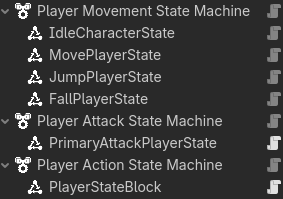
So this is the current state machine I am developing for my revamp of my Character3D Plugin. You’ll note there are three machines. This is so the player can do more than one thing at a time. In this case, movement, attacking and blocking.
Here’s the code for my the KayKitPlayer3D, which inherits from KayKitCharacter3D, which in turn inherits from CharacterBody3D.
class_name KayKitPlayer3D extends KayKitCharacter3D

## The speed at which the player turns.
@export var turn_speed: float = 20.0

var direction := Vector3.ZERO
var rig: Node3D

@onready var cameras: Cameras = $Cameras


func _ready() -> void:
	rig = skin.get_child(0) #Assumes the rig is the first node in the skin.
	_set_head_visibility_layer(rig, 2) #Make it so in 1st person mode the head is invisible.
	Input.mouse_mode = Input.MOUSE_MODE_CAPTURED


func _physics_process(delta: float) -> void:
	if velocity.length() > 1.0 and direction != Vector3.ZERO:
		look_toward(direction, delta)

	move_and_slide()


#Move this to the rig code?
func look_toward(direction: Vector3, delta: float) -> void:
	var target := rig.global_transform.looking_at(rig.global_position + direction, Vector3.UP)
	rig.global_transform = rig.global_transform.interpolate_with(target, 1.0 - exp(-turn_speed * delta))
This is KayKitCharacter3D
## Base character class for KayKit Models - used for Players, NPCs, and Enemies.
class_name KayKitCharacter3D extends CharacterBody3D


## The character skin to use.
@export var skin: Node3D
@export var animation_tree: KayKitAnimationTree
#Movement export variables
@export_category("Movement")
## The character's base walk speed.
@export var base_speed: float = 6.0

var speed = base_speed


## Applies gravity to the character. The gravity multiplier can be used when jumping or falling
## to make the character rise slower or faster, or to fall like a rock or a feather.
## This function uses get_gravity() so that it is affected by Area3D nodes that
## might also apply a localized gravity.
func apply_gravity(delta: float, gravity_multiplier: float = 1.0) -> void:
	velocity += get_gravity() * delta * gravity_multiplier


func set_move_state(move_state: GameConstants.MoveState) -> void:
	animation_tree.set_move_state(move_state)


func trigger_animation(animation: GameConstants.AnimationType) -> void:
	animation_tree.trigger_animation(animation)


func block_toggle(forward: bool) -> void:
	var tween = create_tween()
	tween.tween_method(animation_tree.block_change, 1.0 - float(forward), float(forward), 0.25)
As you can see, there is no input or movement code.
This is the MovePlayerState code:
class_name MovePlayerState extends PlayerState


func _activate_state() -> void:
	super()
	set_process(true)


func _enter_state() -> void:
	super()
	character.set_move_state(GameConstants.MoveState.RUN)
	set_physics_process(true)


func _exit_state() -> void:
	super()
	set_physics_process(false)


## If the player has directional input, move to the Move state.
func _process(_delta: float) -> void:
	character.direction = _get_input_direction()

	if not is_current_state() \
	and character.is_on_floor() \
	and character.direction \
	and not get_current_state() is JumpPlayerState:
		switch_state()


## Handles movement and animation
func _physics_process(_delta: float) -> void:
	character.velocity.x = character.direction.x * character.speed
	character.velocity.z = character.direction.z * character.speed


func _get_input_direction() -> Vector3:
	var input_dir := Input.get_vector(GameConstants.INPUT_MOVE_LEFT, GameConstants.INPUT_MOVE_RIGHT,
									GameConstants.INPUT_MOVE_FORWARD, GameConstants.INPUT_MOVE_BACKWARD)
	var input_vector := Vector3(input_dir.x, 0, input_dir.y) #.normalized()
	return character.cameras.get_facing(input_vector, character.transform.basis)
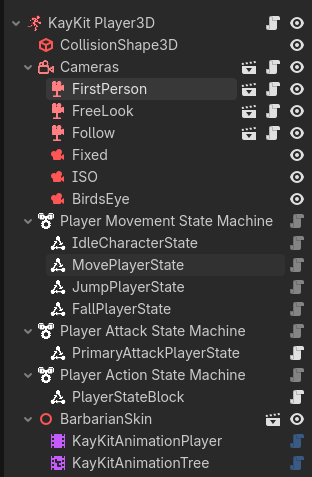
Let me show you the entire scene, and then I’ll explain how it works.
When the StateMachine’s parent node is ready, it activates all the states. This is because all nodes are created top down, and then _ready() is run bottom up. So KayKit Player3D is created, then Player Movement State Machine is created, then MovePlayerState is created. MovePlayerState calls its _ready() function, and neither of the other two have been called yet, so it cannot reference them fully. Nor can it be guaranteed that any other nodes in the scene have been initialized.
So the only thing it does is turn off the _process(), _physics_process(), _input(), and _unhandled_input() functions from processing. In this way we don’t start running things we shouldn’t - and we don’t get errors trying to access the KayKit Player3D’s functions or variables before it is ready.
However, once KayKit Player3D runs its _ready() function, it sends out the ready signal - which means the entire scene is ready. At this point, the Player Movement State Machine activates all the State nodes attached to it.
MovePlayerState
MovePlayerState when activated, assigns the character variable as reference to KayKit Player3D, and turns on the _process() function. (The first thing happens in the CharacterState code, which it inherits in turn through the PlayerState.)
CharacterState Code
## State for a Character (Player/NPC/Enemy
class_name CharacterState extends State

## The Character this CharacterState operates on.
var character: KayKitCharacter3D


# Assigns a value to character once the state has been activated.
func _activate_state() -> void:
	super()
	character = _state_machine.subject
Every process tick, this state monitors movement input, and if it gets any, returns it and assigns it to the KayKit Player3D’s direction variable.
It then evaluates whether it is the current state, the character is on the floor, the character has an input, and the current state is not JumpPlayerState. (I discuss plans to refactor this out below.) If all these are true, this state requests to be the current state.
Providing that the Player Movement State Machine moves to the MovePlayerState, its _enter_state() function is run. (The only time it typically does not change states is if its in the Hurt or Death state - not pictured here.) The MovePlayerState then tells the KayKit Player3D to change its animation, and turns its own _physics_process() function on.
The MovePlayerState’s _physics_process() - which only runs while the State is active - updates the KayKit Player3D’s velocity every frame.
When the MovePlayerState exits, its own _physics_process() function is turned back off.
This encapsulates the MovePlayerState to only handle movement. If I had a run button, I could create a RunPlayerState to handle that if I wanted, or put the walk/run switch in the MovePlayerState. If I wanted the run ability to be something the player gained later in the game, I’d make it separate and add the node when the player unlocked the ability. If it was basic functionality, I’d combine the two.
You may have deduced that this function does not run when the player is in the air. Air control is not under the purview of this State Instead, that is handled by the JumpPlayerState and the FallPlayerState, both of which handle applying gravity and movement when they are active. In this way I can tweak gravity on the way up and down. For example making the Player jump quickly and float down with lots of air control like Princess Peach in Mario Bros., or I can make them jump slowly and fall even faster. Or anything in between.
This Modularization allows me a lot of control on what gets added, and makes making new states really easy. While a State does know about the Node it operates on (and maybe some of its components), it is not dependent on the other states and knows nothing (or very little) about them. (MovePlayer state is currently an exception, but I’m planning on making it test vertical velocity instead of testing for JumpPlayerState.)
Component Use Cases
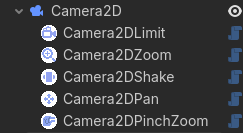
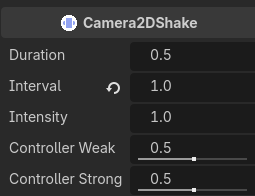
There are lots of ways to create components. My Camera3D Plugin uses inheritance to create first- and third-person cameras. When I made my Camera2D Plugin, I started with a BoundCamera2D - following the same inheritance model. I’d used it in a game, and it took a TileMapLayer as an argument and kept the camera’s bounds within the rectangle described by the placed tiles. But it also had zoom and pan functionality - something I didn’t always want. That’s when I realized I could make components.
I now have plans to go back and create components to add to a Camera3D so that I can just make it a first-person or third-person camera. I’m also thinking about ideas for how to attach a component that switches between camera views - and whether that makes more sense than the Cameras node that currently handles it (and is a component already itself).
Command Pattern
Another thing you can look into if you really want to compartmentalize input and movement, is the Command Pattern discussed here. Basically, you filter all the enemy decision-making into input that looks like player input, and then you would have a PlayerInput component and an EnemyInput component. It would create the input necessary for character movement with the same interface. It could theoretically reduce your code complexity.
However, as I’ve looked into it, it’s a lot of work to turn enemy AI code into something that looks like player input. At least so far. Still, based on what you and @vonpanda were talking about - this would be the path to go down if you really want to follow the idea of Input and Movement components.
Conclusion
In the end, there’s lots of ways to do things. Godot has certain ways that are easier, because you can leverage the existing architecture. I always recommend starting there. But as you can see, there’s more than one way to encapsulate a cat.
I know you were addressing @vonpanda here, but for my part, you owe me exactly none of your time, so no apologies needed. We all have lives outside of the internet.
You might be right here if I’m following correctly. I’ll want vehicle later, and I’m also testing a CharacterBody3D and RigidBody3D to learn the differences. So my thinking was that I’d have an input component that just processes raw input. Then it’s up to CharacterBody/RigidBody/Vehicle to take that input and move according to it’s own logic. Mind you, it’s not one input component to rule them all. Anything I want to make controllable gets its own input component.
Now I don’t expect you to parse through all my code, but for context should you care to see, this is what my actual “input component” looks like. Is this in danger of manager anti-pattern territory?
class_name InputComp extends InputProvider

@export var camera: Camera3D

var move_direction_world: Vector3 = Vector3.ZERO
var jump_requested: bool = false
var input_enabled: bool = false

func _ready() -> void:
	add_to_group("controllable") # Used by possession swapping to see if a character has input control

func _physics_process(delta: float) -> void:
	if camera == null || not input_enabled:
		return
	var move_direction_raw: Vector2 = Input.get_vector("move_left", "move_right", "move_forward", "move_backward")
	jump_requested = Input.is_action_just_pressed("jump")
	if move_direction_raw:
		move_direction_world = _camera_relative_direction(move_direction_raw)
	else:
		move_direction_world = Vector3.ZERO

func _camera_relative_direction(input: Vector2) -> Vector3:
	var right: Vector3 = camera.global_transform.basis.x
	var forward: Vector3 = camera.global_transform.basis.z
	var cam_relative_direction: Vector3 = right * input.x + forward * input.y
	cam_relative_direction.y = 0.0
	cam_relative_direction = cam_relative_direction.normalized()
	return cam_relative_direction

### Called by the movement component to get move commands
func get_move_direction() -> Vector3:
	return move_direction_world

### Called by the movement component to get jump commands
func get_jump_action() -> bool:
	return jump_requested

### Called by possession swapping logic to enable/disable control on this character
func set_input_enabled(value: bool) -> void:
	input_enabled = value
	if not value:
		move_direction_world = Vector3.ZERO # Stop moving if depossessed
That said, I do really like the idea of the node based state machine. I still want to write my own code for the sake of learning, but I’ll definitely be taking a look at your plugins to pick apart and see what I can glean from them.
And that was the crux of this thread. The video tutorial I saw this in was great at a high level, but I could see that as my system grew, I’d be copying a LOT of variables over unnecessarily. It just seemed sloppy. I’ve learned over the years how to take in good info while questioning everything.
That puts a name to how I was already conceptualizing these systems. Indeed, the plan was to create an AI Component that interfaces with the movement component for enemies and NPCs. The idea that a character is agnostic to where it’s getting input (user or AI) just felt right to my brain.
Anyway, you’ve given me a lot to think about and a lot to read (and probably re-read), and I thank you for that. I think I’ll spend some time creating a character using the methodology you laid out, as that’s the only way to drive it home for me. I hope you won’t mind if I pop back in here with some follow up questions in a week or so.
I hear you, and I haven’t forgotten this. To be clear, my goal right now is purely in learning about structure and methodology. The stakes are low in that I’m not running head first into making some big grand game. I’ll be more considerate of keeping things simple when I’m actually ready to start making something that runs the risk of ballooning out of control.
Based on how you plan to use it, I would say no. However, I do have comments on how you can improve it.
InputComp
This term means nothing to me. Perhaps it means something to you, but abbreviating variables is a bad habit to let go. I can infer you mean InputComponent, but it could be InputComputation, InputComposter or something else. Variable abbreviations come from the 80s when a longer variable name actually meant your program took up more memory in RAM. Variable names are not used in modern compilers and interpreters. They’re turned into memory addresses. So you should make your class and variables descriptive always. The only exceptions are i for iterator and x, y, and z because those are mathematical terms.
move_direction_world
This variable shouldn’t be in your input component. Your input component does not need to have any knowledge of facing or movement. You should factor it out by creating a signal. Then have things that need to pay attention to that information do something with it.
signal move_direction_input(direction: Vector2)
Then anything listening can take that input and turn it into a Vector3 if it needs to, but the CharacterBody3D in question is the only thing that needs to know where it is facing. (I’ll put it together at the end after I explain a few more things.)
jump_requested
This is where your pattern is most likely going to break down. You will have to add code for every action, and your code is going to bloat like crazy. Also, instead of driving this through a function, the Godot way is to create a signal and let whoever needs to listen, listen.
signal jump_requested

#other code

if Input.is_action_just_pressed("jump")
	jump_requested.emit()
However you’d be better off just passing this as a string and letting people parse it.
signal action_requested(action: StringName)

#other code

if Input.is_action_just_pressed("jump")
	action_requested.emit(&"jump")
The StringName isn’t necessary, just saves a little RAM. But now we are starting to duplicate the InputMap functionality. Which takes us back to the idea that while you can do this, you may be reinventing the wheel, and your wheel will not be optimized in C++.
camera
Why is this in here? See below, but this code should be in the Camera3D script, taking input from this component. You now have a component that is tightly coupled to the camera. It’s not really a component anymore.
input_enabled
Godot supports getters and setters. Just do it all when you declare the variable.
var input_enabled: bool = false:
	set(value):
		input_enabled = value
		if not value:
			move_direction_world = Vector3.ZERO
Furthermore, you don’t need to store this in a variable. You can just turn _physics_process on and off.
func set_input_enabled(value: bool) -> void:
	set_physics_process(value)
	if not value:
		move_direction_world = Vector3.ZERO
Finally, the name of the function is too wordy, and we can give it a default value to make the code clearer and shorter in some cases. Also we can use our signal (see above) here.
func enable(value: bool = true) -> void:
	set_physics_process(value)
	if not value:
		move_direction_input.emit(Vector3.ZERO)
Now you can call this with input_component.enable() and input_component.enable(false). If you want to get fancy, you can create another helper function:
func disable() -> void:
	enable(false)
add_to_group()
You can do this, but there are probably better ways to track this inofmarion. I’m leaving it in because I don’t know eenough of what you’re doing to provide a better way. I suspect though that you might be able to use _enter_tree() and _exit_tree() to track this more accurately and not need a group.
||
Yes, it means or, but Godot supports and, or and not. Once you get used to reading them your code will become easier to read.
###
One # sign means a private comment to someone reading the code. Two ## signs means this is code documentation. The editor will show it when you hover over this class or function name in the editor. Three ### means nothing. Don’t do that.
New Version of InputCompnent
class_name InputCompnent extends InputProvider

signal move_direction_input(direction: Vector2)
signal action_requested(action: StringName)


func _ready() -> void:
	add_to_group("controllable") # Used by possession swapping to see if a character has input control


func _physics_process(delta: float) -> void:
	var move_direction_raw := Vector2.ZERO
	var move_direction_raw = Input.get_vector("move_left", "move_right", "move_forward", "move_backward")
	move_direction_input.emit(move_direction_raw)

	if Input.is_action_just_pressed("jump")
		action_requested.emit(&"jump")


## Called by possession swapping logic to enable/disable control on this character
func enable(value: bool = true) -> void:
	set_physics_process(value)
	if not value:
		move_direction_input.emit(Vector2.ZERO) # Stop moving if depossessed
It’s a lot shorter, and you’re going to have to listen to the signals, but everything that needs the info was already calling functions so knew about this component. Now you’ve got something that does what it advertises. On the flip side, now that we have taken away everything it shouldn’t be doing - it’s not doing much.
No problem.
Meh. You and I have different ideas of what’s complicated. I do agree that we are talking about things where beginner developers shouldn’t tread, but I get the impression OP is actively learning and wants the deep dive.
As for my architecture, well it’s evolving, but I have created it specifically to pump out new games quickly. Last week someone asked me if I was interested in working (for money) on their game jam game to turn it into something profitable. Using all the systems I created, I was able to re-create most of their game in a few hours just looking at their Unity game on itch (and having access to their assets). It depends on what you’re doing it for. I want to rapidly and reliably create games.
The funny thing is, I actually tend towards overly wordy variable and function names because it’s informative and auto complete exists. To tell you the truth, I’m not sure why I decided to abbreviate that.
I had a feeling it didn’t really belong there, but it didn’t belong in the movement component either since an **AI wouldn’t care about camera direction. You’re right that this logic makes more sense on the camera itself.
**do we still call game AI, “AI” these days? It feels like such a dirty word now haha.
As for using signals, I was under the impression that they were for communicating between unrelated objects. (As I typed that, I realized, duh, components are supposed to be unrelated). So I should use these to pass data between different components on the same character, and not pulling or pushing variables between them?
It’s there because my possession system is probably doing something you all would find shameful. I can left click a character to possess it, which then checks it’s children to see if any are in the group, then it calls it’s set_input_enabled function. I know in my heart it’s junk, but it works and only exists so I can play test my CharacterBody and RigidBody characters with ease.
I thrive on jumping directly into the deep end. I’m taking everyone’s words in here under heavy consideration, but at the end of the day, I’m still going to do things my way even if it might end up being wrong down the line. Why? Because I don’t believe you learn much from doing things the right way just because “that’s what I was told to do.” It’s trying stuff out and failing that the aha moment hits, and the wisdom you’ve all shared sinks in.
Where it belongs is in the CharacterBody3D. The camera direction stuff belongs either on the Camera3D, or on the Player. I put it on the Player so that the model faces the correct direction, and then let the Camera3D follow the Player.
Yes. Can’t let the b*stards take it from us. I refer to LLMs as such to differentiate on here.
Signal up, function down. That’s the rule of thumb in Godot. In you’re manipulating a Node that’s a child of the current node (or even farther down the tree, under the Node), call a function. If it’s up, send a signal. If they’re siblings, I also recommend sending signals. If you need two unrelated things to transfer data, use a Signal Bus. (An Autoload that just has a signal on it that can be used for sending and receiving data.)
You’ll note that my States break that rule. I did that because I consider them to be part of the Character object, and their job is specifically to be delegates that handle certain functions. (It’s kinda like the Delegate Pattern, but not really because the request never comes through the Player.)
First you learn the rules, then when to break them.
Meh. I’ll let it slide. Ha.
There’s truth in that. There’s also Wisdom in learning how to learn from others so you don’t have to repeat their mistakes.


 But I suppose there’s no harm in leaving it open for any more nuggets of wisdom.