Chunk Loading System not saving chunks correctly

Godot Version

Godot 4.5.1.stable.official

Question

I’ve created my own chunk-saving/loading system based on pre-determined` chunks saved as individual scenes, which load in a 3x3 square around (0,0) at runtime. As the player moves, the chunk manager unloads and reloads chunks, ensuring a 3x3 square of chunks surrounding them is always instanced. When a chunk is unloaded, it’s saved to disk as a .res file. When a chunk is loaded for the first time, it’s loaded from the scene, but any subsequent loads are from the disk. The issue I’m having is that when (0,0) is unloaded, the unload function indicates that it’s being saved, and the .res file exists; however, when it’s loaded again, it’s not there.

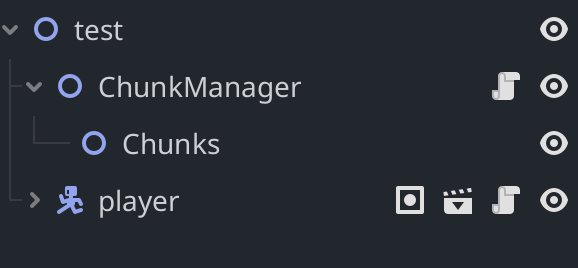
Node structure for test scene:
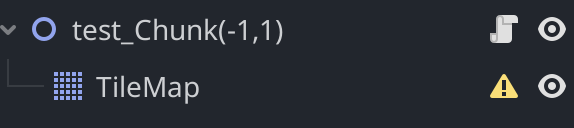
Basic Node Structure for each chunk, though the save load system should be able toaccount for any number of children:
Relevant functions:

func load_chunks():
	for dx in range(-1, 2):  # -1, 0, 1
		for dy in range(-1, 2):
			var chunk_x = PLAYER_CHUNK.x + dx
			var chunk_y = PLAYER_CHUNK.y + dy
			var coords = Vector2i(chunk_x, chunk_y)
			
			# Construct save file path
			var save_path = GlobalData.global_save_path + "chunk_" + str(coords.x) + "_" + str(coords.y) + ".res"
			
			var chunk_instance = null
			
			# First try to load from JSON if it exists
			if FileAccess.file_exists(save_path):
				#print('loading from disk: ', coords)
				var packed_scene = load(save_path)  # returns PackedScene
				if packed_scene:
					chunk_instance = packed_scene.instantiate()
				#else:
				#	print("Failed to load saved chunk:", save_path)
				
			#else:
				#print('file does not exist: ', save_path)
			# If no saved JSON, load from scene
			if chunk_instance == null:
				#print('loading from scene')
				var scene_path = "res://test_chunk(" + str(coords.x) + "," + str(coords.y) + ").tscn"
				var chunk_scene = load(scene_path)
				if chunk_scene:
					chunk_instance = chunk_scene.instantiate()
				#else:
					#print("Failed to load chunk scene:", scene_path)
			
			# Add to scene if we successfully loaded or instantiated it
			if chunk_instance:
				$"Chunks".add_child(chunk_instance)

				
func save_node_to_disk(chunk):
	var save_path = GlobalData.global_save_path
	var coords = Vector2i(0, 0)
	if "," in chunk.name:
		coords.x = int(chunk.name.get_slice(",", 0))
		coords.y = int(chunk.name.get_slice(",", 1))

	var save_location = save_path + "chunk_" + str(coords.x) + "_" + str(coords.y) + ".res"
	
	# Ensure children have correct owner for packing
	for child in chunk.get_children():
		child.owner = chunk
	
	var packed = PackedScene.new()
	var err = packed.pack(chunk)  # returns an int error code
	if err != OK:
		#print("Failed to pack chunk:", err)
		return
	
	ResourceSaver.save(packed, save_location)
	#print("Saved chunk as PackedScene:", save_location)
i think your save_node_to_disk always falls back to coords = Vector2i(0,0) because the chunk.name parsing fails (your scene root name contains parentheses/prefix like test_chunk(0,0)), so every chunk gets saved as chunk_0_0.res. Later you try to load chunk_x_y.res which doesn’t exist.

Quick fixes

Store coords on the chunk (best): set a property or meta when instancing and read that when saving. e.g. when you instance:

chunk.set_meta(“coords”, Vector2i(x,y))
then in save: var coords = chunk.get_meta(“coords”)

Or robustly parse the name (if you prefer):

var coords = Vector2i(0,0)
if "(" in chunk.name and "," in chunk.name:
    var inside = chunk.name.get_slice("(",1).get_slice(")",0) # "0,0"
    var parts = inside.split(",")
    coords.x = int(parts[0])
    coords.y = int(parts[1])

Check save success: inspect err = ResourceSaver.save(…) return and packed.pack() error. Log them.

Paths: ensure GlobalData.global_save_path is a valid path (ends with / and uses user:// or res:// you expect). Use ResourceLoader.load(save_location) or load(save_location) consistently.

That should fix it — you’re basically overwriting chunk_0_0.res. Fix coords source and verify save return values.

1 Like

I decided to add the new parsing code, and that doesn’t seem to have fixed it. Could you explain how I check the save success? The save path is valid.

Edit:

I added debug statements, and the script returned this for 0,0:

— Processing chunk:(0, 0)—
Save path:user://SquirrelGame-VersionBeta5-5/Chunks/chunk_0_0.res
File exists on disk, attempting to load.
Loaded saved chunk successfully.
Adding chunk to scene:(0, 0)

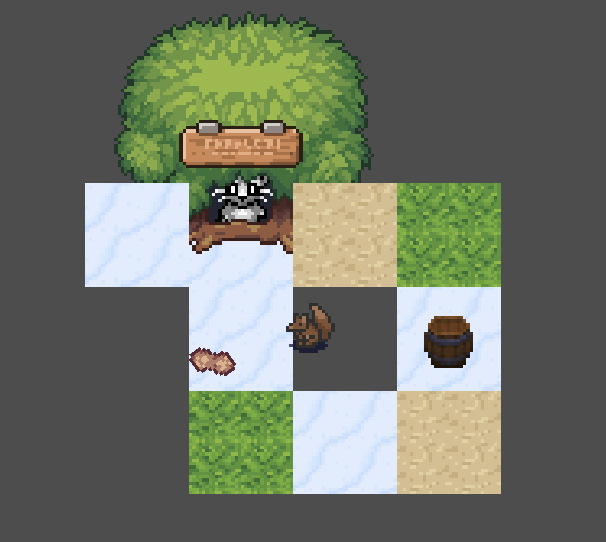
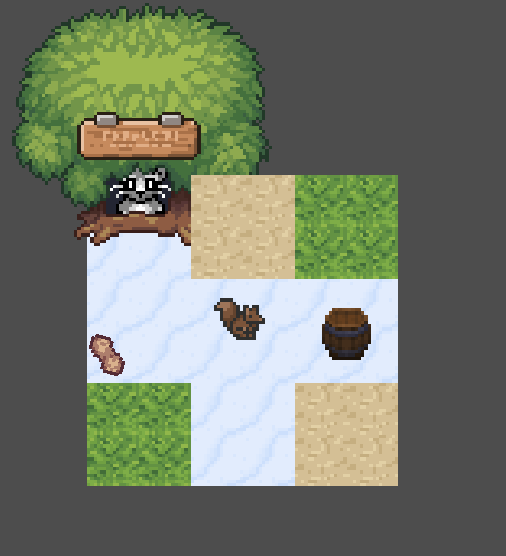
Despite this, the tilemap isn’t appearing. Photos for reference:

At runtime:

After 0,0 is unloaded and reloaded:

How do you add the newly instantiated packed scene to the world? Theres a global function i used that calls

X.get_current_scene().add_child(new_node)

(Or similar). I cant remember what X stands for, but hopfully someone can fix your problem before i go back onto PC.

1 Like

in my load chunks function, i have this:

# Add to scene
			if chunk_instance:
				print("Adding chunk to scene:", coords)
				$"Chunks".add_child(chunk_instance)
			else:
				print("ERROR: No instance created, chunk NOT added:", coords)

I would suggest a redesign. Or at least first prove that the chunks can be accessed in that way without save/load.

You should maybe use the absolute world coordinates of the chunk instead of setting the chunk underneath the player position as (0,0). I would avoid the brackets in the node name too.

So for example, if you had a world size of (128, 128) tiles and the tile size was 4, then the world size is 128×4=512.

When the player is at global_position 49.2, 27.9 then you compute (floor(49.2/tile_size) , floor (27.9/tile_size)) so the player is on tile index (12,6)

Then if you apply the pattern subtracting dx and dy as in your code above, you can retrieve tiles
(11,5), (12,5), (13,5),(11,6),(12, 6),(13,6), (11,7) … etc.

Then load them in … perhaps the map could be stored on disk or even generated procedurally.
If you call them 0_0 instead of 12_6 its easy to make an error.

Also with packed scenes loading and intiating in seperate threads doesnt work the same way with the rendering server.

1 Like

I’m currently calculating the player’s chunk here:

var current_chunk_x = floor(player.global_position.x - player_start_pos.x) * chunk_size.x / tile_size/2 
var current_chunk_y = floor(player.global_position.y - player_start_pos.y) * chunk_size.y / tile_size/2

var current_chunk: Vector2i = Vector2i(current_chunk_x, current_chunk_y)

Is that how I should be doing it according to your redesign?

Yeah, maybe you should try loading pre-defined chunks instead of saving them first.

Start by fetching them from pre-loaded memory, then load from the file, then rebuild the component after every stage has been tested.

1 Like

I dont know what you are calling a chunk, but im putting the division inside the floor() function because 27.9/4 = 6 + 3.9/4, and rounding to an int could get the ceiling() on some platforms.

1 Like

If chunk size is 2×2 tiles, then,

tiles_per_chunk_x =2

if you are on tile (12, 6) then the chunk is

chunk_x = floor(12 / tiles_per_chunk_x)

So the complete calculation

var tile_size = 4
var tiles_per_chunk =2
var tile_x = floor(player.global_position.x/tile_size)
var chunk_x =floor( tile_x / tiles_per_chunk)
1 Like

here is tile_size just tiles_per_chunk_x * tiles_per_chunk_y?

I just implemented it, and it seems to be more responsive than my old chunk calculating! However, it didn’t fix my initial issue. You mentioned loading predefined chunks before saving them, and I thought that’s what my load function was doing. If it isn’t, please let me know how to fix it!!

No i was saying, if you had a chunk of 4 tiles in a 2*2 square, then tile_size would be the actual size of a tile in world units …

So ive defined a grid of tiles on a floating point space, and then a grid of larger tiles called chunks defined on the grid of tiles. The chunk_size is just tile_size ×2 in this case

1 Like

Ok, thanks!

Ok i think you should

1 ) start with a function that does not load or save, just get the tiles from an array and instantiate them then draw them.

  1. once you are confident that you can instantiate chunks in position, define some in files that you can load up to check the load function. Then …

  2. check the save function writes persistant storage.

1 Like

ok, for step 1 should the tiles be indiviual scenes?

I would have chunks as individual scenes, assuming tiles are the smallest measurable world element. Then the chunks contain some tiles, pre-arranged into position.

1 Like

I got through steps one and two all right, but while trying to check if the file writes persistent storage, I tried to find the files on my computer and couldn’t. The function says the directory exists and is correctly writing files, but I can’t find them anywhere on my Mac. Any advice for finding them? the function writes the files to “user://SquirrelGame-VersionBeta5-5/Chunks/”.

Perhaps try writing them to a local directory, within the game res:// folder.

1 Like

I saved them locally, and it is writing persistent storage. is there any way to check the content of a tilemap remotely during runtime? The only reason it still wouldn’t be appearing is that the tile map data is saving improperly, but only for 0,0 for some reason.