Hello! I am a beginner to Godot and cannot wrap my head around why the following is not working as intended.
I am attempting to create a Chicken-Invaders style game. The way I went about it was to have a static camera and static player/mobs, with the background moving downwards continuously (2 different tilemaplayers set as children of 2 distinct PathFollow2Ds set on loop on a straight vertical Path2D whose progresses get incremented in _process with a certain constant speed).
I checked and the progresses of each Pathfollow2D’s work as intended, independently and never come close to eachother. However, when play the scene, the two tilemaplayers seem to render on top of eachother, following only one of the 2 PathFollow2Ds instead of following each their own.
Is it a thing with TileMapLayers?
Code below
Level.gd
extends Node2D

@export var difficulty_level: int
@export_category("Level Stage Settings")
@export var stage_speed: float
@export var start_model: Resource
@export var end_model: Resource
@export var rolling_model: Resource

func _ready() -> void:
	$Stage.start_model = start_model
	$Stage.end_model = end_model
	$Stage.rolling_model = rolling_model
	$Stage.SPEED = stage_speed
	$Stage.set_stage()
	$Stage.set_rolling_state(true)

	$"Wave 1".wave_start()
Stage.gd
extends Node2D

var start_model: Resource
var end_model: Resource
var rolling_model: Resource
var SPEED: float
var queued_changes_array: Array = []
var rolling: bool = false


func set_rolling_state(state: bool):
	rolling = state

func set_stage():
	%Anchor1.progress = 736
	%Anchor2.progress = 0
	var start_decor = start_model.instantiate()
	var rolling_decor = rolling_model.instantiate()
	start_decor.global_position = %Anchor1.global_position
	rolling_decor.global_position = %Anchor2.global_position
	start_decor.global_rotation = %Anchor1.global_rotation
	rolling_decor.global_rotation = %Anchor2.global_rotation
	%Anchor1.add_child(start_decor)
	%Anchor2.add_child(rolling_decor)


func _process(delta: float) -> void:
	if (rolling == true):
		%Anchor1.progress += SPEED * delta
		%Anchor2.progress += SPEED * delta
Please, Im begging you, I tried everything and it is maddening. I’ve logged both PathFollow2Ds progress and the TileMapLayers global positions and they are correct, but for some reason they do not appear where the logger says their positions are - they just overlap eachother.
Hi, wchc! Thank you lots for helping out! Video below
I changed the rotation of one of the PathFollow2Ds (tilemaplayer rotation is changed to PF2d rotation in script when scene plays) to emphasize that they are indeed overlapping.
Uploaded it to Drive because as a new member I cannot upload media, it seems.
I don’t really see anything wrong with your code.
Try looking at the Remote Scene view during runtime to see if you can spot any issue there with positioning.
Do you know of any TileMapLayer behaviour that could be causing this? Something like “TileMapLayers in the same scene automatically overlap unless forced otherwise”? Or “if moving, when a TileMapLayer touches another, they merge” thing? I’ve researched everywhere, documentation included, and could not find anything. Do they share a single canvas layer or something? I saw it inherits the same path as AnimatedSprite2D, for example, so I have no clue why it behaves this way since the whole transformation properties come from Node2D, right? T_T
You can easily test it by isolating the problem - put 2 TileMapLayer nodes next to each other so that you can see both, make them children to 2 separate PathFollow2D nodes, offset one’s progress property, and animate the progress property in _process() of both of these with different speed. You will see they move independently.
Update: I did as you said and offset both tilemaplayers to get a glimpse of whats happening - one to the right, one to the left.
Results are even weirder. You can see video below. The upper TileMapLayer moves together with the lower, and at some point straight up disappears.
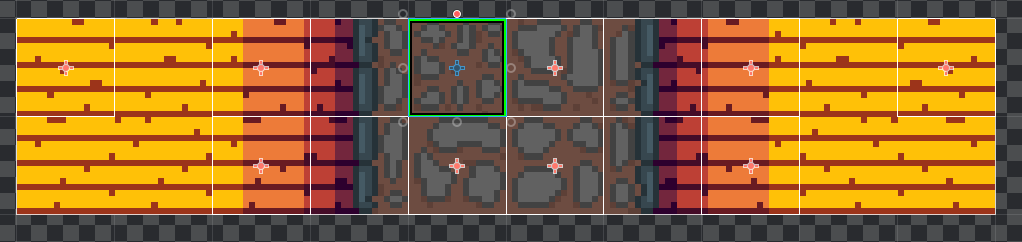
Could it be an issue generated by the tileset? See picture below, I have tiles of different sizes and with differemt origin points. Maybe they dont snap well and behave weirdly?
Can you try zooming out the camera so that you can see all tile maps the whole time? There’s a lot of guessing what happens when the tile map disappears now. My guess is it just loops around somewhere to a starting position. I bet it doesn’t just “disappear”.
I did as you said, increased window size and repositioned elements and immediately noticed that indeed the two TileMapLayers moved as if one of them was following an off-set path of the other, higher.
This gave me a hunch that somehow the relative position of a child to the parent was altered. Removing the lines of code below immediately fixed the issue:
It seems like for some reason the things that were affected were the children relative position rather than their global positions. Don’t know why. But now it works.
If you have any insight on it, I’d be glad to read it and learn more.
Either way, I want you to thank you for sticking with me and helping me run through this and debug it! Helped a lot and I’m very grateful for your time! <3