@mrcdk , I’m really hoping I glossed over an existing gdscript binding, but maybe you could point me to where I’d find it if it’s there?
I’m not afraid of writing a little c++ for a gdextension, but I am quite worried about maintaining it. Especially because I don’t have a Mac device at my disposal and I believe I would need one to compile a gdextension for Mac separately, right?
You can get the grid offset, grid snap,… with EditorSettings.get_editor_metadata() like: EditorInterface.get_editor_settings().get_editor_metadata("2d_editor", "grid_snap")
But this only contains the last value that was input.
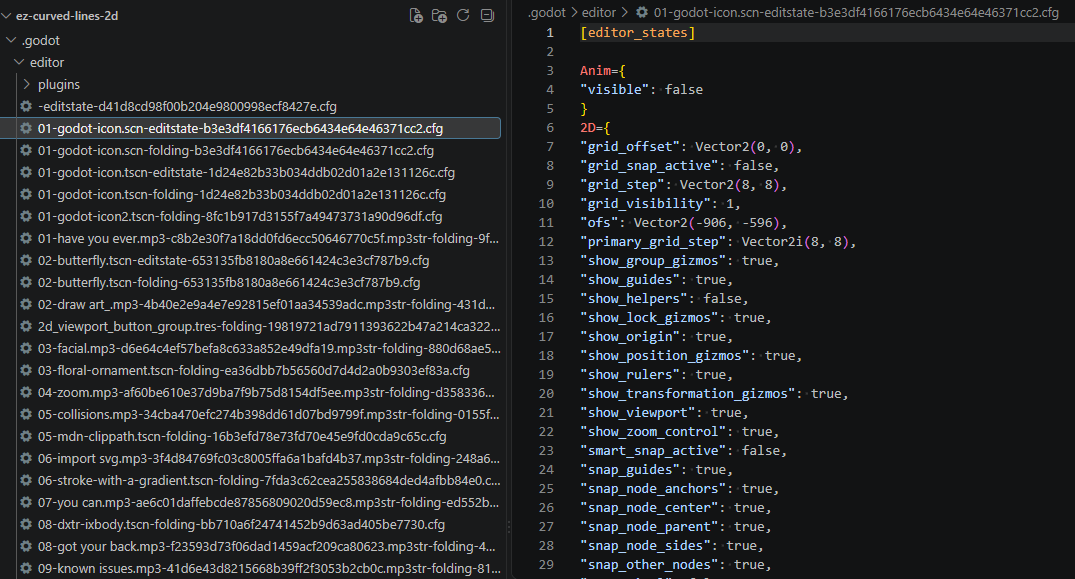
If you need the specific values per scene then you can load the file and parse it as it’s a ConfigFile. For example:
@tool
extends EditorPlugin


func _enter_tree() -> void:
	scene_changed.connect(_on_scene_changed)


func _exit_tree() -> void:
	if scene_changed.is_connected(_on_scene_changed):
		scene_changed.disconnect(_on_scene_changed)


func _on_scene_changed(root: Node) -> void:
	if is_instance_valid(root) and not root.scene_file_path.is_empty():
		var settings_dir = EditorInterface.get_editor_paths().get_project_settings_dir()
		var state_file = settings_dir.path_join("%s-editstate-%s.cfg" % [root.scene_file_path.get_file(), root.scene_file_path.md5_text()])
		var config = ConfigFile.new()
		if not config.load(state_file) == OK:
			print("Scene does not have editstate")
			return

		print(config.get_value("editor_states", "2D", {}))
The file is written every time the scene is saved or closed.
If you really need the values as soon as they change then you’ll need to get them like:
@tool
extends EditorPlugin

var dialogs: Array[AcceptDialog]

func _enter_tree() -> void:
	var possible = EditorInterface.get_base_control().find_children("*", "SnapDialog", true, false)
	for snap_dialog in possible:
		dialogs.append(snap_dialog)
		snap_dialog.confirmed.connect(_on_snap_dialog_confirmed.bind(snap_dialog))


func _exit_tree() -> void:
	for dialog in dialogs:
		if is_instance_valid(dialog) and dialog.confirmed.is_connected(_on_snap_dialog_confirmed):
			dialog.confirmed.disconnect(_on_snap_dialog_confirmed)


func _on_snap_dialog_confirmed(dialog: AcceptDialog) -> void:
	var boxes = dialog.find_children("*", "SpinBox", true, false)
	for box in boxes:
		print(box.value)
I think there’s only one SnapDialog but I’m not a 100% sure. Also, I’m just printing the value of each one in the example but the order is the same as they are added in the snap dialog:
GDExtension has access to the same API as GDScript/C# do so it wouldn’t be useful if alternative methods weren’t available.
Thank you for this great and comprehensive answer. The last accessed values may be enough, but the rest of the information was really helpful!
Also thanks for pointing out the same API restriction!
[edit]:
Looking at this a little closer, I get the impression the most reliable approach would actually be to hook into the dialog (the get_project_settings method you linked to does not expose the snap settings and the config file is not updated while editing)
It’s just I haven’t been able to find the SnapDialog in the UI up until now. I realize the location and name of UI nodes may change over time/releases, so it is already part of my regular regression tests. I’m really happy with this, so
Just one quick follow-up! Thanks for putting me on the right track. I pinned the canvas_item_editor_plugin.cpp to my browser tabs, because it’s all in there.
What my collaborator actually asked was not a full grid integration, but just a snap-to-guide implementation… And that’s actually pretty easy, now that you pointed me to the correct sources (again, I think, sorry for that).
I will be using EditorInterface.get_edited_scene_root().get_meta("_edit_vertical_guides_") and EditorInterface.get_edited_scene_root().get_meta("_edit_horizontal_guides_") which return arrays of floats.
I’m just putting it here, because I remember others asking for how this works as well.
[final edit: the effective changes I applied will remain visible in the diff of pull request I’m working on]
I will leave that here. It can not cover the case of unsaved scenes because the SnapDialog is initially not filled correctly and only the CanvasItemEditor class can access the most recent defaults when swapping between tabs of unsaved scenes…