Godot Version
4.5.1
Question
I have an editor script that adds NavigationRegion instances to connect to preexisting NavigationRegions. Specifically using the “connection” feature as described in Connecting navigation meshes — Godot Engine (stable) documentation in English , where edges are within edge_connection_margin distance.
When edges have significant size difference, the connection may be shorter than the longest edge, causing the connection to fail when pathfinding in that direction. To fix this I added new vertices into the existing navmesh polygon to align with the connection:
# Read polygon info.
var verts := navmesh.vertices
var polys: Array[PackedInt32Array] = []
var poly_count := navmesh.get_polygon_count()
polys.resize(poly_count)
for i in range(poly_count):
	polys[i] = navmesh.get_polygon(i)

# Append new vertex to verts.
# Add index to relevant polys element.

# Write polygon info back into navmesh.
navmesh.vertices = verts
navmesh.clear_polygons()
for p in polys:
	navmesh.add_polygon(p)
This works in terms of fixing connections. But when I run the script, some preexisting polygons in the navmesh vanish, presumably because I edited their vertex data to a format considered invalid.
I’ve tried following the existing winding order when I add vertices, but still get vanishing polygons. I can’t find much in the documentation about what format navmesh data is supposed to follow when you edit them manually. Can anyone help here?
PS - there’s probably a more efficient method than rebuilding the whole navmesh every time, but since the script runs in the editor and my levels are small this isn’t a major concern.
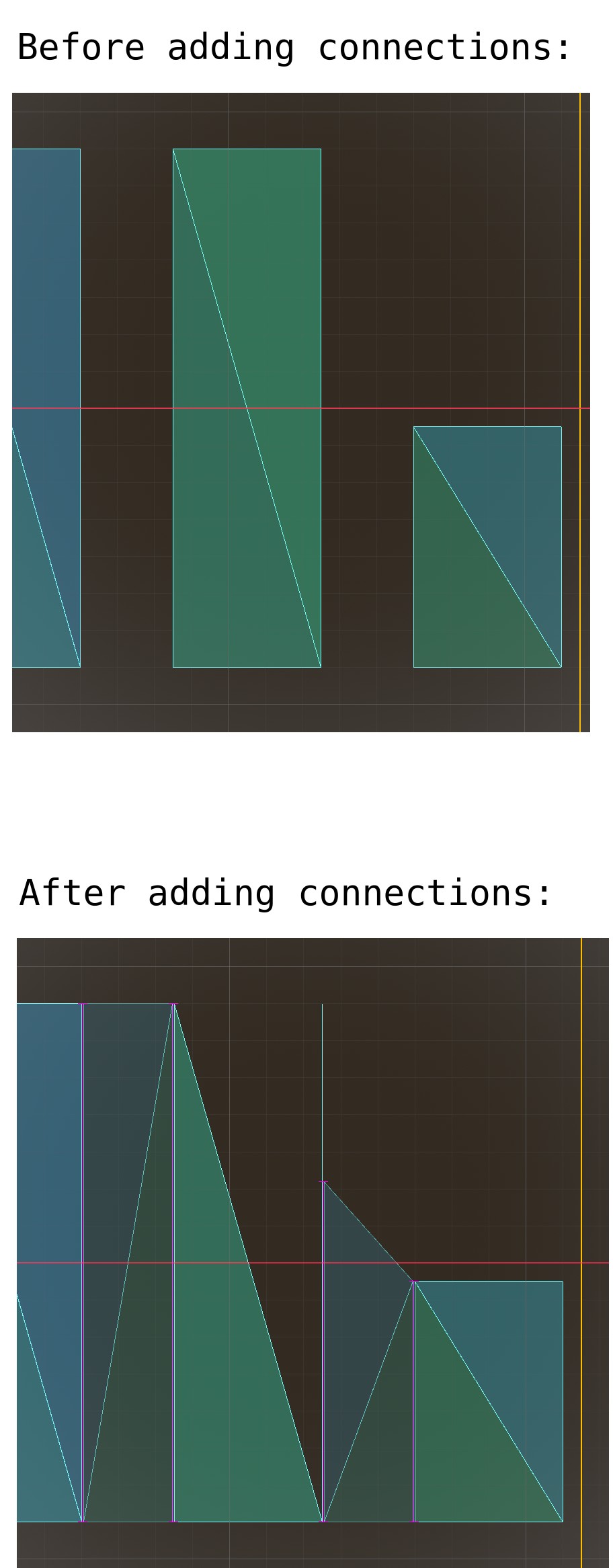
PPS - these images might help clarify the problem. Beforehand there are 3 rectangular portions of the navmesh; afterwards connecting regions have been added, necessitating an extra vertex in one triangle, and this has caused the triangle to disappear in the editor.
In-game the “disappeared” triangle is visible with debug navigation enabled, and pathfinding will route through it, but will not stop on it. Instead the destination point is set to the nearest point not in the triangle interior.