I am making a top down 2D game. I have a code that spawns trees on launch, but most of the time they overlap. I want a way to have the trees not appear on each other, so it looks nice and the player is able to move smoothly
	for i in 100:
		var clone := preload("res://Scenes/tree.tscn").instantiate()
		var x: float = randf_range(-2500, 2500)
		var y: float = randf_range(-2500, 2500)
		clone.position = Vector2(x, y)
		add_child(clone)
extends Node2D


var trees: Array
var buffer_time: float = 1.0


func _ready() -> void:
	for i in 100:
		var tree := preload("res://cloning/tree.tscn").instantiate()
		_move_to_random_position(tree)
		add_child(tree)

		tree.get_node("Area2D").body_entered.connect(_move_to_random_position)
		trees.append(tree)

	await get_tree().create_timer(buffer_time).timeout
	for tree in trees:
		tree.get_node("Area2D").body_entered.disconnect(_move_to_random_position)

	trees.clear()


func _get_random_position() -> Vector2:
	var x: float = randf_range(-2500, 2500)
	var y: float = randf_range(-2500, 2500)
	return Vector2(x, y)


func _move_to_random_position(node: Node2D) -> void:
	node.position = _get_random_position()
	print("Moved node %s to %s" % [node.name, node.position])
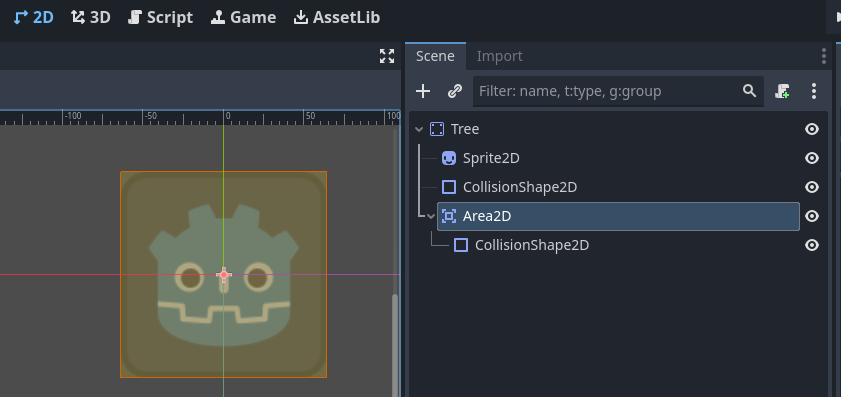
What it does is it first assigns a random position to each tree like you had before, then connects to the Area2D’s body_entered signal to detect if another tree has been spawned at the same position. If yes - it would trigger the signal and move the tree to a different position. This should repeat until all the trees are not overlapping anymore.
The buffer_time is used to allow it to settle after some time and disconnect all signals. Otherwise in some cases it could loop forever if you have a lot of overlap.
Let me know if there is anything unclear about this, or you have any issues.
For each tree, save the position you picked for it as a “last_picked_position” or such, then for each new random position check if “position” is too similar to “last_picked_position” with a while loop.
If you have several trees I guess you could have a last_picked_position1, last_picked_position2 etc for the number you need. Set all too null, then when selecting a position “if last_picked_position1” == null, set the first instance to that. If last_picked_position1 != null, go forward to last_picked_position2 etc. That in combination with comparing the random position to the new should make it possible to spawn many trees without having any of them overlap another.
Here is a possible solution in code. I made it by editing some lines I have for a similar thing and just kept my variable names and values. Just to give you a clearer idea of what I mean. I guess it would be better to keep all the previous positions in an array and compare the new position with each item in the array. If you need some help, let me know but it is late here and I am heading to sleep.
Here is a script you can use. Just be aware that it is not great for performance if you want to add large numbers of things, as it checks the positions of every new thing it places against every previously placed things position. If you try to make it spawn too many things, it will get stuck in an endless process of trying to find an empty spot on the screen.
You can add the different pngs or scenes into the array in the inspector. Also the variable number_of_objects_to_place is the number of trees or whatever you want to spawn.
extends Node2D

@export var objects: Array
@export var number_of_objects_to_place: int
@export var position_offset: Vector2

var previously_picked_positions: Array
var placement_area
var random_object: int

func _ready() -> void:
	placement_area = get_viewport().get_visible_rect().size
	randomize_positions()


func randomize_positions():
	for i in number_of_objects_to_place:
		var random_position : Vector2

		var valid = false
		while valid == false:
			valid = true
			random_position = Vector2(randi_range(0, placement_area.x),randi_range(0, placement_area.y))

			for prev_pos in previously_picked_positions:
				if prev_pos != null and random_position.distance_to(prev_pos) < position_offset.length():
					valid = false
					break

		previously_picked_positions.append(random_position)
		instantiate_and_place(random_position)


func instantiate_and_place(random_position: Vector2):
	random_object = randi_range(0, objects.size() - 1)
	if objects[random_object] is CompressedTexture2D:
		print("compressedtext")
		var sprite := Sprite2D.new()
		sprite.texture = objects[random_object]
		sprite.position = random_position
		add_child(sprite)
	elif objects[random_object] is PackedScene:
		print("packedscene")
		var instance = objects[random_object].instantiate()
		instance.position = random_position
		add_child(instance)
A common approach in procedurally generated games is to find local maximas or peaks in your noise data. Currently you are using randf_range many times, but using a FastNoiseLite allows you to sample noise.
Here’s a slide deck on finding peaks in 1d and 2d datasets.
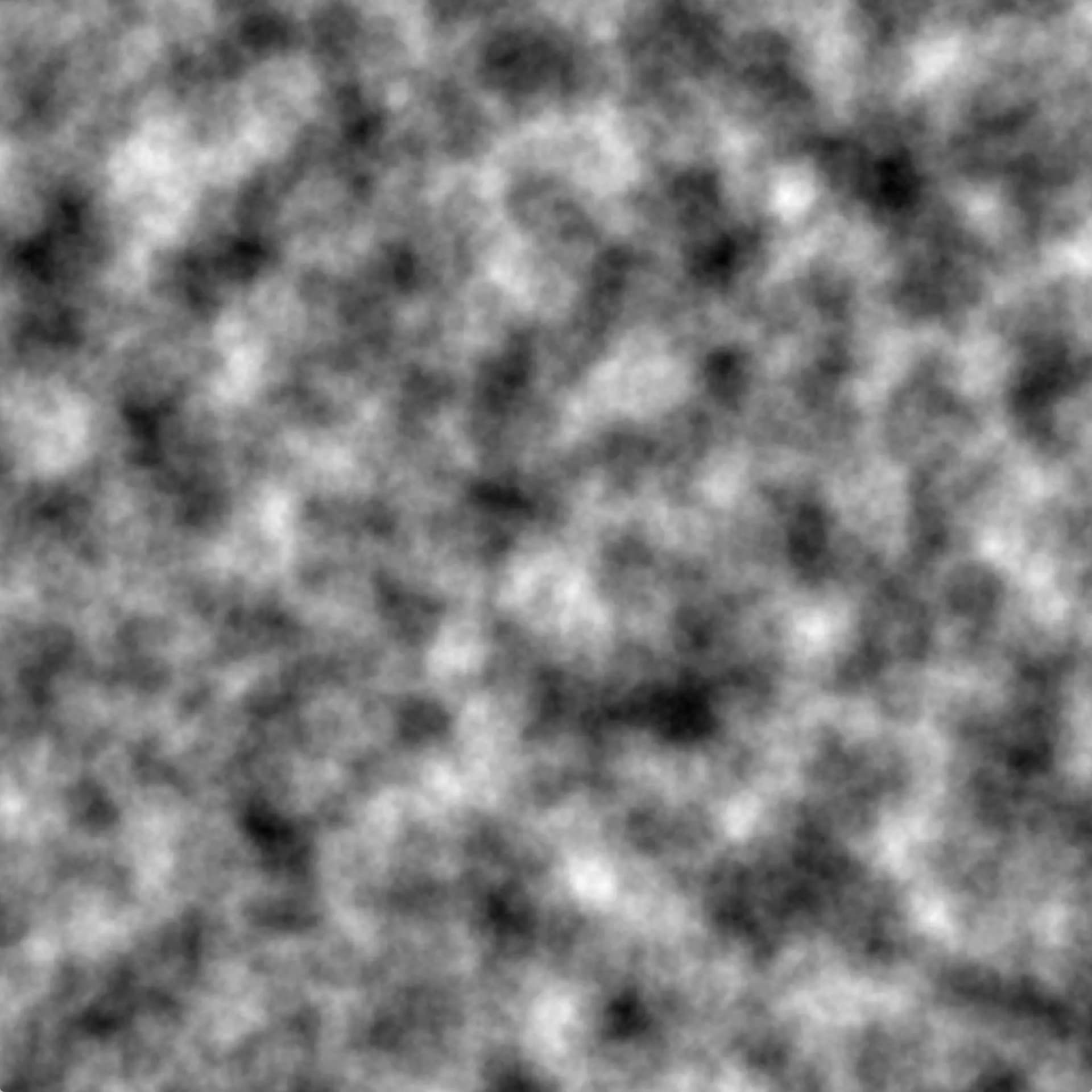
The idea is given a noise texture, like the one below; we sample any point on it, is that point brighter than it’s neighbors? If so, we place a tree.
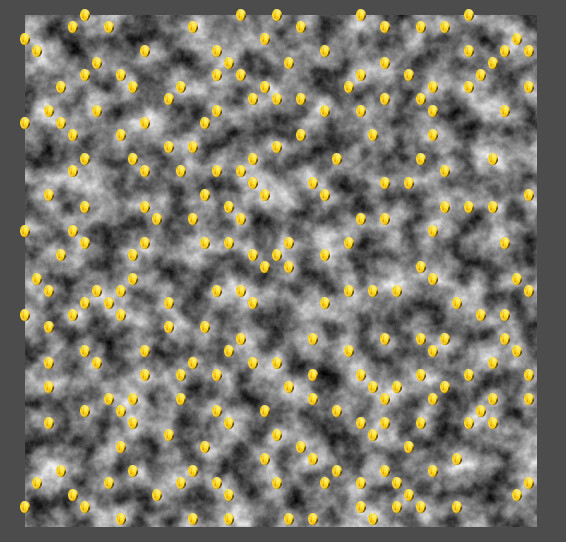
In Godot I’ve plotted coins on top of local maximas, they are fairly uniformly distributed. Though I can’t control exactly how many are spawned, editing the noise’s frequency can create a dense forest, or sparse plains. Similarly the trees will be at least SAMPLE_STEP pixels away from each other.
This was generated using a very naive approach that should be optimized for much larger scenes, but even with your 5000 square range it’s quick enough for one generation.
@export var noise: Noise

const SAMPLE_STEP = 12.0
const MIN_SIZE = 0
const MAX_SIZE = 5000

func _ready() -> void:
	for y in range(MIN_SIZE, MAX_SIZE, SAMPLE_STEP):
		for x in range(MIN_SIZE, MAX_SIZE, SAMPLE_STEP):
			var sample: float = noise.get_noise_2d(x, y)
			if sample < 0.01: # skip low-value samples, set higher for clumping trees
				continue

			var neighbor_top: float = noise.get_noise_2d(x, y - SAMPLE_STEP)
			var neighbor_bot: float = noise.get_noise_2d(x, y + SAMPLE_STEP)
			var neighbor_left: float = noise.get_noise_2d(x - SAMPLE_STEP, y)
			var neighbor_right: float = noise.get_noise_2d(x + SAMPLE_STEP, y)
			if sample > neighbor_top and\
				sample > neighbor_bot and\
				sample > neighbor_left and\
				sample > neighbor_right:
				make_coin(Vector2(x,y))
This looks like a nice solution. I just need to know how to change the make_coin(Vector2(x,y)) to spawn trees. Do I just put the very previous code in a new function called something like “spawn trees” and then replace the make_coin with it?
I am a very beginner. The only game in Godot I made was a simple clicker