Issue with updating Graphics Settings!

Godot Version

Godot 4.5.1 stable official

Question

when I run the game my fps gets stuck to around 50 and then when I pause and unpause then only fps goes to 100, I can see the effect of settings like disabled shadows with 0 after start without pause and unpause, but the fps only fix after pause and unpause !

SettingsScreen:
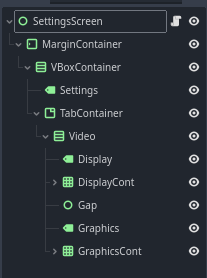
settings_screen.gd:

class_name SettingsScreen extends Control


## Vars
@export var debug : bool = false

@export_group("Graphics")

@export_subgroup("graphic_refs")
@export var resolution_opt : OptionButton
@export var window_opt : OptionButton
@export var vsync_opt : OptionButton
@export var shadow_opt : OptionButton
@export var render_scale_slider : HSlider


var settings_config : ConfigFile = ConfigFile.new()
var config_path : String = "user://config/settings.cfg"

var config_is_loading : bool = false


var config_display_section : String = "Display"
var config_graphics_section : String = "Graphics"


const resolution_data : Dictionary = {
	"def": { "id": "resolution", "data": Vector2i(1280, 720), "value": 0 },
	0: { "id": "resolution", "data": Vector2i(1280, 720) },
	1: { "id": "resolution", "data": Vector2i(1900, 1600) },
	2: { "id": "resolution", "data": Vector2i(1920, 1280) }
}

const window_data : Dictionary = {
	"def": { "id": "fullscreen", "data": DisplayServer.WINDOW_MODE_MAXIMIZED, "value": 1 },
	0: { "id": "fullscreen", "data": DisplayServer.WINDOW_MODE_WINDOWED, "name": "Windowed" },
	1: { "id": "fullscreen", "data": DisplayServer.WINDOW_MODE_MAXIMIZED, "name": "Maximized" },
	2: { "id": "fullscreen", "data": DisplayServer.WINDOW_MODE_FULLSCREEN, "name": "Fullscreen" },
	
	
}

const vsync_data : Dictionary = {
	"def": { "id": "vsync", "data": DisplayServer.VSYNC_ENABLED, "value": 1 },
	0: { "id": "vsync", "data": DisplayServer.VSYNC_DISABLED, "name": "Disabled" },
	1: { "id": "vsync", "data": DisplayServer.VSYNC_ENABLED, "name": "Enabled" },
	2: { "id": "vsync", "data": DisplayServer.VSYNC_ADAPTIVE, "name": "Adaptive"  }
}

const shadow_data : Dictionary = {
	"def": { "id": "shadow", "data": 4096, "value": 2 },
	0: { "id": "shadow", "data": 0, "name": "Disabled" },
	1: { "id": "shadow", "data": 2048, "name": "Low" },
	2: { "id": "shadow", "data": 4096, "name": "Medium" },
	3: { "id": "shadow", "data": 8192, "name": "High" },
}

const render_scale_data : Dictionary = {
	"def": { "id": "render_scale", "data": 1.0, "value": 1.0 }
}


### Mains
func _ready() -> void:
	self.process_mode = Node.PROCESS_MODE_ALWAYS
	
	_connect_signals()
	
	_make_or_load_config()


func _unhandled_input(event: InputEvent) -> void:
	if Input.is_action_just_pressed("p1_ctrl"):
		self.visible = !self.visible


### UseCallables

## Func
func save_setting(section: String, key: String, value) -> void:
	if config_is_loading:
		return
	
	settings_config.load(config_path)
	
	settings_config.set_value(section, key, value)
	settings_config.save(config_path)


func log_debug(id: String, value, always_print: bool = false) -> void:
	if always_print:
		print( str("Debug: ", self.name, ": ", id, " = ", value) ) 
	else:
		if debug:
			print( str("Debug: ", self.name, ": ", id, " = ", value) )


### Usables

## Ready
func _connect_signals() -> void:
	# Dispaly
	resolution_opt.item_selected.connect(_on_resolution_opt_selected)
	window_opt.item_selected.connect(_on_window_opt_selected)
	vsync_opt.item_selected.connect(_on_vsync_opt_selected)
	
	# Graphics
	render_scale_slider.value_changed.connect(_on_render_scale_changed)
	shadow_opt.item_selected.connect(_on_shadow_opt_selected)


func _make_or_load_config() -> void:
	var user_dir := DirAccess.open("user://")
	if not user_dir.dir_exists("config"):
		user_dir.make_dir("config")
	
	if FileAccess.file_exists(config_path):
		_load_config()
	else:
		_make_default_config()


## Func
func _make_default_config() -> void:
	settings_config.set_value(config_display_section, resolution_data["def"]["id"], resolution_data["def"]["value"])
	settings_config.set_value(config_display_section, window_data["def"]["id"], window_data["def"]["value"])
	settings_config.set_value(config_display_section, vsync_data["def"]["id"], vsync_data["def"]["value"])
	
	settings_config.set_value(config_graphics_section, render_scale_data["def"]["id"], render_scale_data["def"]["value"])
	settings_config.set_value(config_graphics_section, shadow_data["def"]["id"], shadow_data["def"]["value"])
	
	
	settings_config.save(config_path)
	
	log_debug("default_config_created", "true", true)


func _load_config() -> void:
	config_is_loading = true
	
	
	settings_config.load(config_path)
	
	var res_index = settings_config.get_value(config_display_section, resolution_data["def"]["id"], resolution_data["def"]["value"])
	resolution_opt.select(res_index)
	_on_resolution_opt_selected(res_index)
	
	var win_index = settings_config.get_value(config_display_section, window_data["def"]["id"], window_data["def"]["value"])
	window_opt.select(win_index)
	_on_window_opt_selected(win_index)
	
	var vsync_index = settings_config.get_value(config_display_section, vsync_data["def"]["id"], vsync_data["def"]["value"])
	vsync_opt.select(vsync_index)
	_on_vsync_opt_selected(vsync_index)
	
	var scale = settings_config.get_value(config_graphics_section, render_scale_data["def"]["id"], render_scale_data["def"]["value"])
	render_scale_slider.value = scale
	_on_render_scale_changed(scale)
	
	var shadow_index = settings_config.get_value(config_graphics_section, shadow_data["def"]["id"], shadow_data["def"]["value"])
	shadow_opt.select(shadow_index)
	_on_shadow_opt_selected(shadow_index)
	
	
	config_is_loading = false
	
	log_debug("config_loaded", "true", true)


### Signals

## Display
func _on_resolution_opt_selected(index: int) -> void:
	var dict = resolution_data[index]
	DisplayServer.window_set_size(dict["data"])
	
	save_setting(config_display_section, dict["id"], index)
	
	log_debug(dict["id"], dict["data"])


func _on_window_opt_selected(index: int) -> void:
	var dict = window_data[index]
	DisplayServer.window_set_mode(dict["data"])
	
	save_setting(config_display_section, dict["id"], index)
	
	log_debug(dict["id"], dict["name"])


func _on_vsync_opt_selected(index: int) -> void:
	var dict = vsync_data[index]
	
	DisplayServer.window_set_vsync_mode(dict["data"])
	
	save_setting(config_display_section, dict["id"], index)
	
	log_debug(dict["id"], dict["name"])


## Graphics
func _on_render_scale_changed(value: float) -> void:
	var viewport := get_viewport()
	var sub_viewports := get_tree().get_nodes_in_group(GlobalVarHandler.Group.Group_SubViewPort)
	
	viewport.scaling_3d_scale = value
	
	for sv in sub_viewports:
		sv.scaling_3d_scale = value
	
	save_setting(config_graphics_section, "render_scale", value)
	
	log_debug("render_scale", value)


func _on_shadow_opt_selected(index: int) -> void:
	var dict = shadow_data[index]
	RenderingServer.directional_shadow_atlas_set_size(dict["data"], true)
	
	save_setting(config_graphics_section, dict["id"], index)
	
	log_debug(dict["id"], dict["name"])

GameUI:
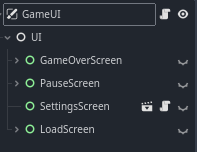
game_ui.gd:

class_name GameUI extends CanvasLayer


## Vars
@export_group("uis")
@export var main_ui : Node


@export_group("screens")
@export var game_over_screen : Control
@export var pause_screen : Control
@export var settings_screen : Control


@export_group("buttons")
@export var pause_resume_button : Button
@export var pause_settings_button : Button
@export var pause_close_button : Button


var player_count : int = 0


### Mains
func _ready() -> void:
	_ready_game_ui()
	
	_connect_signals()


func _unhandled_input(event: InputEvent) -> void:
	_get_input(event)


### Usables

## Ready
func _ready_game_ui() -> void:
	self.process_mode = Node.PROCESS_MODE_ALWAYS
	main_ui.process_mode = Node.PROCESS_MODE_ALWAYS
	
	layer = 100
	
	game_over_screen.hide()
	settings_screen.hide()
	pause_screen.hide()


func _connect_signals() -> void:
	# Screens
	GlobalSignalHandler.all_players_died.connect(_update_game_over_screen)
	
	# Buttons
	pause_resume_button.pressed.connect(_on_pause_resume_button_pressed)
	pause_settings_button.pressed.connect(_on_pause_settings_button_pressed)
	pause_close_button.pressed.connect(_on_pause_close_button_pressed)


## Input
func _get_input(_event: InputEvent) -> void:
	
	# Pause Screen
	if Input.is_action_just_pressed(GlobalVarHandler.KeyBind.Escape):
		#get_tree().quit()
		pause_screen.visible = !pause_screen.visible
		if pause_screen.is_visible_in_tree():
			get_tree().paused = true
			settings_screen.hide()
		else:
			get_tree().paused = false


### Signals

## Screens
func _update_game_over_screen() -> void:
	print("game over")
	game_over_screen.show()


## Buttons
func _on_pause_resume_button_pressed() -> void:
	get_tree().paused = false
	pause_screen.hide()


func _on_pause_settings_button_pressed() -> void:
	pause_screen.hide()
	settings_screen.show()


func _on_pause_close_button_pressed() -> void:
	get_tree().quit()

settings.cfg:

[Display]

resolution=0
fullscreen=1
vsync=0

[Graphics]

render_scale=1.0
shadow=0

more reference:
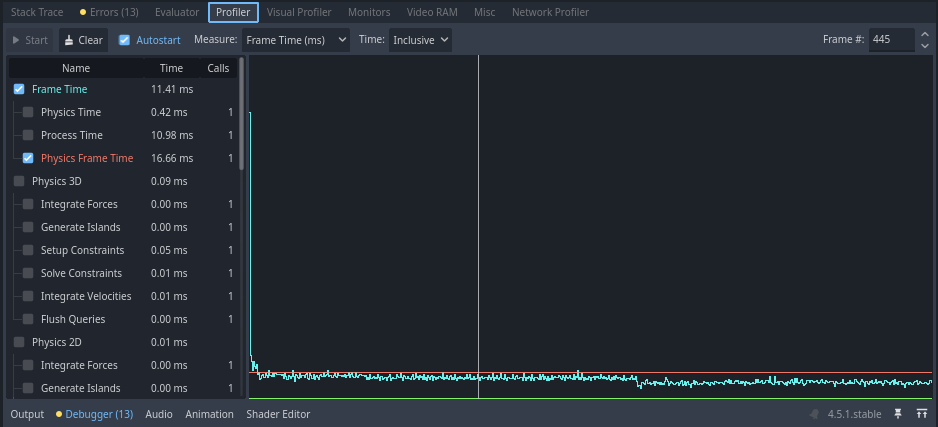
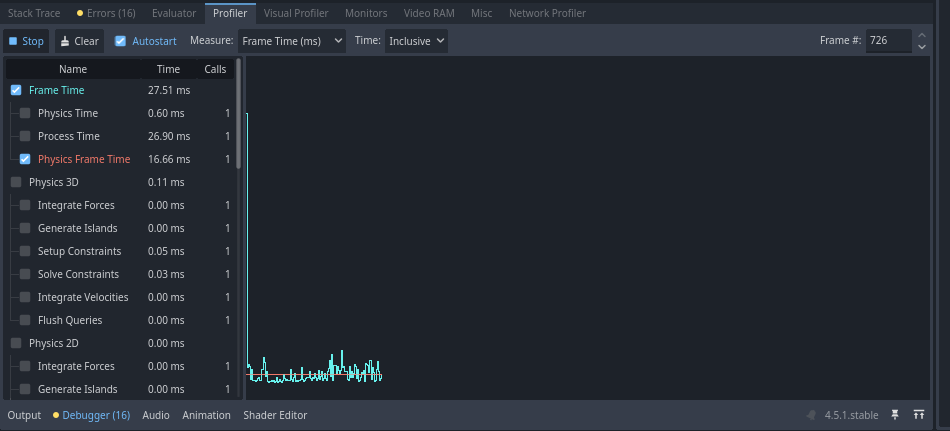
Profiler:

first one is before pause & unpause with around 50 fps and second one is after pause and unpause with around 100 fps !
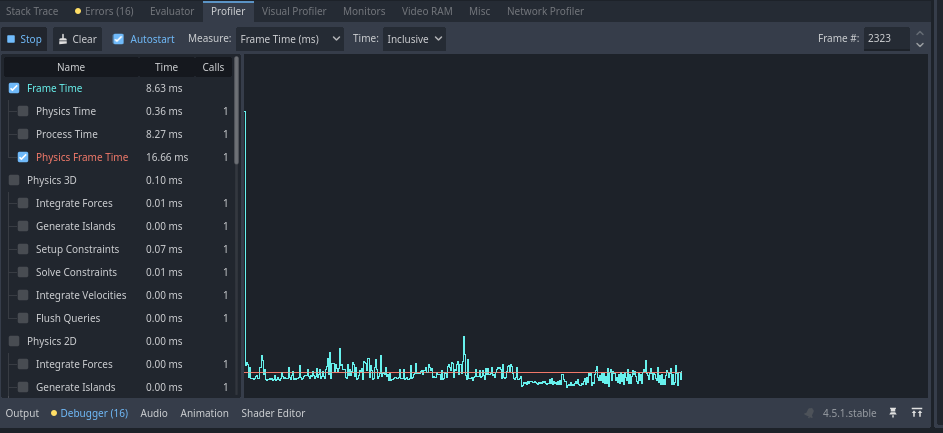
and now after sometime
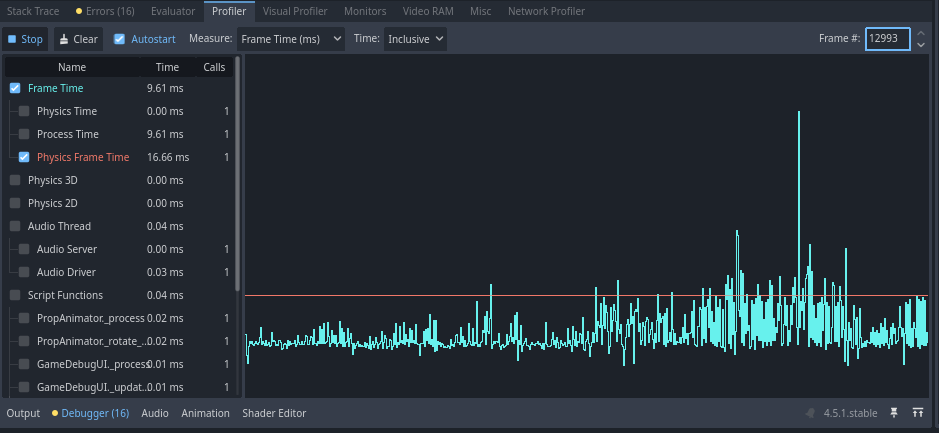
After some testing i got to know that issue only appears when 3d world is in a SubViewPort !

but still couldnt find any fix except for doing pause and unpause every time the game starts

does anyone knows any fix to this ?

Thank you for your time and help !
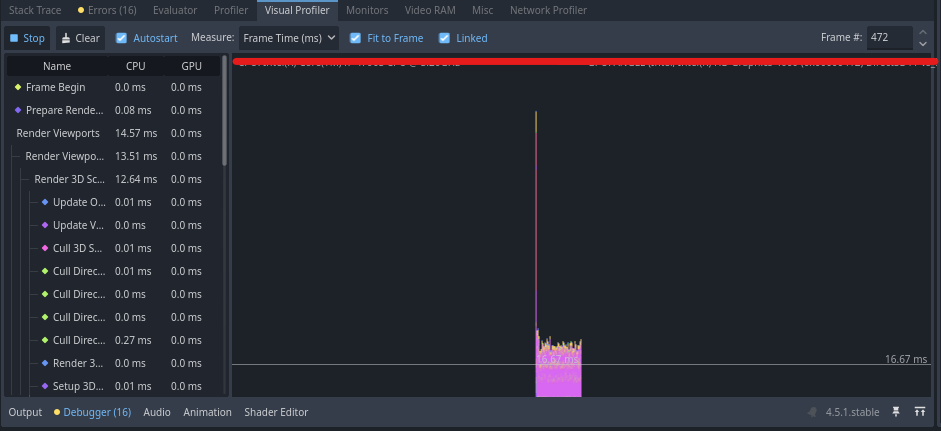
What does the visual profiler say?

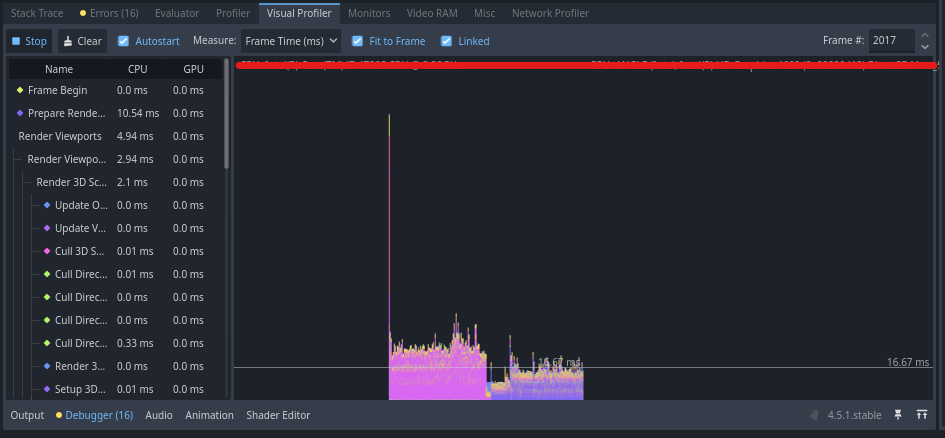
visual profiler -

before pause & unpause around 50 fps:

after pause & unpause around 100 fps:

ty, for ur time and help !

Looks like you’re rendering something heavy before the pause that is removed when you unpause. Try to find out what that is.

with which approach I could / must find it ?

Start with clicking on highest stacks in the visual profiler chart and see what they are. This should give you some clue about what that might be in your scene. Then proceed to remove/disable suspicious stuff piece by piece until the bottleneck is gone. Last thing you removed is the likely culprit.

first I tried this setup in an isolated environment with dif techniques like dif projects node setup runtime, manual changes but when i removed my player or replaced it with dif one the issue disappears but is it to do with its model or animations or code ?

If it’s in the visual profiler then it has to do with rendering. It can be either cpu or gpu part of the rendering process. What’s the fattest stack in the visual profiler chart?

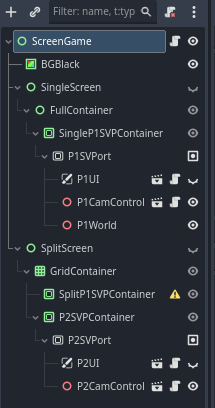
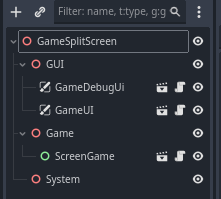
update: player’s model / code doesnt matter, issue comes when I use ScreenGame:


screen_game.gd

class_name ScreenGame extends Control


# Vars
@export_group("Refs")

@export_subgroup("display_refs")
@export var single_screen : Control
@export var split_screen : Control

@export var p1_viewport : SubViewport
@export var p2_viewport : SubViewport

@export var single_p1_container : SubViewportContainer
@export var split_p1_container : SubViewportContainer


@export_subgroup("game_refs")
@export var p1_cam_controller : PlayerCameraController
@export var p2_cam_controller : PlayerCameraController

@export var p1_ui : PlayerUI
@export var p2_ui : PlayerUI

@export var p1_world_node : Node3D


@export_group("Packs")
@export var level_scene : PackedScene
@export var p1_scene : PackedScene
@export var p2_scene : PackedScene


@export_group("Game")
@export var screen_mode : ScreenModeEnum = ScreenModeEnum.SINGLE

enum ScreenModeEnum { SINGLE, SPLIT}


var player_1 : Player
var player_2 : Player

var p1_spawn_point : Vector3
var p2_spawn_point : Vector3


### Mains
func _ready() -> void:
	_ready_split_screen()
	
	_spawn_players(screen_mode)


### Usables

## Ready
func _ready_split_screen() -> void:
	if level_scene == null:
		return
	
	self.hide()
	switch_screen_mode(screen_mode)
	self.show()
	
	
	var level : Level = level_scene.instantiate()
	p1_world_node.add_child(level)
	
	p1_spawn_point = level.p1_spawn_marker.global_position
	p2_spawn_point = level.p2_spawn_marker.global_position


func _spawn_players(passed_screen_mode: ScreenModeEnum) -> void:
	if not level_scene or not p1_scene or not p2_scene:
		return
	
	
	player_1 = p1_scene.instantiate()
	player_1.player_id = 1
	
	p1_viewport.add_child(player_1)
	
	player_1.global_position = p1_spawn_point
	
	p1_cam_controller.set_cam_target(player_1)
	p1_ui.set_player(player_1)
	
	
	if passed_screen_mode == ScreenModeEnum.SPLIT:
		player_2 = p2_scene.instantiate()
		player_2.player_id = 2
		
		p2_viewport.add_child(player_2)
		
		player_2.global_position = p2_spawn_point
		
		p2_cam_controller.set_cam_target(player_2)
		p2_ui.set_player(player_2)


## Func
func switch_screen_mode(passed_screen_mode: ScreenModeEnum) -> void:
	
	if passed_screen_mode == ScreenModeEnum.SINGLE:
		single_screen.show()
		split_screen.hide()
		
		p1_viewport.reparent(single_p1_container)
		
		p1_viewport.render_target_update_mode = SubViewport.UPDATE_WHEN_VISIBLE
		p2_viewport.render_target_update_mode = SubViewport.UPDATE_DISABLED
	
	
	if passed_screen_mode == ScreenModeEnum.SPLIT:
		split_screen.show()
		single_screen.hide()
		
		p1_viewport.reparent(split_p1_container)
		
		p1_viewport.render_target_update_mode = SubViewport.UPDATE_WHEN_VISIBLE
		p2_viewport.render_target_update_mode = SubViewport.UPDATE_WHEN_VISIBLE

I switched to dif assets, now the issue is same but in a dif way !

I have a enemy CharBody3D in the scene and when the Game starts the fps stay around 70 to 80 and when the enemy comes on screen / gets rendered the fps increase to 100 and stay around it this same can be done with pause and unpause

for testing I tried removing the script of enemy it fixes the issue fps stay at 100 at start and making enemy invisible also fixes it !

enemy.gd

class_name Enemy extends CharacterBody3D


## Vars
@export var debug : bool = false

@export_group("enemy_refs")
@export var anim_player : AnimationPlayer
@export var nav_agent : NavigationAgent3D
@export var follow_range_ray_cast: RayCast3D


@export_group("enemy_anims")
@export var run_animation : String
@export var idle_animatin : String


@export_group("_move()")
@export var move_speed : float = 4
@export var acceleration_strength : float = 10
@export var deceleration_strength : float = 10

var move_direction : Vector3
var movement_velocity : Vector3
var target_velocity : Vector3
var horizontal_velocity : Vector3


@export_group("_follow_entity()")
@export var use_follow_system : bool = false
@export var use_nav_follow_system : bool = false


@export_subgroup("follow_vars")
@export var can_follow_entity : bool = true
@export var follow_stop_distance : float = 5


var player : Player
var aggro : bool
var follow_distance : float


### Mains
func _init() -> void:
	_init_enemy()


func _ready() -> void:
	pass


func _process(delta: float) -> void:
	find_player()
	
	_update_follow_range_raycast()


func _physics_process(delta: float) -> void:
	_apply_physics(delta)
	
	_follow_entity(player, follow_stop_distance, delta)
	_nav_follow_entity(player, follow_stop_distance, delta)
	
	_update_animation()
	
	move_and_slide()


### UseCallables

## Process
func _apply_physics(_delta: float) -> void:
	
	# Gravity
	if not is_on_floor():
		velocity.y -= GlobalVarHandler.Physics.Gravity * _delta


func _follow_entity(_entity: Node3D, _stop_distance : float, _delta: float) -> void:
	if !use_follow_system:
		return
	
	if !can_follow_entity:
		return
	
	if use_nav_follow_system:
		return
	
	if _entity == null or not is_instance_valid(_entity):
		velocity.x = 0
		velocity.z = 0
		return
	
	
	look_at(_entity.global_transform.origin, Vector3.UP)
	
	follow_distance = (_entity.global_position - global_position).length()
	move_direction = (_entity.global_position - global_position).normalized()
	
	target_velocity = move_direction * move_speed
	horizontal_velocity = Vector3(velocity.x, 0, velocity.z)
	
	if !follow_distance > _stop_distance:
		horizontal_velocity = horizontal_velocity.lerp(target_velocity, acceleration_strength * _delta)
	else:
		horizontal_velocity = horizontal_velocity.lerp(Vector3.ZERO, deceleration_strength * _delta)
	
	velocity.x = horizontal_velocity.x
	velocity.z = horizontal_velocity.z


func _nav_follow_entity(_entity: Node3D, _stop_distance: float, _delta: float) -> void:
	if !use_nav_follow_system:
		return
	
	if !can_follow_entity:
		return
	
	if use_follow_system:
		return
	
	if _entity == null or not is_instance_valid(_entity):
		velocity.x = 0
		velocity.z = 0
		return
	
	
	nav_agent.target_position = _entity.global_position
	
	follow_distance = (_entity.global_position - global_position).length()
	move_direction = (nav_agent.get_next_path_position() - global_position).normalized()
	
	look_at(_entity.global_transform.origin, Vector3.UP)
	
	target_velocity = move_direction * move_speed
	horizontal_velocity = Vector3(velocity.x, 0, velocity.z)
	
	if !follow_distance > _stop_distance:
		horizontal_velocity = horizontal_velocity.lerp(target_velocity, acceleration_strength * _delta)
	else:
		horizontal_velocity = horizontal_velocity.lerp(Vector3.ZERO, deceleration_strength * _delta)
	
	velocity.x = horizontal_velocity.x
	velocity.z = horizontal_velocity.z


### Usables

## Init
func _init_enemy() -> void:
	add_to_group(GlobalVarHandler.Group.GroupEnemy)
	
	var collisions := GlobalVarHandler.Collision
	collision_layer = collisions.LayerC_Enemy
	collision_mask = (
		collisions.LayerC_World  | collisions.LayerC_Enemy |
		collisions.LayerC_Player |  collisions.LayerC_Prop
		)


## Ready
func _ready_follow_range_raycast() -> void:
	if !debug and !use_follow_system or !use_nav_follow_system:
		return
	
	follow_range_ray_cast.hide()
	follow_range_ray_cast.enabled = false
	follow_range_ray_cast.process_mode = Node.PROCESS_MODE_DISABLED


## Process
func find_player() -> void:
	if player != null:
		return
	
	if player == null:
		player = get_tree().get_first_node_in_group(GlobalVarHandler.Group.Group_Player)


func _update_animation() -> void:
	if anim_player == null:
		return
	
	var speed := horizontal_velocity.length()
	
	if speed > 0.1:
		anim_player.play(run_animation)
	else:
		anim_player.play(idle_animatin)


func _update_follow_range_raycast() -> void:
	if debug and use_follow_system or use_nav_follow_system:
		follow_range_ray_cast.target_position.z = -(follow_stop_distance)

what could be the cause of this ?

thank you for your time and help !

update upon some debugging, if I disable / don’t call the _update_animation() func then the issue gets fixed !

but why this weird fps change issue is appearing when I call this func ?

Hard to tell without being able to run the thing. Animation player can do almost anything. The clue is in the profiler. You still haven’t said what’s the largest time chunk in the chart.

Which profiler ? normal or visual ?

Whichever shows the spikes. Could be both.

there is a change in graph in mid !

before and after enemy gets rendered !

Identify the function(s) that cause that. Switch to self time and look in the function list to see which functions eat up most time. Do similar with visual profiler. Look for parts of the rendering pipeline that consume significant amount of frame time.