Godot Version
v4.6.1.stable.mono.official [14d19694e]
Question
I have a shader for repeated texture overlays for tillemaps, the base was originally obtained here → Repeated texture overlay for tilemaps - Godot Shaders
I am using the idea for window reflections. I have an environment texture (clouds/sky) and a tilemap as a mask for the windows. It works well, except when the tilemap is a child of a Parallax2D node.
I have a simple example below: clouds overlaying the tilemap mask. I’ve removed camera scrolling, auto-scrolling, transparency, for simplicity. The foreground building reflections behave as expected, static within the window frames. But, the background building’s environment texture scrolls back and forth when I parallax preview in the editor (or move the camera ingame). The background tilemap is a child of a Parallax2D node.
I would like the cloud overlay texture to not scroll, like the foreground buildings. The mask/window frames should (and do) scroll of course, as I want the buildings themselves to have a parallax effect, but I need the overlay texture to be stationary within the frames, or else it throws everything off. After I have a baseline, I can add back in auto-scrolling + manual camera scrolling, etc.
Is there something I need to do in the shader to accomplish this? I thought the MODEL_VIEW matrix would handle this scenario. I have researched but am at a loss.
Thank you so much in advance.
Mike
Video of effect: FG window overlay is fine, BG window overlay texture scrolls (undesired)
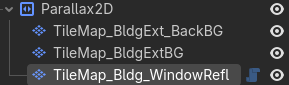
Node structure of BG window reflections
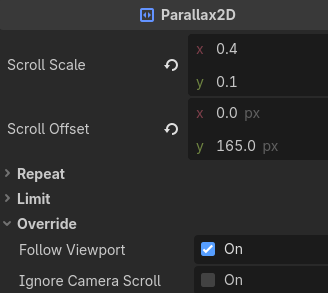
Parallax2D settings for testing
Tilemap texture overlay shader:
shader_type canvas_item;
render_mode unshaded;
// uv coords origin are top-left
uniform sampler2D tex_environment: filter_nearest, repeat_enable;
uniform float scale = 400;
uniform vec4 color_tint : source_color = vec4(1.0); // .a is the reflection strength
varying vec2 world_position;
void vertex()
{
// calculate the world position for use in the fragment shader
world_position = (MODEL_MATRIX * vec4(VERTEX, 0.0, 1.0)).xy;
}
void fragment()
{
ivec2 tex_size_enviro = textureSize(tex_environment, 0);
float tex_env_ratio = float(tex_size_enviro.x) / float(tex_size_enviro.y);
vec2 scale_env = vec2(scale, scale / tex_env_ratio);
vec4 tex_enviro_color = texture(tex_environment, (world_position / scale_env));
vec3 tinted_color = tex_enviro_color.rgb * color_tint.rgb;
COLOR.a = texture(TEXTURE, UV).r * tex_enviro_color.a * color_tint.a;
COLOR.rgb = tinted_color.rgb;
}