Trying to replicate T3ssel8r grass shader

Godot Version

4.4-stable

Question

I’ve been trying a bunch of “tutorials” and searching everywhere but only find dead ends. I have a half-competent attempt I found digging deep. It doesn’t work as the reference.

 shader_type spatial;

//render_mode depth_prepass_alpha, depth_draw_opaque;
render_mode diffuse_burley;

uniform float time_scale = 1.0;
uniform float pivot = 1.0;

uniform vec4 albedo : source_color;
uniform sampler2D texture_albedo : source_color, filter_nearest, repeat_enable;
uniform float wrap : hint_range(-2.0f, 2.0f) = 0.0f;
uniform float steepness : hint_range(1.0f, 8.0f) = 1.0f;
uniform int cuts : hint_range(1, 8) = 3;

uniform sampler2D SCREEN_TEXTURE : hint_screen_texture, filter_nearest;

varying vec3 instance_origin;
varying float random_value;

void vertex() {
	random_value = INSTANCE_CUSTOM.z;

	float time = (TIME * (0.5 + INSTANCE_CUSTOM.y) * time_scale) + (6.28318 * INSTANCE_CUSTOM.x);
	float pivot_angle = cos(time) * 0.1 * pivot;
	mat2 rotation_matrix = mat2(vec2(cos(pivot_angle), -sin(pivot_angle)), vec2(sin(pivot_angle), cos(pivot_angle)));

	instance_origin = MODELVIEW_MATRIX[3].xyz;
	//billboarding
	MODELVIEW_MATRIX = VIEW_MATRIX * mat4(INV_VIEW_MATRIX[0],INV_VIEW_MATRIX[1],INV_VIEW_MATRIX[2],MODEL_MATRIX[3]);
	VERTEX.xz = rotation_matrix * VERTEX.xz;
	NORMAL = vec3(0.0, 1.0, 0.0);
}

void fragment() {
	vec2 base_uv = UV;
	LIGHT_VERTEX = instance_origin;
	//vec4 original_color = texture(SCREEN_TEXTURE, SCREEN_UV);
	vec4 albedo_tex = texture(texture_albedo, base_uv);
	ALBEDO = albedo.rgb * albedo_tex.rgb;
	ALPHA *= albedo.a * albedo_tex.a;
}

void light() {
	float attenuation = ATTENUATION;
	float NdotL = dot(NORMAL, LIGHT);
	float diffuse_amount = NdotL + (attenuation - 1.0) + wrap;
	diffuse_amount *= steepness;
	float cuts_inv = 1.0f / float(cuts);
	float diffuse_stepped = clamp(diffuse_amount + mod(1.0f - diffuse_amount, cuts_inv), 0.0f, 1.0f);
	// Apply diffuse result
	vec3 diffuse = ALBEDO.rgb * LIGHT_COLOR / PI;
	diffuse *= diffuse_stepped;
	DIFFUSE_LIGHT += diffuse;
}

this is the shader I’m currently using. It works, but colors don’t fully match.

shader_type spatial;

//render_mode ambient_light_disabled;

//const float PI = 3.1415926536f;

uniform vec4 albedo : source_color = vec4(1.0f);
uniform sampler2D albedo_texture : source_color;
uniform bool clamp_diffuse_to_max = false;

uniform int cuts : hint_range(1, 8) = 3;
uniform float wrap : hint_range(-2.0f, 2.0f) = 0.0f;
uniform float steepness : hint_range(1.0f, 8.0f) = 1.0f;

uniform bool use_attenuation = true;

uniform bool use_specular = true;
uniform float specular_strength : hint_range(0.0f, 1.0f) = 1.0f;
uniform float specular_shininess : hint_range(0.0f, 32.0f) = 16.0f;
uniform sampler2D specular_map : source_color;

uniform bool use_rim = true;
uniform float rim_width : hint_range(0.0f, 16.0f) = 8.0f;
uniform vec4 rim_color : source_color = vec4(1.0f);

uniform bool use_ramp = false;
uniform sampler2D ramp : source_color;

uniform bool use_borders = false;
uniform float border_width = 0.01f;

varying vec3 vertex_pos;
varying vec3 normal;

float split_specular(float specular) {
	return step(0.5f, specular);
}

void vertex() {
	vertex_pos = VERTEX;
	normal = NORMAL;
}

void fragment() {
	ALBEDO = albedo.rgb * texture(albedo_texture, UV).rgb;
}

void light() {
	// Attenuation.
	float attenuation = 1.0f;
	if (use_attenuation) {
		attenuation = ATTENUATION;
	}

	// Diffuse lighting.
	float NdotL = dot(NORMAL, LIGHT);
	float diffuse_amount = NdotL + (attenuation - 1.0) + wrap;
	//float diffuse_amount = NdotL * attenuation + wrap;
	diffuse_amount *= steepness;
	float cuts_inv = 1.0f / float(cuts);
	float diffuse_stepped = clamp(diffuse_amount + mod(1.0f - diffuse_amount, cuts_inv), 0.0f, 1.0f);

	// Calculate borders.
	float border = 0.0f;
	if (use_borders) {
		float corr_border_width = length(cross(NORMAL, LIGHT)) * border_width * steepness;
		border = step(diffuse_stepped - corr_border_width, diffuse_amount)
				 - step(1.0 - corr_border_width, diffuse_amount);
	}

	// Apply diffuse result to different styles.
	vec3 diffuse = ALBEDO.rgb * LIGHT_COLOR / PI;
	if (use_ramp) {
		diffuse *= texture(ramp, vec2(diffuse_stepped * (1.0f - border), 0.0f)).rgb;
	} else {
		diffuse *= diffuse_stepped * (1.0f - border);
	}

	if (clamp_diffuse_to_max) {
		// Clamp diffuse to max for multiple light sources.
		DIFFUSE_LIGHT = max(DIFFUSE_LIGHT, diffuse);
	} else {
		DIFFUSE_LIGHT += diffuse;
	}

	// Specular lighting.
	if (use_specular) {
		vec3 H = normalize(LIGHT + VIEW);
		float NdotH = dot(NORMAL, H);
		float specular_amount = max(pow(NdotH, specular_shininess*specular_shininess), 0.0f)
							    * texture(specular_map, UV).r
								* attenuation;
		specular_amount = split_specular(specular_amount);
		SPECULAR_LIGHT += specular_strength * specular_amount * LIGHT_COLOR;
	}

	// Simple rim lighting.
	if (use_rim) {
		float NdotV = dot(NORMAL, VIEW);
		float rim_light = pow(1.0 - NdotV, rim_width);
		DIFFUSE_LIGHT += rim_light * rim_color.rgb * rim_color.a * LIGHT_COLOR / PI;
	}
}

I’m using this shader for my ground. Both have the same exact green color as the Albedo. The grass sprite is a simple white shape. I know very little shader logic, enough to copy and paste and have an idea of what’s happening to make very small changes.

This are my references:
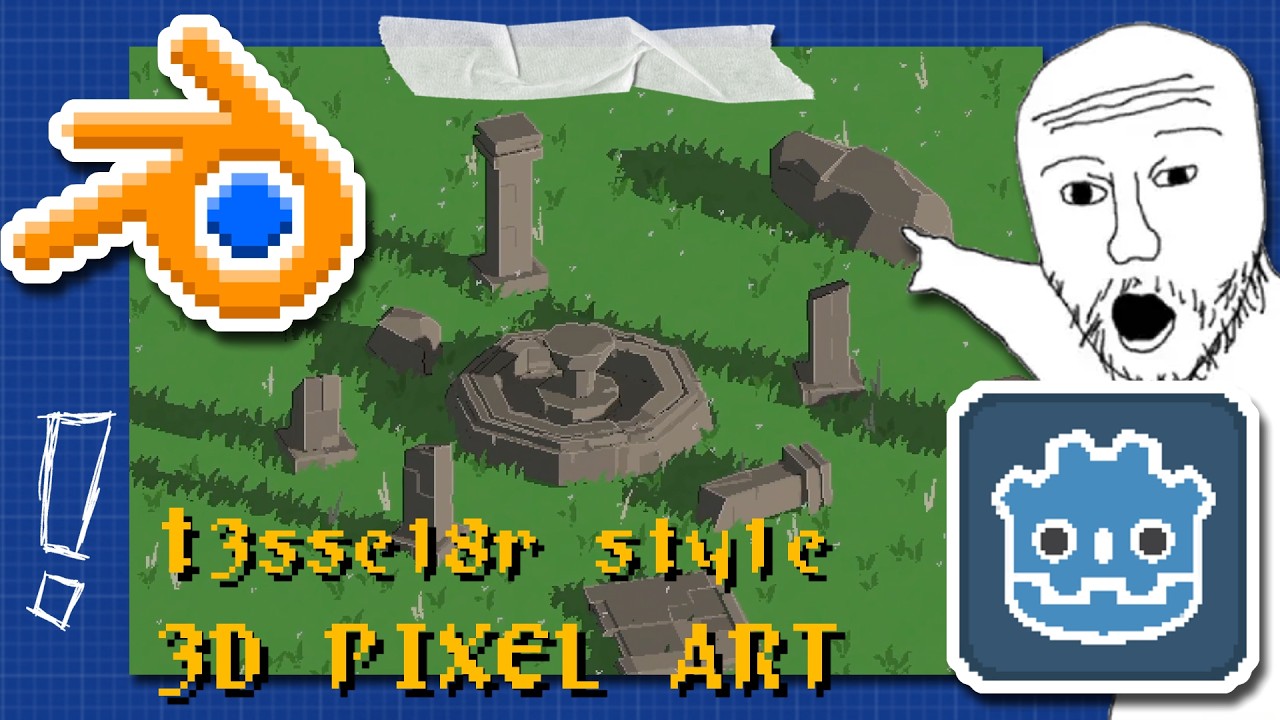
I’ve tried everything, but all codes I find around, all changes I try to make, all still lacks and all still has some really annoying edge case. I’m kinda desperate as I don’t know what to do, since none of the sources really explain or show exactly how the effect is done, and nothing I find online produces the same result.
1 Like

Hey there, sorry I never followed up on my original post, I’ll do so later today. I have been busy with the project and forgot to look on the forum for a couple of months. I have gotten basically the whole 3d 2d style down (altough my style is super different from t3ssel8r’s now as I went into a different direction).

If you have any questions could you please give a detailed explanation of what is not working for you and what you want to have fixed (please post screenshots). I’ll try to help within my ability.

1 Like

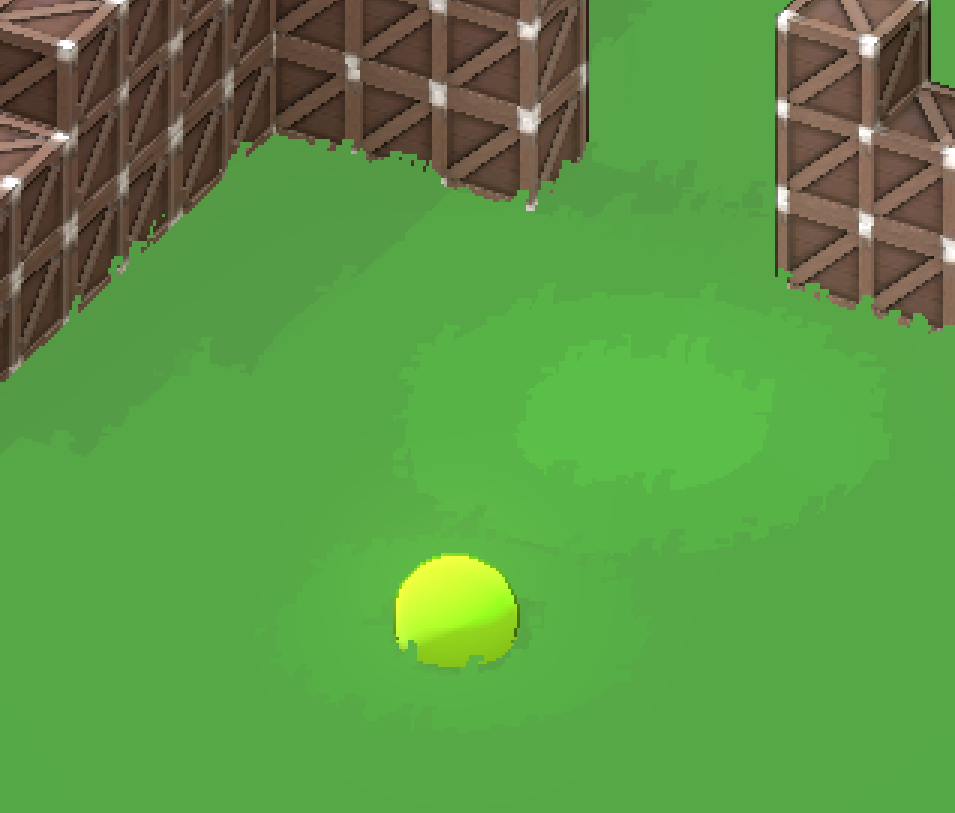
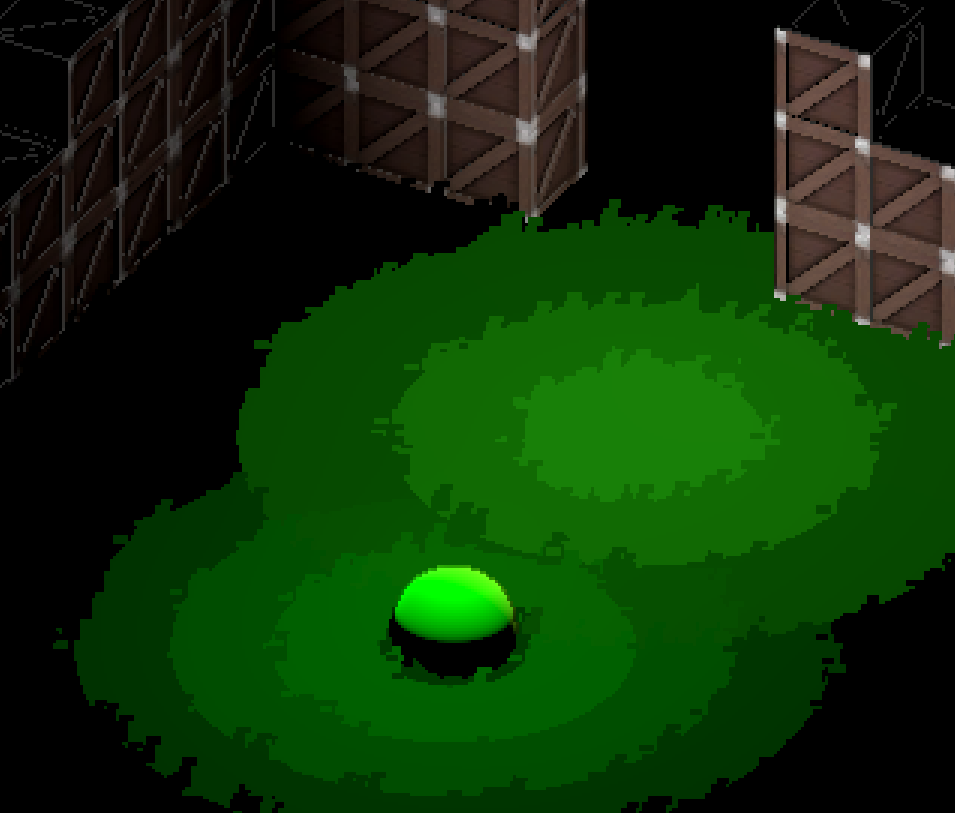
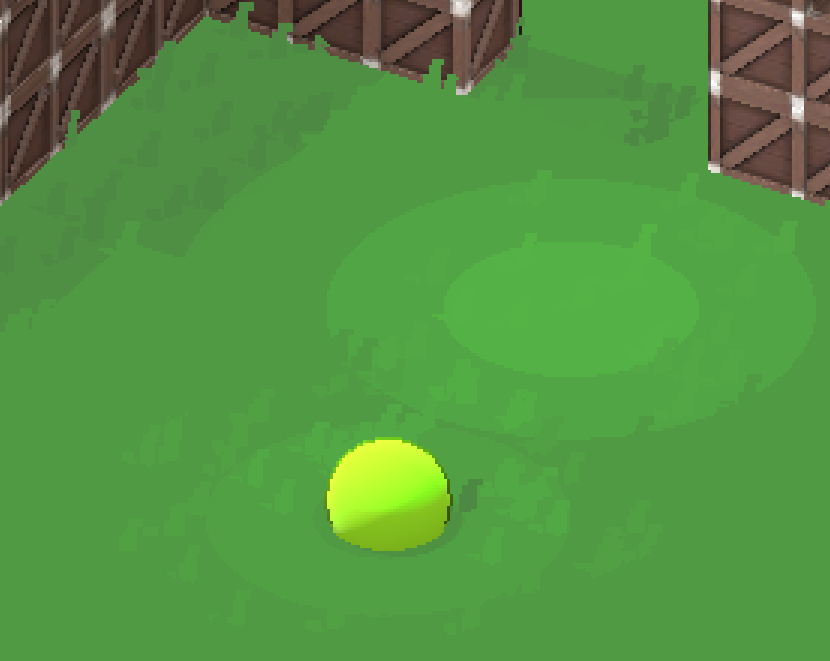
Hey, thanks for the quick response. I’m simply trying to achieve a similar look to the one on your second image on the post I linked, where the grass is only visible on the edges, and with billboarding. Shouldn’t be too fancy, but my current shader is quite inconsistent between the ground color and the leaf color, especially when involving OmniLight3D.

Here is how the scene looks:

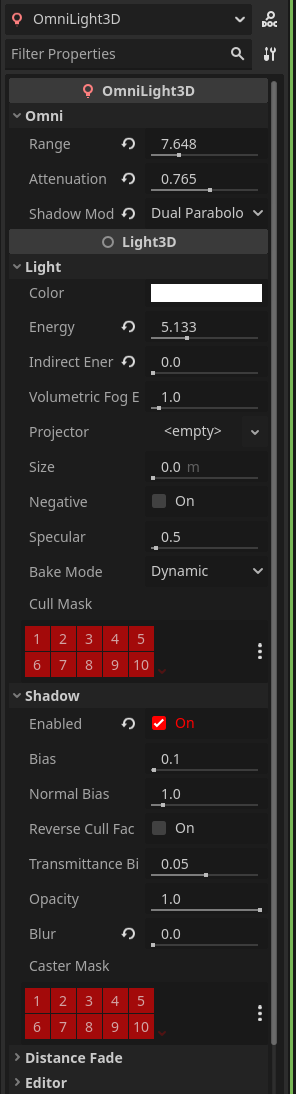
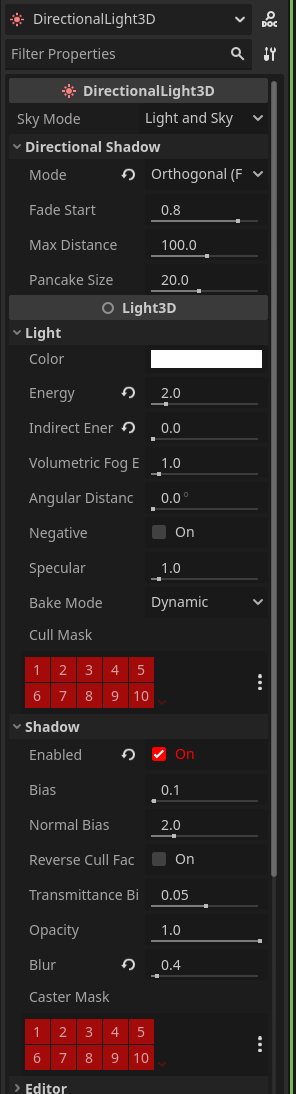
And my light configurations:


WorldEnvironment is only a generic sky and Linear tonemapping.

Another thing I really would like to know how you’re doing, is the really deep shadow, mine look washed out and light. I already set all my shadows to hard shadows only in the project settings.

The best way to get consistent colors and lighting is to have basically the same toon_shader logic for the floor and grass. So just make sure that all the calculations and code inside both shaders are identical. Also the render_modes should match up too. I don’t think its a problem with the light nodes as that shouldn’t have to matter.

My project looks quite different so my shader logic will not be of much help im afraid :joy_cat:

For toon shading I always recommend this tutorial:
https://saturnmind.hashnode.dev/shaders-cel-shading

Also if nothing works try using this code for the billboarding instead of the one you use now. I see a lot of people using that one but I know also a lot of people have problems with. I’ve been using this one since the start, and I made it with basic vector logic and its been working perfectly:

shader_type spatial;
render_mode diffuse_toon;

void vertex() {
    vec3 cam_z = normalize(CAMERA_DIRECTION_WORLD);
    vec3 cam_y = vec3(0.0, 1.0, 0.0);
    vec3 cam_x = normalize(cross(cam_y, cam_z));
    mat3 spherical_billboard = mat3(cam_x, cam_y, cam_z);

    vec3 billboarded_vertex = spherical_billboard * VERTEX;

    vec3 instance_origin = (MODEL_MATRIX * vec4(0.0, 0.0, 0.0, 1.0)).xyz;
    vec3 world_position = instance_origin + billboarded_vertex;
    POSITION = PROJECTION_MATRIX * VIEW_MATRIX * vec4(world_position, 1.0);

    NORMAL = (MODEL_MATRIX * vec4(0.0, 1.0, 0.0, 0.0)).xyz;
}
1 Like

Mate, you are my hero. I’ll check this other cel-shading you linked and your bilboarding code when I have time, but for now simply adapting the toon shader to my grass one was enough. I can’t thank you enough, I’m currently making a game of my own (I’m on my third to fourth year developing it now) and this Friday I have a big project fair at my uni where I wanted to show it off, and I really wanted the looks to be there to impress everyone lol.


I still want to tweak things to get the colors and sizes and amount correct, but at least the basic effect is working.

One last probably stupid and easy question: is there any thing you do specifically to get those deep color shadows? Mine still look a tad… flat? It could be because of the toon shader I’m using, but, if there’s any postprocessing or easy setting you could share, I’ll be really glad. Specially for a more cinematic feel like the last image in your post, I found it absolutely gorgeous.

Thank you, mate! :folded_hands: :folded_hands: :folded_hands:

Np dude, glad I was able to help! Good luck with ur uni project B)

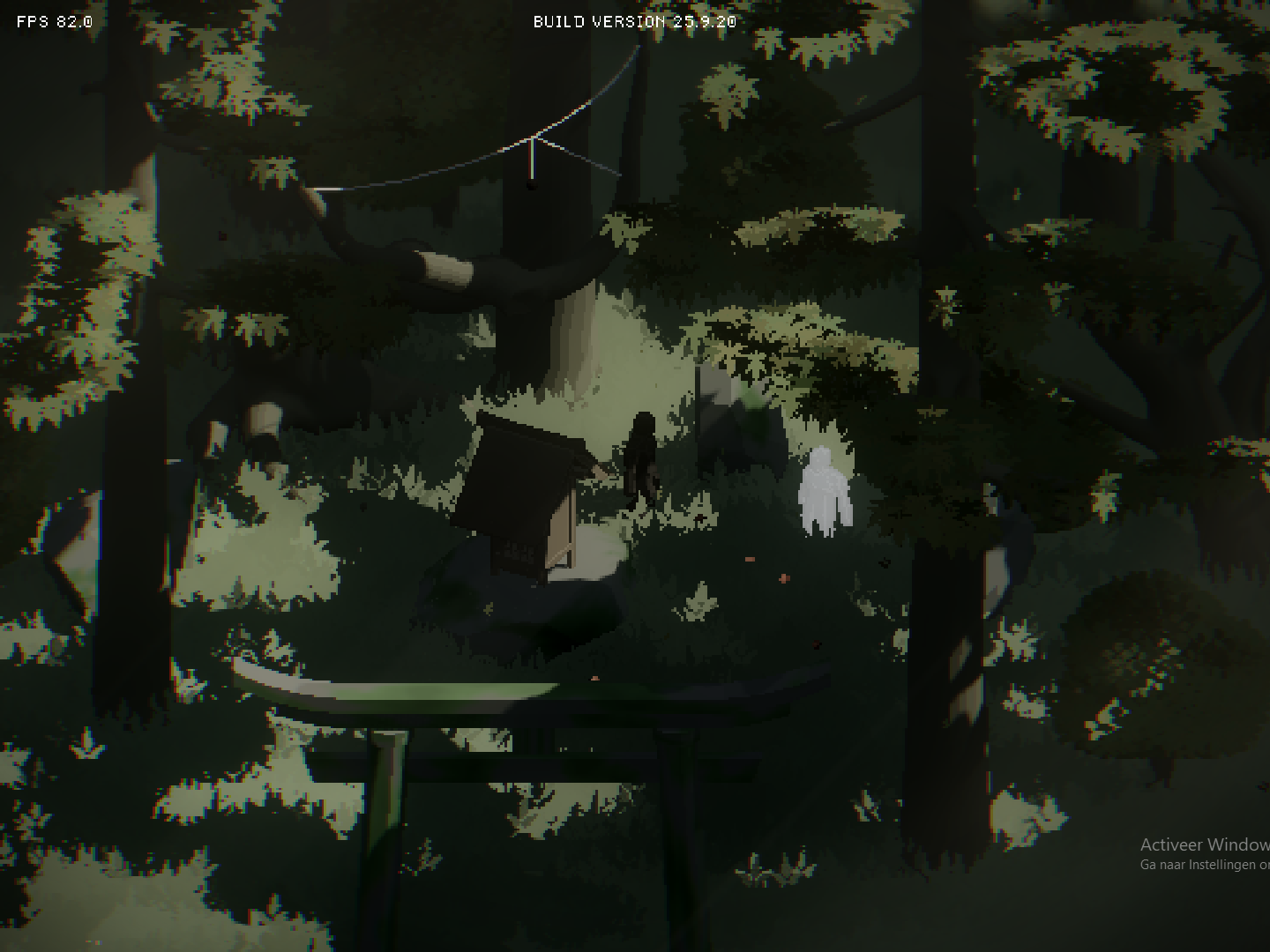
My project looks like this rn so I’m not sure if its still the shadows you want but you can play with the directionallight3d light settings to make the lights darker/brighter. Also if you want a lot of freedom you can play with all the worldenvironment node settings. A final tip is to enable use physical light units in the projects rendering settings. This is a bit hard to use at first but it gives you the most control. Altough I think its not necessary for your game!

If you have any other questions feel free to ask here or dm me.

1 Like

Hey guys,

I’m trying to implement my own very basic version of this right now in Godot 4.5.1, and I’ve got it somewhat working (albeit not properly). My problem right now is that edge highlights drawn by my pixelization style shader are being drawn OVER the grass, even though the object is behind the grass.

Here’s the code I’m using for it, and I just can’t get it to work. I think it’s most likely that my grass shader is incorrect somehow, but I would like some help. Thanks:

grass.gdshader:

shader_type spatial;
render_mode cull_disabled, depth_draw_opaque, diffuse_toon;

uniform sampler2D grass_texture : source_color, filter_nearest;

// Wind parameters
uniform float wind_speed : hint_range(0.0, 5.0) = 2.0;
uniform float wind_strength : hint_range(0.0, 1.0) = 0.2;
uniform float wind_scale : hint_range(0.0, 10.0) = 2.0;

// Color control
uniform bool use_terrain_color = false;  // Toggle between terrain and manual color
uniform vec3 manual_color : source_color = vec3(0.309, 0.653, 0.248);  // Manual grass color
uniform float color_brightness : hint_range(0.1, 2.0) = 1.15;  // Brightness multiplier
uniform float terrain_color_mix : hint_range(0.0, 1.0) = 0.0;  // Blend between manual and terrain
uniform bool apply_terrain_shading = true;  // Apply slope-based shading from terrain

varying vec3 grass_color;
varying float terrain_slope_shading;

void vertex() {
    // Get grass color from terrain (rgb) and slope shading (alpha)
    grass_color = INSTANCE_CUSTOM.rgb;
    terrain_slope_shading = INSTANCE_CUSTOM.a;

    vec3 instance_origin = (MODEL_MATRIX * vec4(0.0, 0.0, 0.0, 1.0)).xyz;

    // Billboard
    mat4 modified_model_view = VIEW_MATRIX * mat4(
        INV_VIEW_MATRIX[0],
        INV_VIEW_MATRIX[1],
        INV_VIEW_MATRIX[2],
        MODEL_MATRIX[3]
    );
    MODELVIEW_MATRIX = modified_model_view;

    // Force normal to point up
    NORMAL = (MODEL_MATRIX * vec4(0.0, 1.0, 0.0, 0.0)).xyz;

    // Wind
    float wind_factor = UV.y;
    float wind_phase = (instance_origin.x + instance_origin.z) * wind_scale;
    float wind = sin(TIME * wind_speed + wind_phase) * wind_strength;
    VERTEX.x += wind * wind_factor;
    VERTEX.z += cos(TIME * wind_speed * 0.7 + wind_phase) * wind_strength * 0.5 * wind_factor;
}

void fragment() {
    vec4 tex = texture(grass_texture, UV);

    // Choose color source based on debug settings
    vec3 final_color;
    if (use_terrain_color) {
        // Mix between terrain color and manual color based on terrain_color_mix
        final_color = mix(manual_color, grass_color, terrain_color_mix);
    } else {
        // Use only manual color
        final_color = manual_color;
    }

    // Apply terrain slope shading to match terrain's lighting
    if (apply_terrain_shading) {
        final_color *= terrain_slope_shading;
    }

    // Apply brightness adjustment
    ALBEDO = final_color * color_brightness;
    ALPHA = tex.a;

    METALLIC = 0.0;
    ROUGHNESS = 1.0;
    SPECULAR = 0.0;

    if (ALPHA < 0.5) {
        discard;
    }
}

void light() {
    // Only apply shadow attenuation, not light color
    DIFFUSE_LIGHT = vec3(1.0) * ATTENUATION;
}

pixelart_stylizer.gdshader:

shader_type spatial;
render_mode unshaded;

// MIT License. Made by Leo Peltola
// Inspired by https://threejs.org/examples/webgl_postprocessing_pixel.html

uniform sampler2D DEPTH_TEXTURE : hint_depth_texture, filter_linear_mipmap;
uniform sampler2D SCREEN_TEXTURE : hint_screen_texture, filter_linear_mipmap;
uniform sampler2D NORMAL_TEXTURE : hint_normal_roughness_texture, filter_nearest;

uniform bool shadows_enabled = true;
uniform bool highlights_enabled = true;
uniform float shadow_strength : hint_range(0.0, 1.0, 0.01) = 0.4;
uniform float highlight_strength : hint_range(0.0, 1.0, 0.01) = 0.1;
uniform vec3 highlight_color : source_color = vec3(1.);
uniform vec3 shadow_color : source_color = vec3(0.0);

varying mat4 model_view_matrix;


float getDepth(vec2 screen_uv, sampler2D depth_texture, mat4 inv_projection_matrix){
//	Credit: https://godotshaders.com/shader/depth-modulated-pixel-outline-in-screen-space/
	float raw_depth = texture(depth_texture, screen_uv)[0];
	vec3 normalized_device_coordinates = vec3(screen_uv * 2.0 - 1.0, raw_depth);
    vec4 view_space = inv_projection_matrix * vec4(normalized_device_coordinates, 1.0);
	view_space.xyz /= view_space.w;
	return -view_space.z;
}

vec3 getPos(float depth, mat4 mvm, mat4 ipm, vec2 suv, mat4 wm, mat4 icm){
  vec4 pos = inverse(mvm) * ipm * vec4((suv * 2.0 - 1.0), depth * 2.0 - 1.0, 1.0);
  pos.xyz /= (pos.w+0.0001*(1.-abs(sign(pos.w))));
  return (pos*icm).xyz+wm[3].xyz;
}

float normalIndicator(vec3 normalEdgeBias, vec3 baseNormal, vec3 newNormal, float depth_diff){
	// Credit: https://threejs.org/examples/webgl_postprocessing_pixel.html
	float normalDiff = dot(baseNormal - newNormal, normalEdgeBias);
	float normalIndicator = clamp(smoothstep(-.01, .01, normalDiff), 0.0, 1.0);
	float depthIndicator = clamp(sign(depth_diff * .25 + .0025), 0.0, 1.0);
	return (1.0 - dot(baseNormal, newNormal)) * depthIndicator * normalIndicator;
}

void vertex(){
    model_view_matrix = VIEW_MATRIX * mat4(INV_VIEW_MATRIX[0], INV_VIEW_MATRIX[1], INV_VIEW_MATRIX[2], MODEL_MATRIX[3]);
}

void fragment() {
	vec2 e = vec2(1./VIEWPORT_SIZE.xy);

//	Shadows
	float depth_diff = 0.0;
	float neg_depth_diff = .5;
	if (shadows_enabled) {
		float depth = getDepth(SCREEN_UV, DEPTH_TEXTURE, INV_PROJECTION_MATRIX);
		float du = getDepth(SCREEN_UV+vec2(0., -1.)*e, DEPTH_TEXTURE, INV_PROJECTION_MATRIX);
		float dr = getDepth(SCREEN_UV+vec2(1., 0.)*e, DEPTH_TEXTURE, INV_PROJECTION_MATRIX);
		float dd = getDepth(SCREEN_UV+vec2(0., 1.)*e, DEPTH_TEXTURE, INV_PROJECTION_MATRIX);
		float dl = getDepth(SCREEN_UV+vec2(-1., 0.)*e, DEPTH_TEXTURE, INV_PROJECTION_MATRIX);
		depth_diff += clamp(du - depth, 0., 1.);
		depth_diff += clamp(dd - depth, 0., 1.);
		depth_diff += clamp(dr - depth, 0., 1.);
		depth_diff += clamp(dl - depth, 0., 1.);
		neg_depth_diff += depth - du;
		neg_depth_diff += depth - dd;
		neg_depth_diff += depth - dr;
		neg_depth_diff += depth - dl;
		neg_depth_diff = clamp(neg_depth_diff, 0., 1.);
		neg_depth_diff = clamp(smoothstep(0.5, 0.5, neg_depth_diff)*10., 0., 1.);
		depth_diff = smoothstep(0.2, 0.3, depth_diff);
//		ALBEDO = vec3(neg_depth_diff);
	}

//	Highlights
	float normal_diff = 0.;
	if (highlights_enabled) {
		vec3 normal = texture(NORMAL_TEXTURE, SCREEN_UV).rgb * 2.0 - 1.0;
		vec3 nu = texture(NORMAL_TEXTURE, SCREEN_UV+vec2(0., -1.)*e).rgb * 2.0 - 1.0;
		vec3 nr = texture(NORMAL_TEXTURE, SCREEN_UV+vec2(1., 0.)*e).rgb * 2.0 - 1.0;
		vec3 nd = texture(NORMAL_TEXTURE, SCREEN_UV+vec2(0., 1.)*e).rgb * 2.0 - 1.0;
		vec3 nl = texture(NORMAL_TEXTURE, SCREEN_UV+vec2(-1., 0.)*e).rgb * 2.0 - 1.0;
		vec3 normal_edge_bias = (vec3(1., 1., 1.));
		normal_diff += normalIndicator(normal_edge_bias, normal, nu, depth_diff);
		normal_diff += normalIndicator(normal_edge_bias, normal, nr, depth_diff);
		normal_diff += normalIndicator(normal_edge_bias, normal, nd, depth_diff);
		normal_diff += normalIndicator(normal_edge_bias, normal, nl, depth_diff);
		normal_diff = smoothstep(0.2, 0.8, normal_diff);
		normal_diff = clamp(normal_diff-neg_depth_diff, 0., 1.);
//		ALBEDO = vec3(normal_diff);
	}

	vec3 original_color = texture(SCREEN_TEXTURE, SCREEN_UV).rgb;
	// Brighten original color while preserving hue (instead of mixing with white)
	vec3 final_highlight_color = original_color * (1.0 + highlight_strength * 3.0);
	vec3 final_shadow_color = mix(original_color, shadow_color, shadow_strength);
	vec3 final = original_color;
	if (highlights_enabled) {
		final = mix(final, final_highlight_color, normal_diff);
	}
	if (shadows_enabled) {
		final = mix(final, final_shadow_color, depth_diff);
	}
	ALBEDO = final;

	// Simple: just set alpha based on edge strength
	float alpha_mask = depth_diff * float(shadows_enabled) + normal_diff * float(highlights_enabled);
	ALPHA = clamp(alpha_mask * 5., 0., 1.);
}

Hey there!

It may sound stupid but have you tried to lower the render priority of your outline shader? Shader priority matters a lot so try to look if changing them for your outline and grass helps or not.

1 Like

Oh lmao thank you so much, I was so caught up on sorting_offset I never even saw render_priority. That did it! Hours of work debugging over something so simple…

Thanks again.

1 Like

This topic was automatically closed 30 days after the last reply. New replies are no longer allowed.