Want Design Pattern advise: Dynamically Create Nodes instead of manually creating them in each scene

Godot Version

4.6

Question

Right now, I have something like this. This is a stripped down version for simplicity:

Node scene_gun_1

  • TextureRect for gun 1 (shows image of the gun)
  • Label for gun 1’s HUD (shows ammo type and ammo count on HUD)

Node scene_gun_2

  • TextureRect for gun 2
  • Label for gun 2’s HUD

From here, I see that if I have many many more guns, I will have to repeatedly manually create a TextureRect and a Label for each gun scene, so I would like some advises on managing this programatically:

  1. From researching online, I see this could be done:
var new_label = Label.new()
new_label.text = "Hello World"
add_child(new_label)

And this should go into ready() function , and never init() , yes?

  1. I was thinking of creating each scene for each gun type, so there would be a pistol scene, shotgun scene, machine gun scene, etc. Each gun scene will house a different logic, so a pistol only fires one shot at a time, a shotgun spreads bullets around and a machine gun rapid fires. However:

from dynamically creating nodes above, perhaps a single scene could be used too, but then I still need to house the different logic for each gun type. Because of this, I am thinking of something like a general class that holds the logic for each generic type. For example, I could use a General_Pistol class that could allocate a TextureRect for a magnum pistol, a water pistol, etc. but they will all be under the General_Pistol class. So one scene could actually be used for many similar objects, given they will share the same logic.

Is this recommended or are there better design patterns out there?

1 Like

Take a look at this post https://forum.godotengine.org/t/question-about-scene-inheritance-and-animations/130172/5?u=suddenhost . It can give you some direction about that.

1 Like

In Godot you can create your own Resources. In your case, create a class like Weapon extending from Resource.
You can save resources and load them so you can have stored multiple weapons and load what you need when you need it.
You can check the official documentation at https://docs.godotengine.org/en/stable/tutorials/scripting/resources.html

Yeah I wrote a good answer there. :slight_smile: But I’d give a slightly different answer to this.
Yes. Never use _init(). People who come from other languages view them as constructors, and they’re not really quite the same because Node construction doesn’t finish until the ready phase is done.

I would recommend using Resources. Let’s break it down.

Design

You have an infinite number of guns you want to create. You want to use a base Scene to represent any gun, but a way to define the properties of an individual gun. You want to use this for a HUD. It needs to have the following properties at a minimum:

  • Texture2D for the gun’s image.
  • Ammo Type
  • Max Ammo the gun holds when fully loaded
  • Max Ammo the player can hold in reserve

HUD

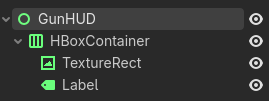
So we will start with the Scene you may have created, and tweak it a bit. So we are going to make a new scene with a Control node as the base and rename it to GunHUD. (You can rename the other nodes too - I’m just keeping it simple.) We’ll add an HBoxContainer and then a TextureRect and Label.

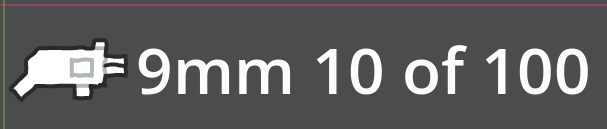
Then add some default values so we can see what it looks like. (Font is 64px, and texture is from Kenney.)

Resource

Now let’s make our Resource class. We’ll create a script called gun.gd.

class_name Gun extends Resource

enum AmmoType {
	NINE_MILIMETER,
	LASER,
}

@export var texture: Texture2D
@export var ammo_type: AmmoType
@export var max_magazine: int = 10
@export var max_ammo: int = 100

We’ve defined AmmoType as an Enum, and given some default ammo values. With this we can now go back to our GunHUD.

GunHUD script

Now we need a place to store the current Gun Resource in the GunHUD, and code to load the data from it.

class_name GunHUD extends Control

@export var gun: Gun

var magazine_ammo: int
var extra_ammo: int

@onready var texture_rect: TextureRect = $HBoxContainer/TextureRect
@onready var label: Label = $HBoxContainer/Label


func _ready() -> void:
	magazine_ammo = gun.max_magazine # Just for testing, probably want to set this value somewhere else.
	extra_ammo = gun.max_ammo # Just for testing, probably want to set this value somewhere else.
	texture_rect.texture = gun.texture
	label.text = update_label_text()


func update_label_text() -> String:
	var return_value: String = ""
	match gun.ammo_type:
		Gun.AmmoType.NINE_MILIMETER:
			return_value += "9mm "
		Gun.AmmoType.LASER:
			return_value += "Laser "
	return_value += str(magazine_ammo) + " of " + str(extra_ammo)
	
	return return_value

Creating Gun Resources

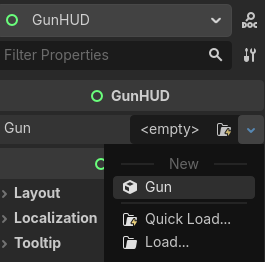
In the Inspector, you can now create a new Gun Resource

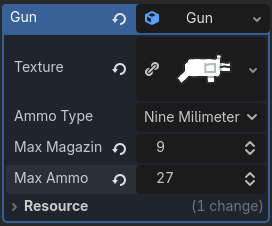
Then set the values…

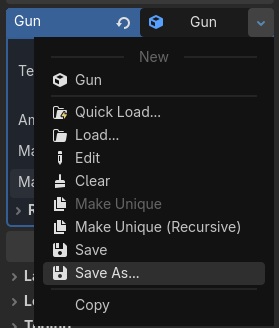
Then save the Gun Resource to disk…

Rinse and repeat, and whenever you load a different Resource, the values will update.

Conclusion

Since the Gun Resource doesn’t store the actual ammo values, you can store those values in the GunHUD, or store them on the Player, or anywhere else you want.

2 Likes

Thank you for suggesting this. This will be useful.

One noteworthy thing about Resource as also mentioned in the document is that a Resource is shared between the scene instances. From example above, if I decided to make it so one of the 9mm pistols will have more max ammo than other 9mm pistols, I will need to create another Resource for it. Or alternatively, if each 9mm could always be different from each other, a class should be used instead of Resource. ← yes/no? @dragonforge-dev

1 Like

You can do it either way. Either put the max ammo value in the object and have separate objects, or put the values in the Resource and have separate Reousrces. You can save Resources to disk, but you can also store them local to the scene - which means they’re stored inside the .tscn. Also, programmatically, you can duplicate a Resource, and then change the duplicate because it’s not a reference to the original - it’s a copy that starts with the same values.

1 Like