Yeah I wrote a good answer there.  But I’d give a slightly different answer to this.
Yes. Never use _init(). People who come from other languages view them as constructors, and they’re not really quite the same because Node construction doesn’t finish until the ready phase is done.
I would recommend using Resources. Let’s break it down.
Design
You have an infinite number of guns you want to create. You want to use a base Scene to represent any gun, but a way to define the properties of an individual gun. You want to use this for a HUD. It needs to have the following properties at a minimum:
- Texture2D for the gun’s image.
- Ammo Type
- Max Ammo the gun holds when fully loaded
- Max Ammo the player can hold in reserve
HUD
So we will start with the Scene you may have created, and tweak it a bit. So we are going to make a new scene with a Control node as the base and rename it to GunHUD. (You can rename the other nodes too - I’m just keeping it simple.) We’ll add an HBoxContainer and then a TextureRect and Label.
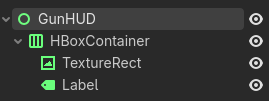
Then add some default values so we can see what it looks like. (Font is 64px, and texture is from Kenney.)
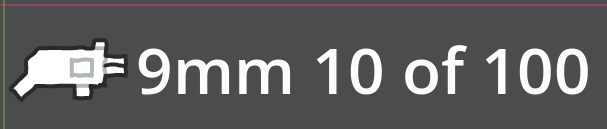
Resource
Now let’s make our Resource class. We’ll create a script called gun.gd.
class_name Gun extends Resource

enum AmmoType {
	NINE_MILIMETER,
	LASER,
}

@export var texture: Texture2D
@export var ammo_type: AmmoType
@export var max_magazine: int = 10
@export var max_ammo: int = 100
We’ve defined AmmoType as an Enum, and given some default ammo values. With this we can now go back to our GunHUD.
GunHUD script
Now we need a place to store the current Gun Resource in the GunHUD, and code to load the data from it.
class_name GunHUD extends Control

@export var gun: Gun

var magazine_ammo: int
var extra_ammo: int

@onready var texture_rect: TextureRect = $HBoxContainer/TextureRect
@onready var label: Label = $HBoxContainer/Label


func _ready() -> void:
	magazine_ammo = gun.max_magazine # Just for testing, probably want to set this value somewhere else.
	extra_ammo = gun.max_ammo # Just for testing, probably want to set this value somewhere else.
	texture_rect.texture = gun.texture
	label.text = update_label_text()


func update_label_text() -> String:
	var return_value: String = ""
	match gun.ammo_type:
		Gun.AmmoType.NINE_MILIMETER:
			return_value += "9mm "
		Gun.AmmoType.LASER:
			return_value += "Laser "
	return_value += str(magazine_ammo) + " of " + str(extra_ammo)

	return return_value
Creating Gun Resources
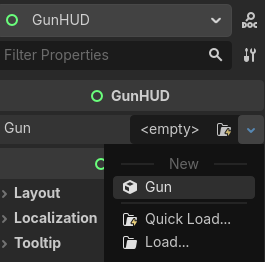
In the Inspector, you can now create a new Gun Resource
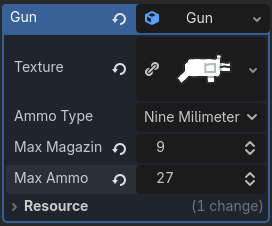
Then set the values…
Then save the Gun Resource to disk…
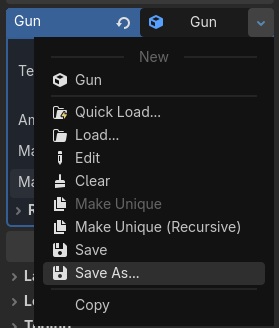
Rinse and repeat, and whenever you load a different Resource, the values will update.
Conclusion
Since the Gun Resource doesn’t store the actual ammo values, you can store those values in the GunHUD, or store them on the Player, or anywhere else you want.